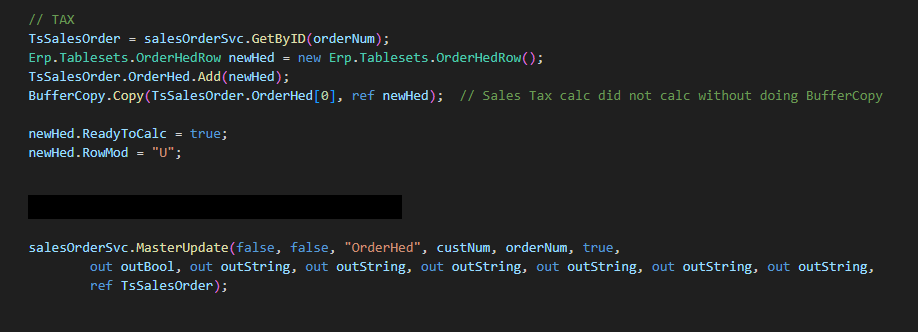
It’s probably the Before image / buffer copy situation. The below code works for me inside a Function that creates orders. Did not have to do the TaxConnectStatus / SetReadyToCalc steps.
Master update is a red herring. The rule (if you follow it) is that every BO call that contains an Updated or Deleted Record (RowMod U or D) should contain the original unchanged Row on every call. (Buffer Copy is the easiest way to accomplish this)
For quote you can call regular Update (or whtever the appropriate Trace tells you)
Might need to see your whole function. In mine I have OrderHed.ReadyToCalc off (false) initially, create all the lines and whatnot, and then set ReadyToCalc to true at the very end in the snippet I shared above.
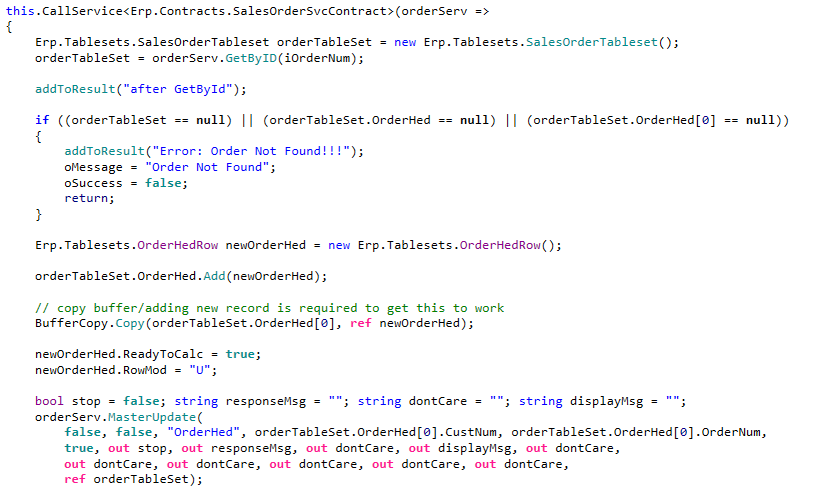
In my case I’m not updating or adding anything to the order, just calculating the taxes:
(ignore the calls to addToResult(), is just helps me trace/log)
It would be nice if there was a built in extension method that does the whole buffer copy for you in 1 line. I think we all don’t always do it because of the ugliness of dropping in those 3 lines.
Are these orders created in the UI or by some other kind of automation? I wonder if something not fully kosher is happening with the creation. Also is ReadyToCalc already true or false or unknown?
Might be worth a shot to first set ReadyToCalc to false, do a master update, then set it to true and master update again.
When the function is called, ReadyToCalc is false, especially in the current scenario I am testing, so I don’t think setting it false and and doing an additional master update will help, but I can give it a try (probably tmrw though)
OK, I did get a chance to try setting ReadyToCalc false, master update, then set back to true, master update, that did not resolve my problem.
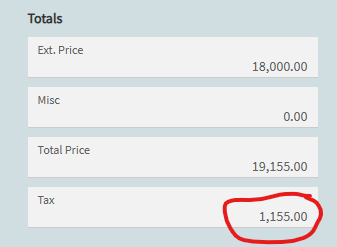
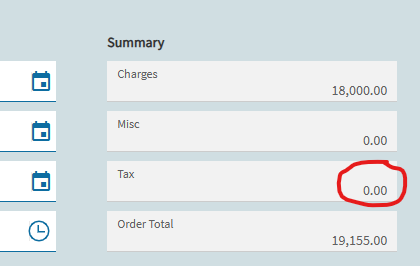
However, what I did find by adding in my function that after the master update call, the DocTotalTax value in the returned dataset was set to the correct value, but it is not being reflected on screen after the call (shows $0.00, even after refresh)
This scenario is in Kinetic (web), using an event to call the function
@josecgomez, would you have any thoughts on the latter part of this ?
Very odd… Is the value correct in the database after the fact or is it $0?
What sort of event is calling the Function? I wonder if there are unsaved changes when the function is called and there is a weird timing issue.
Also curious what the business case / problem is here? If UI activity is triggering the Function, couldn’t the UI (App studio) just auto-check the ReadyToCalc checkbox instead of processing all this on the server?
Back at it today, out sick yesterday, so…this is ever so strange
I double-checked, it is coming back correct in the dataset (OrderHed.DocTotalTax) after the call to MasterUpdate().
But using developer tools to trace and look at the OrderHed dataview it is zero.
Also created a query to check datatable and it is also zero.
This makes sense since when I hit refresh, it’s also zero.
I put a slidout in the event right after the function to make sure it wasn’t being set and then cleared by something else, the trace stops right after the function and the slideout and the results are the same.
This is the use case:
Users complaining about performance in Quote and Order Entry as number of lines increase…this is primarily related to having the ReadyToCalc flag defaulted to true in Company Configuration.
Request to developer (me) was to default ReadToCalc flag to false so taxes are not continually calculated everytime a change is made
This means at certain times (On demand via UI, New order from Quote, Print Quote, Print SO Ack, Order Closing) we want to ensure taxes are calculated…turn ReadyToCalc on, calculate taxes, turn ReadyToCalc off
(this is because we can’t trust the users to remember to calculate taxes)
Chose a function as the implementation because some cases are handled in events and some in BPM’s - calling a function seemed like the cleanest approach, especially since the desire was to have it work the same in Classic and Kinetic/web.
My first attempt at this, I did have it working pretty solidly by using events only (Kinetic only), except in one scenario, which I wasn’t aware of and need to go back to if we decide to finally get our sales team off of classic, they are running out of time anyway.
So based on all of this and your suggestion I’m probably going to try the event route again…I was using row-update to set the flag, then calling the event provided in Epicor to calculate taxes and then another row-update to reset the flag.
Thanks, for you time and suggestions, I do feel like submitting a ticket (bug ?) to Epicare for this just to see what happens, but they want this out urgently and I know the ticket will take a while
Thanks for the explanation. We have a similar situation but approach a little differently.. All our orders start of as on Hold. When user is ready to take it off Hold, we have a BPM check all kinds of data conditions that a user is prone to screw up (including ReadyToCalc must be true). While it’s on Hold user can do whatever they want and we don’t fire any code really until they want to take off hold.