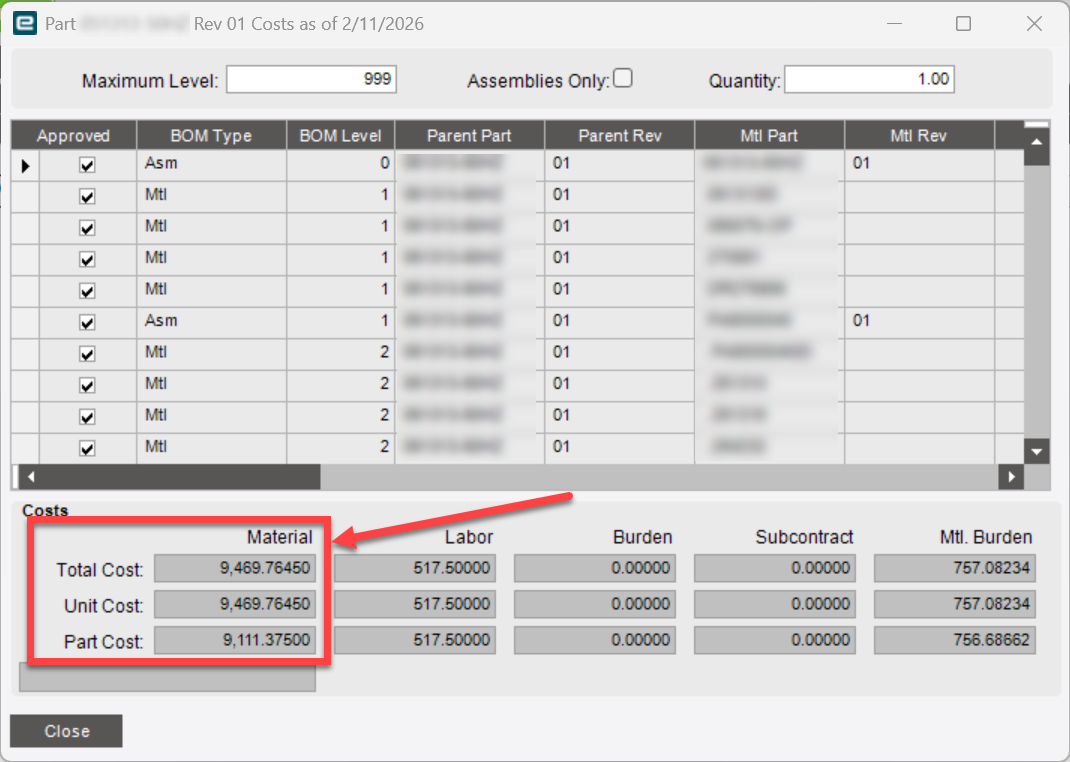
Hello, I am hoping someone can straighten me out. I am expecting these three values on the View Costs to be the same in Costing Workbench. They aren’t. The top two numbers are “correct” but it publishes the bottom number when posting the cost rollup. What’s the difference? What should I look for?
Backstory:
I have been doing a pretty deep dive on our cost rollups and understanding how/why we arrive at the standard costs we do. I’m getting probably 90% of my manufactured parts to line up with what I would expect them to be based on an exploded costed method BAQ we have that helps us capture realtime costing. I’ve got another thread open about how the cost rollup “works” but I felt this might be its own question because you can get here from outside the Costing Workbench.
When we do a roll the top 2 always equal the new standard cost based on the material costs in the grid above (current BOM cost). The bottom Part Cost is equal to the current standard cost of the part. After rolling and posting all three match for us.
So this just goes back to my other post, then. It is not rolling that BOM for some reason. It is included in my Loaded Costs but the system is not rolling that part number. It just doesn’t show up in the logs at all. It’s like it is excluded from the Cost Roll. Sorry - I will close this post. It’s the same issue. I just found it again a new way.
So I rolled just that one part by itself. It gives me an error and says one of the subassemblies does not exist in the cost group. Later in the log it says error.
02/11/26 15:41:48 (9cf84ec9-6399-4a3e-98bc-026e086529ab) Rollup process started for group 260211DR.
02/11/26 15:41:49 (9cf84ec9-6399-4a3e-98bc-026e086529ab) Exploder - (3) - AltMethods/Plant List/Approved - Part: PA6040104 Plant: South
02/11/26 15:41:49 (9cf84ec9-6399-4a3e-98bc-026e086529ab) Exploder - (3) - AltMethods/Plant List/Approved - Part: PA6110033 Plant: South
02/11/26 15:41:49 (9cf84ec9-6399-4a3e-98bc-026e086529ab) Part PA6040104 does not exist in the Cost Group.
02/11/26 15:41:50 (9cf84ec9-6399-4a3e-98bc-026e086529ab) findLocalPartRev - (3) - AltMethods/Plant List/Approved - Part: EN38480 Plant: South
02/11/26 15:41:50 (9cf84ec9-6399-4a3e-98bc-026e086529ab) findLocalPartRev - (3) - AltMethods/Plant List/Approved - Part: PA6110033ID Plant: South
02/11/26 15:41:50 (9cf84ec9-6399-4a3e-98bc-026e086529ab) findLocalPartRev - (3) - AltMethods/Plant List/Approved - Part: DL276397 Plant: South
02/11/26 15:41:50 (9cf84ec9-6399-4a3e-98bc-026e086529ab) findLocalPartRev - (3) - AltMethods/Plant List/Approved - Part: DL277334 Plant: South
02/11/26 15:41:50 (9cf84ec9-6399-4a3e-98bc-026e086529ab) ERROR - Part: PA6040104 record not found when attempting to update.
02/11/26 15:41:50 (9cf84ec9-6399-4a3e-98bc-026e086529ab) Rollup process has completed for group 260211DR.
The goofy thing is that this subassembly seems perfectly normal to me. It’s active, has an approved rev, it’s all setup in the same site.
So adding to this: When I add that missing subassembly to the cost group, it rolls the top level part just like I’d expect. The difference in the standard cost was that subassembly’s cost. So again, I keep going back to the same issue. The Costing Workbench seems to randomly omit certain parts and it’s one thing if it doesn’t roll them at all.. but in this case it appears to roll them but missing some of the costs. Yikes! That’s a scary thought.
Here’s the link to my other open post. I am going to mark this as solved since it seems to be the same issue.
Costing workbench behavior has been unsteady for us since we upgraded to kinetic from Epicor 10 where the only complaint I had was with it’s speed and memory use limits on the server.
We just encountered new behavior (again) on 2025.1.2 that is (of course) ‘working as designed’.
This one involves the View As Assembly (true/false) setting for each BOM items.
View as Assembly (to my knowledge and I go back to Vantage 7) was a ‘convenience’ choice for us in that you could drill into the the mtlPartNum and see it’s method in the old Method tree views. It had no impact on planning, costing & job detail generation.
On 2025.1.2 it suddenly starting impacting rolled costs much the way you describe (leaving out whole sub assembly costs even though job details generate clean as expected and job estimated costs are what was expected).
I’ve found the inconsistent behavior disappears by ALWAYS having it set to false.
I cleaned up a little over 100,000 BOMs with DMT, have an intneral IT request in to customize so it defaults to false, and for now, continue to clean up new BOM entries with DMT daily before cost rolling new items.
I vaguely remember and similar issue for another early version of kinetic but can’t recall which one anymore.
You may want to try playing with the pull/plan and view as assembly BOM material flags to see if it’s a similar issue.