I am using this BAQ to pull my data. I may find that I need to include more fields in this export. For now this is a good start. ExportPartRevs.baq (29.2 KB)
/*
 * Disclaimer!!!
 * This is not a real query being executed, but a simplified version for general vision.
 * Executing it with any other tool may produce a different result.
 */

select
	[PartRev].[Company] as [PartRev_Company],
	[PartRev].[PartNum] as [PartRev_PartNum],
	[PartRev].[RevisionNum] as [PartRev_RevisionNum],
	[PartRev].[RevShortDesc] as [PartRev_RevShortDesc],
	[PartRev].[RevDescription] as [PartRev_RevDescription],
	[PartRev].[DrawNum] as [PartRev_DrawNum],
	[PartOpr].[OprSeq] as [PartOpr_OprSeq],
	[PartOpr].[OpCode] as [PartOpr_OpCode],
	[PartOpr].[OpStdID] as [PartOpr_OpStdID],
	[PartOpr].[ProdStandard] as [PartOpr_ProdStandard],
	[PartOpr].[StdBasis] as [PartOpr_StdBasis],
	[PartOpr].[QtyPer] as [PartOpr_QtyPer],
	[PartOpr].[SubContract] as [PartOpr_SubContract],
	[PartOpr].[EstUnitCost] as [PartOpr_EstUnitCost],
	[PartOpr].[DaysOut] as [PartOpr_DaysOut],
	[PartOpr].[VendorNum] as [PartOpr_VendorNum],
	[PartOpr].[PurPoint] as [PartOpr_PurPoint],
	[PartOpr].[CommentText] as [PartOpr_CommentText],
	[PartOpr].[RunQty] as [PartOpr_RunQty],
	[PartOpDtl].[OpDtlSeq] as [PartOpDtl_OpDtlSeq],
	[PartOpDtl].[CapabilityID] as [PartOpDtl_CapabilityID],
	[PartOpDtl].[ResourceGrpID] as [PartOpDtl_ResourceGrpID],
	[PartOpDtl].[ResourceID] as [PartOpDtl_ResourceID],
	[PartOpDtl].[OpDtlDesc] as [PartOpDtl_OpDtlDesc],
	[PartMtl].[MtlSeq] as [PartMtl_MtlSeq],
	[PartMtl].[MtlPartNum] as [PartMtl_MtlPartNum],
	[PartMtl].[QtyPer] as [PartMtl_QtyPer],
	[PartMtl].[RelatedOperation] as [PartMtl_RelatedOperation],
	[PartMtl].[MfgComment] as [PartMtl_MfgComment],
	[PartMtl].[PurComment] as [PartMtl_PurComment]
from Erp.PartRev as PartRev
left outer join Erp.PartOpr as PartOpr on
	PartRev.Company = PartOpr.Company
	and PartRev.PartNum = PartOpr.PartNum
	and PartRev.RevisionNum = PartOpr.RevisionNum
	and PartRev.AltMethod = PartOpr.AltMethod
left outer join Erp.PartOpDtl as PartOpDtl on
	PartOpr.Company = PartOpDtl.Company
	and PartOpr.PartNum = PartOpDtl.PartNum
	and PartOpr.RevisionNum = PartOpDtl.RevisionNum
	and PartOpr.AltMethod = PartOpDtl.AltMethod
	and PartOpr.OprSeq = PartOpDtl.OprSeq
left outer join Erp.PartMtl as PartMtl on
	PartRev.Company = PartMtl.Company
	and PartRev.PartNum = PartMtl.PartNum
	and PartRev.RevisionNum = PartMtl.RevisionNum
	and PartRev.AltMethod = PartMtl.AltMethod
where (PartRev.PartNum = '12345')
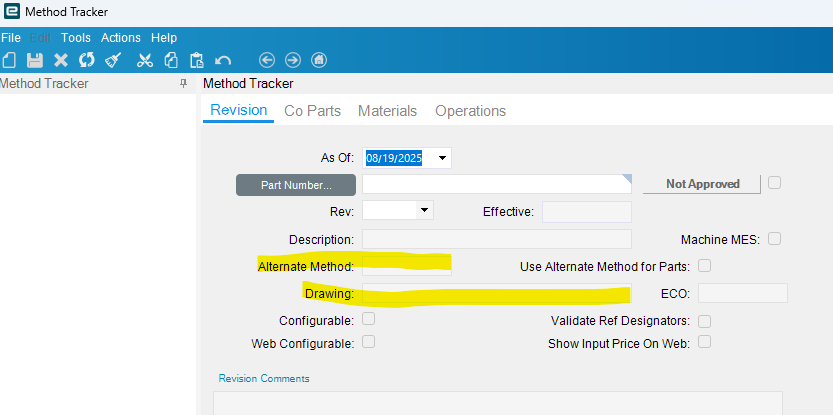
Can you tell me more about creating the alternate method for a revision using DMT? I have the part revision template builder in DMT open and I am adding the fields that I think I will need including: RevDescription, DrawNum, AltMethod, and AltMethodDesc.
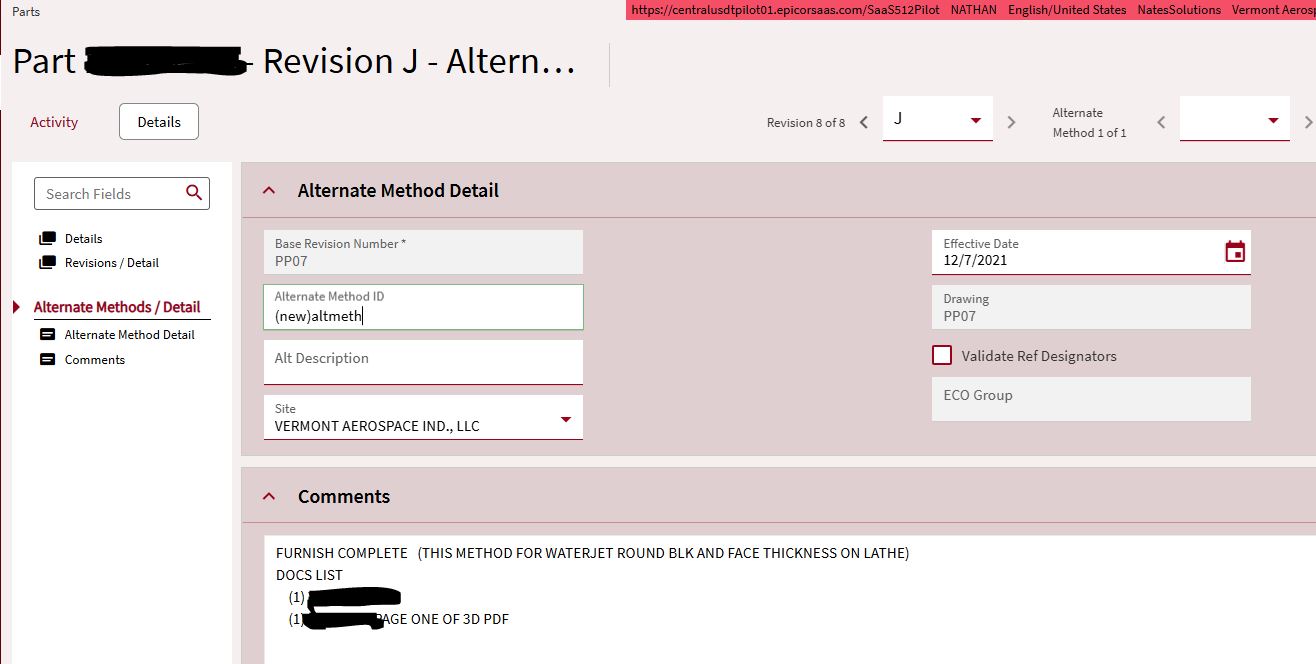
When I put this back together for import with DMT, I will create a new part rev, and add an alternate method. How do I setup the Part Revision template to create a new alternate method? Do I just make up a value to put in the AltMethod string field? Are there other tables involved in creating the alt method?
Thank you! When I go to load in the BOO and BOM via DMT, I will just set the Alt Method to the same value I created in the PartRev import, right? Do I ever need to fill in ParentAltMethod?
It looks like DrawNum is only at the PartRev level. What if we have different drawing nums for the alt methods? For example, we have a different drawing number for the part when it is made via casting rather than hog-out.
Forgot about that. Since the functionality is for different routings at sites it assumes it is the same drawing, just an alternate way to manufacture it.
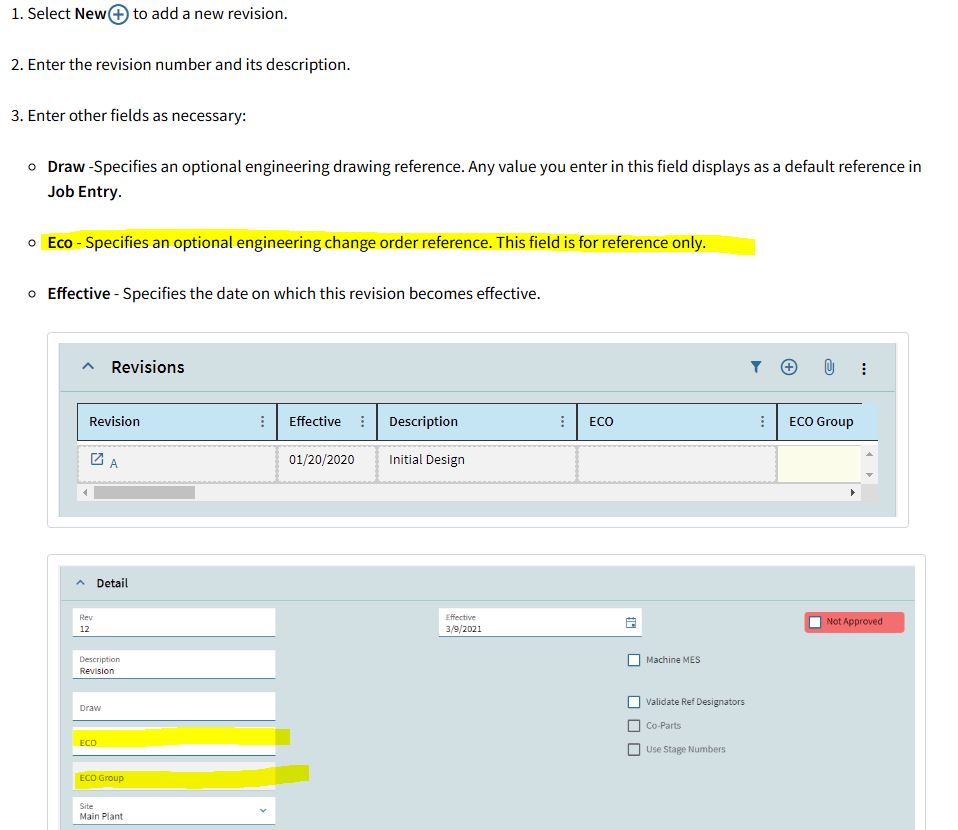
In Revision we have two ECO fields. ECO and ECO Group. I understand ECO Group is where we check parts out to. What is the ECO field for, and is it related in any way to the ECO Group?
you can specify the primary alternate method that is used by MRP when it creates jobs
As of Kinetic 2025.1, you can also specify in Urgent Planning a different alternate method to use if the demand is considered urgent. This allows you to normally make the part with one revision (and alt method if specified) but then if urgent, MRP will suggest to make the part using the specified alternate method.
This means that alternate methods are NOT specifically for multi-site environments (but they are REQUIRED if you make the part in more than one site.)
Product Costing can also be specified to use one of your alternates as the primary costing method.
BUT I always clarify… the REVISION of the part specifies the revision of the assembly, and therefore WHAT is made… the alternate methods are simply “different ways to acheive the same revision. In the end, you should not be able to tell any difference in the fit/form/function of the finished part. (although it might cost more or less, and it might take longer/shorter to manufacture, and it might have different base materials and different routing steps).
This helped ease my mind a bit. The more we look at alt methods, the more it looks like the right way to do what we need. We do make the same part in various different ways. In the past engineers had stored all the different methods in different revisions. Now we have multiple versions of the same revision, it can get confusing.
Can you weigh in on that ECO field and how or if it relates to the ECO Group. I know I use ECO group during the DMT importing. We are considering using the ECO field to store change notices.
For example, we have a part Rev B. The customer issues a change notice that the method of manufacture must change to include or exclude some specific step. The customer does not issue a new drawing rev yet. For now we have to keep making Rev B, but we cant make it using the standard MOM, so we would create an alternate MOM and put the change notice number in the ECO field. Then we keep making that part until the customer changes their drawing. At that point we can up-rev our drawing rev to B/1 (or whatever), and create a new alternate MOM on rev B. The whole time we are still on the same part and revision. Only the alternate methods and ECOs would change. We also see the draw num field, and are debating if we should use this or the ECO field for CN#s.
eco is he field that stores the eco value… the “eco group” is the unfortunate name for a group of parts that are all being changed at the same time, but it is also no necessary for those parts to all be part of the same ECO. This does allow you to do whatever you want with the ECO Group. Some people simply reuse the same ECO Group every day, while others make the ECO Group actually mean what it says, and if there is only one part affected by the ECO, then they create the group for that purpose, but if there are 100 parts all affected, then they check them all out at the same time in the same group.
One trick that my former (over 26 years ago) employer did was to separate the Customer Revision from OUR revision. This allowed us to be on a different revision than the customer. Very often a customer would come in with their part number CX1, which was already on Rev “G+ab1”… that would get a new part number assigned internally (xyz1) with a DASH rev (no revision was marked with a DASH) when it had no revision, it meant that it was the first time we created it. If we found that we had an error in our design, or MORE OFTEN, since we were the experts in our field, we would find that they customer’s drawing/part/rev had an error in their part and specifications… we would bump our revision to Rev A, and fix the problem. We would also notify the customer of the problem with their drawing. For our purposes, we would continue to make rev A even if the customer modified (or if they didnt) their drawing to match ours. Since they were updating their drawing to match ours, we didnt need to make a change except to make sure that we knew that their new Rev H was still teh same as our Rev A. This also allowed us to do further enhancements (rev b, rev c) as we proceeded to make the part better without needing the customer to change.
In our world, we also had parts that WE designed, and we were on rev F, but the customer would send a drawing in at Rev A (it was new for them). we had nothing to do except to make rev F just like before. Separating our part number/rev from the customers allowed a lot more freedom.
Doing some testing we found that when you have a revision with alternate methods, every op you add to the main revision also gets added to any alternate methods. You can add ops to the alternates without them affecting the main rev. I can see this causing some confusion. Our engineers are asking if it would work to make all of our revisions into alternate methods. We would need to have revisions but would intend to not build any main revisions, instead we would always choose an alternate. That way if they want to edit a rev/alternate they won’t impact any other alternates. This seems like a lot of extra revs to me.
Is there a flag somewhere that we can turn off automatically adding ops to the alternates when making edits to the main rev?
Another semi common use of the Alternate Method is for planning for Emergency Outsource - Example is a Key Machine goes down for a period of time and the Alternate Method has Sub Contract operation with an already approved Supplier so that can be applied and set to plan using the Alternate Method from the Alt Method Effective Date.
This can also be used for Extra Capacity where there is Only a Single Site and again the Supplier has already been setup and provided the drawings etc.