Has any one seen this before?? When opening the Invoice Payment Selection not all the Remit To is populating. the info is in there on the Supplier so I am not sure why it is not working. I did open ticket with Epicor.
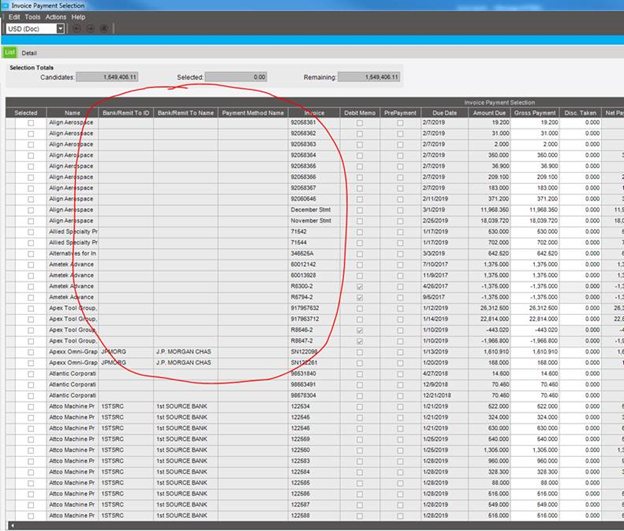
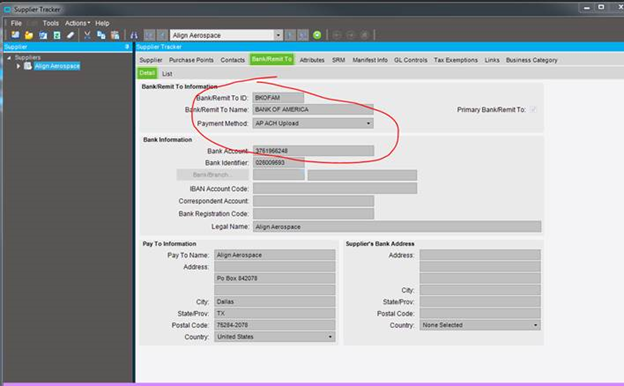
If you select the invoice and create the payment, does the correct remittance information populate on the payment record? The invoice selection screen is still messed up, but I wonder if there’s a deeper issue with the data.
I am leaning toward a data issue but not sure. Still doing all my testing. Accounting is not my strong area…LOL
You can check and update each of the invoices via Posted Invoice Update, the Remit To Field would be active to add a valid Remit To for each of the invoices while you waiting to hear back from Support
here is what I got from support…makes sense now to me.
Hi Kimberly,
   The Bank/Remit to information is obtained from the  AP Invoice rather than the Supplier account. This can be seen in the invoice Tracker > Header Tab in the bottom right corner. If you look at the invoices which do not display the Bank/Remit to information i believe this field will be blank.  The Invoices which do have the Bank info will have the correct Bank/Remit to shown in the tracker.

    The Bank is only populated onto the Invoice if the Account is set to Electronic interface when the invoice is created, otherwise it remains blank and does not display on the Invoice Payment Selection screen.

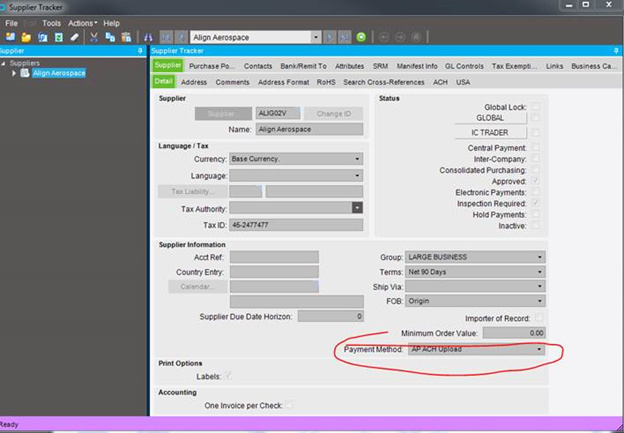
     If you look at your screenshot provided for the Supplier Tracker Detail screen under the Status section you can see that Electronic interface is not enabled for this supplier.  For this to be enabled the Payment Method must be an Electronic Interface enabled payment method.  The invoices already generated will not retrospectively change once this is setup but future invoices will be populated with the Bank/Remit to details.