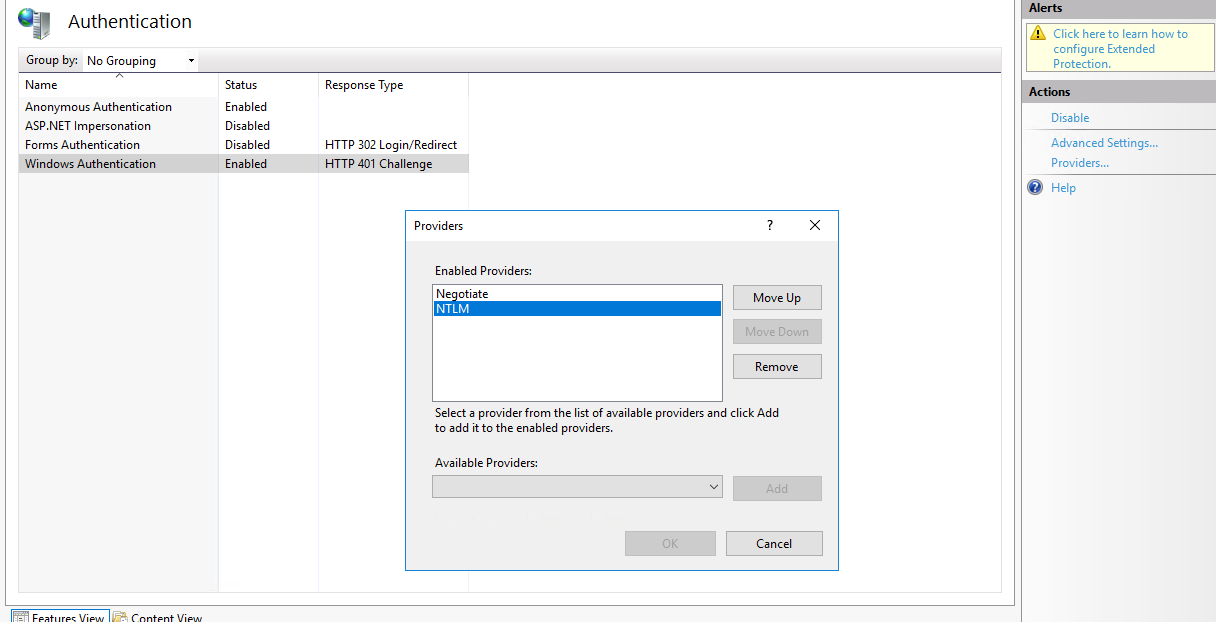
Every so often in version: 10.1.400.24 day 1 of a GO LIVE we are encountering the following random error on different clients.
Any thoughts or clues as to what’s causing this?
Exception caught in: mscorlib
Error Detail
Message: Authentication failed on the remote side (the stream might still be available for additional authentication attempts).
Inner Exception Message: Authentication failed on the remote side (the stream might still be available for additional authentication attempts).
Program: CommonLanguageRuntimeLibrary
Method: HandleReturnMessage
Client Stack Trace
Server stack trace:
at System.ServiceModel.Channels.WindowsStreamSecurityUpgradeProvider.WindowsStreamSecurityUpgradeInitiator.OnInitiateUpgrade(Stream stream, SecurityMessageProperty& remoteSecurity)
at System.ServiceModel.Channels.StreamSecurityUpgradeInitiatorBase.InitiateUpgrade(Stream stream)
at System.ServiceModel.Channels.ConnectionUpgradeHelper.InitiateUpgrade(StreamUpgradeInitiator upgradeInitiator, IConnection& connection, ClientFramingDecoder decoder, IDefaultCommunicationTimeouts defaultTimeouts, TimeoutHelper& timeoutHelper)
at System.ServiceModel.Channels.ClientFramingDuplexSessionChannel.SendPreamble(IConnection connection, ArraySegment1 preamble, TimeoutHelper& timeoutHelper) at System.ServiceModel.Channels.ClientFramingDuplexSessionChannel.DuplexConnectionPoolHelper.AcceptPooledConnection(IConnection connection, TimeoutHelper& timeoutHelper) at System.ServiceModel.Channels.ConnectionPoolHelper.EstablishConnection(TimeSpan timeout) at System.ServiceModel.Channels.ClientFramingDuplexSessionChannel.OnOpen(TimeSpan timeout) at System.ServiceModel.Channels.CommunicationObject.Open(TimeSpan timeout) at System.ServiceModel.Channels.SecurityChannelFactory1.ClientSecurityChannel`1.OnOpen(TimeSpan timeout)
at System.ServiceModel.Channels.CommunicationObject.Open(TimeSpan timeout)
at System.ServiceModel.Channels.ServiceChannel.OnOpen(TimeSpan timeout)
at System.ServiceModel.Channels.CommunicationObject.Open(TimeSpan timeout)
at System.ServiceModel.Channels.CommunicationObject.Open()
Exception rethrown at [0]:
at System.Runtime.Remoting.Proxies.RealProxy.HandleReturnMessage(IMessage reqMsg, IMessage retMsg)
at System.Runtime.Remoting.Proxies.RealProxy.PrivateInvoke(MessageData& msgData, Int32 type)
at System.ServiceModel.ICommunicationObject.Open()
at Epicor.ServiceModel.Channels.ChannelEntry1.CreateNewChannel() at Epicor.ServiceModel.Channels.ChannelEntry1.CreateChannel()
at Epicor.ServiceModel.Channels.ChannelEntry1.GetContract() at Epicor.ServiceModel.Channels.ImplBase1.GetChannel()
at Epicor.ServiceModel.Channels.ImplBase`1.HandleContractBeforeCall()
at Ice.Proxy.BO.ReportMonitorImpl.GetRowsKeepIdleTime(String whereClauseSysRptLst, Int32 pageSize, Int32 absolutePage, Boolean& morePages)
at Ice.Adapters.ReportMonitorAdapter.GetRowsKeepIdleTime(SearchOptions opts, Boolean& MorePages)
Inner Exception
Authentication failed on the remote side (the stream might still be available for additional authentication attempts).
Inner Stack Trace
at System.Net.Security.NegoState.ProcessReceivedBlob(Byte[] message, LazyAsyncResult lazyResult)
at System.Net.Security.NegoState.StartReceiveBlob(LazyAsyncResult lazyResult)
at System.Net.Security.NegoState.CheckCompletionBeforeNextReceive(LazyAsyncResult lazyResult)
at System.Net.Security.NegoState.StartSendBlob(Byte[] message, LazyAsyncResult lazyResult)
at System.Net.Security.NegoState.CheckCompletionBeforeNextSend(Byte[] message, LazyAsyncResult lazyResult)
at System.Net.Security.NegoState.ProcessReceivedBlob(Byte[] message, LazyAsyncResult lazyResult)
at System.Net.Security.NegoState.StartReceiveBlob(LazyAsyncResult lazyResult)
at System.Net.Security.NegoState.CheckCompletionBeforeNextReceive(LazyAsyncResult lazyResult)
at System.Net.Security.NegoState.StartSendBlob(Byte[] message, LazyAsyncResult lazyResult)
at System.Net.Security.NegoState.ProcessAuthentication(LazyAsyncResult lazyResult)
at System.Net.Security.NegotiateStream.AuthenticateAsClient(NetworkCredential credential, ChannelBinding binding, String targetName, ProtectionLevel requiredProtectionLevel, TokenImpersonationLevel allowedImpersonationLevel)
at System.Net.Security.NegotiateStream.AuthenticateAsClient(NetworkCredential credential, String targetName, ProtectionLevel requiredProtectionLevel, TokenImpersonationLevel allowedImpersonationLevel)
at System.ServiceModel.Channels.WindowsStreamSecurityUpgradeProvider.WindowsStreamSecurityUpgradeInitiator.OnInitiateUpgrade(Stream stream, SecurityMessageProperty& remoteSecurity)
Inner Exception
No authority could be contacted for authentication