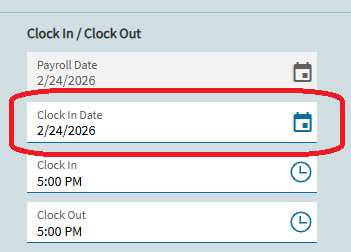
We are in the pilot environment developing Epicor to go live later this year. The Time Entry screen does not allow the user to change the Payroll Date for the Time Entry Details which is the 2nd grid on that screen that shows the time spent on specific phases.
I’m trying to backdate the time entry as if I wanted to enter some project time from the previous day, which would not be unusual in real life.
To be clear, the main purpose for using Time Entry right now is for our design team to enter their project hours against specific phases of a project. This would also be for them to enter their indirect time as well.
The WSB Phases have Phase Jobs setup and the Phase Jobs have all the proper operations setup.
I’ve read numerous articles and tried asking AI and cannot understand why this is happening. The Earliest payment date was set way before the dates I’m trying to enter time for, so I don’t believe that was the problem, but I did see that it was a possible cause of the issue were having.
Does Epicor Kinetic cloud not let you change the payroll date by default in Time Entry? We are on Kinetic version 2025.2.10
Yeah, the majority of our time entry is down through MES (with out operators)… but our Engineers manually log their time via Time Entry. That Default Date is by no means self-explanatory!
Glad it worked for you… and welcome to the Forum!!