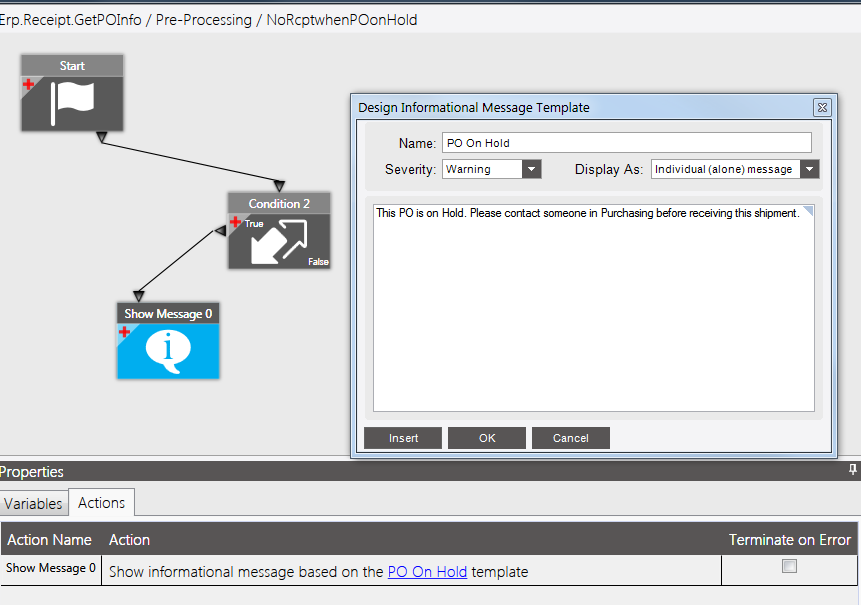
I have been asked to create a BPM that would display a message box when the PO is on hold. The idea is that the receiving clerk would have to stop and click OK on the message and would need to call purchasing for approval to receive the shipment.
I have done some google searches and found threads about this, but they all seem to be related to Vantage and also talk about ‘query’. I don’t understand what the ‘query’ is. I feel stupid. I should know more about creating BPM’s than I do. This will be the first one I’ve created.
I’m looking at a Pre-Processing BPM on the Method of GetPOInfo (for Receipt). That’s as far as I’ve been able to go with this.
Learn to use the client tracing to find out what the BPM path is (start trace, perform action you want to trigger on, stop trace, edit that BPM. Over simplistic but the basic idea)
Method GetPOInfo not sure but sounds like you’re on the right track there, for that method you will probably want to fire after it Get’s the PO info so you can find out if “held” is available in what you get back after Base Process or you at least have the opportunity to take the PO info retrieved and go out and get PO status then trigger on held true condition.
The POHeader table (and therefore the OrderHeld flag) isn’t available in the argument/variable list when I select the condition ‘The specified argument/variable is equal to the specified expression’ on the Condition. I see a selection for ‘Number of rows in the _____ query is not more than 1’. This looks like what I would need to use because I can pull tables in like a BAQ.
I’ve selected that Condition and in the compose Query windows, I’ve tried pulling in the POHeader table and setting Table Criteria to OrderHeld = True constant.
Then I have the Show Message block and the connector from the True side of my Condition 0 to Show Message. I’ve set up message text in there.
I’m getting compilation errors:
Error CS1593: Delegate ‘System.Func<Erp.Tables.POHeader,int,bool>’ does not take 1 arguments [GetPOInfo.Pre.NoRcptwhenPOonHo.cs(72,21)]
Error CS1660: Cannot convert lambda expression to type ‘string’ because it is not a delegate type [GetPOInfo.Pre.NoRcptwhenPOonHo.cs(72,21)]
Error CS0103: The name ‘True’ does not exist in the current context [GetPOInfo.Pre.NoRcptwhenPOonHo.cs(72,54)]
You can’t use True since C# is case sensitive and booleans are represented by true / false.
I don’t mean for this to sound rude, but without some reading and education its going to be tough to pull BPMs off. Like @jgiese.wci suggested do a lot of reading and poking around.
Make sure you understand what BPMS are and how they are constructed as well as how the framework works.
I’ve taken the class, read the ‘book’, watched youtube videos. Nothing I found went into how to do this type of thing. Some were so much more, I was amazed. I don’t learn well from theoretical stuff, i do better with real life needs and jumping in feet first.
I changed True to true and now the compilation errors are resolved. But… the BPM triggers regardless of whether the PO is on hold or not. The query only has the POHeader table in it with the criteria of OrderHeld = true. The Condition is 'Number of rows in the orderonhold query is not less than 1.
Karen, this is from an old post from several years ago but the logic should
be the same
FIND FIRST ttRcvHead WHERE ttRcvHead.RowMod = “A” NO-LOCK NO-ERROR.
FIND FIRST POHeader where POHeader.company = ttRcvHead.company and
POHeader.poNum = ttRcvHead.poNum NO-LOCK NO-ERROR.
/IF POHeader.ApprovalStatus <> “A” THEN/
Case POHeader.ApprovalStatus:
WHEN “U” THEN
{Lib/PublishEx.i &ExMsg = “‘PO has not been submitted for approval. Please
submit for approval before receiving PO.’”}
WHEN “P” THEN
{Lib/PublishEx.i &ExMsg = “‘PO has not been approved. Please approve PO
before receiving.’”}
WHEN “R” THEN
{Lib/PublishEx.i &ExMsg = “‘PO has been rejected. PO cannot be received.’”}
END CASE.
I had come across that code in my searches. I don’t understand where it goes though. It doesn’t look like I can put that in the condition element, but then I’m so new I don’t know what I’m doing
This will do what you want:
Purpose: This BPM will display a message if the PO is on hold at receipt entry
Business Object: Receipt
Method: GetPOInfo
Directive: Post-Processing
Just drag on the Custom Code option and link to start, then open the custom code editor and paste the following:
string vMessageID = string.Empty;
string vSupplier = string.Empty;
I finally got around to trying this. It works. I had to make minor changes, the quotes around + vSupplier + in the message text had to be fixed and I added a space after the words for supplier and before the words is on Hold in the message text. Other than that, perfection!
I can even read what this is doing. Not that I can write something like this, but at least I can understand what this is saying.