Button to create a rework job; need advice or sanity check

As @MicromaticQuality said (somewhat) recently:

And you know, that really would be nice.

I will try to do this, with an Epicor Function. If it works out, I’d like to share it, so this makes me wonder, is the process indeed the same for everyone? If not I’ll still try to make it for us, but it would be nice to plan for a broader user base from the start.

First assumption

I am starting with a DMR.

This is how it should be done - you need to rework the thing, therefore by definition the thing is “bad,” meaning not currently usable for production.

So I’ll read the details off of the DMR.

  • Part
  • Quantity
  • Job it came from, if applicable
  • Or if it came from a PUR-MTL, maybe use that job info?

Second assumption

If the DMR parts came from a job (or from a PO for job material), then the result of the rework job is for the parts to go back to that other job (i.e. job-to-job demand link).

Otherwise, return to stock.

Now, it could have come from a PO inspection for a buy-direct part, but I get the sense that you are hosed if that is the case.

Third assumption

Job format is generally the same for all rework jobs.

Like this:

  1. The part that job is for (JobHead.PartNum) is the same part as the part on the DMR
  2. The material on the job is (to start with) only one item and is ALSO the part number from the DMR.
    a. Qty/parent is 1 EA
    b. Of course you may need to add more components, but that will forever vary. The point here is for a universal template.
  3. At least one operation
    a. I’ll make this an input, but intent would be a specific rework operation that has a special (exorbitant) burden rate
  4. Product group - also an input, also should be rework-specific
  5. Demand link
    a. Depends on source - see “Second assumption” above.
    b. Qty is DMR quantity… or probably the remaining qty (not yet dispositioned). Again, it’d be an input regardless.

Fourth assumption

After job is created, just go ahead and issue the material from the DMR to the rework job.

Which is to say that you’d create a DMR action for Accept Material.

  • Needs a reason code
  • For me, the location pre-populated after I entered the Mtl Seq.

Did I miss anything?

Or make a mistake? Let me know. Well, and let me know if you agree, too.

[Edit: Definitely start off with an “ARE YOU SURE?” dialog box.]

2 Likes

Hmm, one thing crossed my mind.

AFAIK, we never send a second (or third) Nonconformance to an existing DMR.

You can. But that means that a single DMR could theoretically tie to a job material that was rejected AND to a PO inspection that was rejected AND to on-hand inventory.

I don’t know, but I can’t imagine that happens often at all.

Personally I’d rather treat that as an edge case to be ignored – or rather handled as if it was a single source NC. So, still make the job, but you, dear user, may need to fiddle with the demand links after the fact.

Even multiple NC’s from the same source - say, inventory - would be fine. It’s the bizarre scenario of job material and PO or inventory that would be the thorn in the side here.

1 Like

These are the assumptions that I was working off of when I was throwing around ideas here, however I got some pushback (from accounting of all departments) for some valid reasons.

They asked how do you capture the cost for the rework if your at different steps of the manufacturing process, as each operation has their own unique costs (an op 40 machines a finer surface than say op 10 the band saw). Another concern is how do you code it to ensure that it goes back to the correct point of the job - for example if the part number contained in the DMR is the finished part number (as in the WIP and finished part are the same), then once rework is complete will it spit it out as a fully finished part / skip the rest of the operation steps? If you code it job-to-job, will it recognize that it still needs to be completed or will it just add it to the finished goods quantity?

One issue I thought of myself is that we don’t always complete rework immediately and if we contained parts from a job, they may sit for a few days to a couple weeks. Epicor won’t allow a job to process to the next step without the good quantity matching the job demand, so does that mean that we will have reporting issues? It’s not great, but my floor operators will push the job forward physically and complete operations they can’t sign into if Epicor won’t allow them to process their current step. For example, if there are 8 steps in a job and I quarantine 5/50 parts at step 4, they can’t move on to step 5 in Epicor until they have 50 good parts. My floor will just send the 45 good on and start the physical work on step 5, 6, 7, and 8 and worry about Epicor later. Meaning this might cause inventory issues and red tape on the production side. I haven’t thought of a good solution for this yet.

I was told to table anything for now by my team here until I could investigate how rework is supposed to work in Epicor (they want to know if such a feature already exists before trying to customize something that could break a bunch of other stuff). Correct me if I’m wrong, but from what I’ve seen you can accept a part on a DMR and put the reason code as rework - so in theory you could accept the parts back to the job they came from as rework, then log into that job in MES and record time as rework rather than production for those parts. This keeps the cost with that job instead of making a bunch of different rework jobs; the only issue is how to communicate the rework instructions. I was considering using the DMR accept print ticket as the instruction communication since it prints the comments as well. Here’s another thread that speaks on this a bit more - Reworking DMR production parts.

I still think that it would make the most sense to be able to create a rework job right in the DMR since it has all the info you need (your assumption 1). I was thinking you could even hard code the button to autofill the rework classification on the job code of the job entry screen so its always coded as rework. The only info that would still need to be entered would be a resource/machine the rework is to take place on and maybe a due date as well?

1 Like

Appreciate the response, there is a lot there that did not cross my mind.

So where I work, we only reject one way, and that is from inventory. Even when we damage a component in WIP, we just pretend it was damaged in inventory. So I am not familiar with all of the quirks of rejecting from job operations or even job material. Having said that…

So, my assumption is to make a separate rework job. But you float the idea of putting it to the same job, as your linked post did also. Fair point.

So this is if we did a separate job. But the demand link would point to the original place it came from in the time-space continuum, so Marty’s dad is still alive. Wait, that’s Back to the Future II.

Full disclosure, all our ops are the same (“person on giant assembly line,” basically). But regardless, you put the operation you need on the rework job. Like I hinted earlier, that’s why we have a special vendor rework operation for soaking them with overhead for our incurred downtime etc.

Is this if you reject an operation? And I feel like the operation is more a proxy for an assembly, since nothing in the QA world allows for rejecting an assembly by name. Regardless, I have no experience here; just curious.

Is this a BPM? If it’s standard, then that’s new to me (very possible).

I was thinking operation; our resources are 1:1 to operations. But if you need to specify a resource, eek that’s new ground to me.

True. I’d probably allow the input, but default to like “a week from now” or something.

Thanks again! Looking forward to more input if you can spare the time.

1 Like

Also, serial numbers. :angry: Need to incorporate those.

Oh, and then would I need deferred update? If nothing else, I’d skip it for the version I hope to share.

Honestly even it would help me, these rework jobs are so rare that I would not even bother.

(What I mean is this)

Most important sentence in there is this one:

1 Like

Yes! I was wrong!

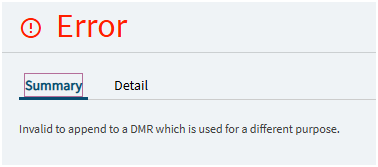
OK, so you can add multiple NCs to one DMR, that is true. What I just learned, though, is that they cannot be different types, or you get this error. Sweet!

2 Likes

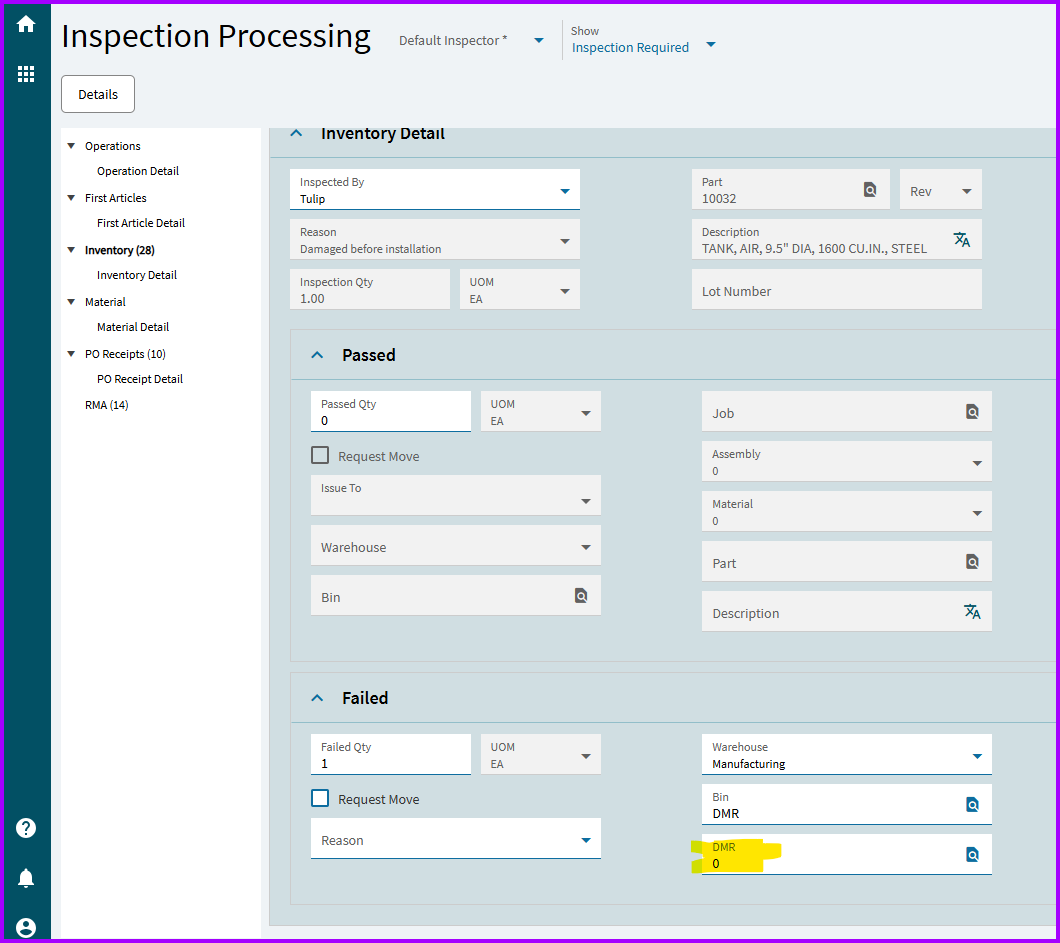
So how did you link multiple NCs to the same DMR? Is there a way in Inspection Processing to specify to add it to an existing DMR? And what would be different types, as in part numbers?

1 Like

Not to be funny, but it’s there in plain sight.

Types, I assume are these options:

Point being that I did 2 NCs as “Inventory” and 1 as Material and it let me combine the inventory ones but not add the material as a 3rd. (All same part number)

2 Likes

That would be nice, I wish we could do that. Unfortunately a majority of our product is made to order / custom rather than mass quantities so we usually don’t have a whole lot of inventory on hand.

My initial starting point was creating a whole separate rework job, since that’s how we call it out in our controlled documents. It wasn’t until I started digging that I found that linked post and even considered that as a possibility. I still think it would be best to create a rework job for traceability purposes as well as scrap/rework tracking, but then we get into the territory of who’s responsibility is it to make those rework jobs, yada yada.

So in other words, if Epicor knows I DMR’d parts from op 20, loaded those as my material into the rework job, then coded it as a job-to-job output back into the original it should recognize that those parts should go to op 20. I’m just afraid that the big ball of wibbly-wobbly, timey-wimey stuff may cause unforeseen issues.

I spoke to my ops manager and apparently, at least for now, all the machines are coded to have the same run cost. I guess at some point the accounting team is going to try to get the correct/unique machine costs into Epicor. I was just thinking that you could assign a workstation to the rework job and it would auto calculate the costs based on the cost the machine accrues while running, and for how long it runs, but looking at it now I don’t see a field for it. I guess that was just wishful thinking on my part.

Yes, like I mentioned above we would want to re-enter the parts into the original job op they were quarantined from so they could continue on their merry way to completion. However you mentioning that you rework from inventory makes me wonder if we can do that too; it would just take some adjustments to how we do things here.

I’m not sure - it could also be an error in the way our Epicor was launched that no one ever figured out / took the time to fix. Basically, if we have a job for 50 parts and I NC 5pcs at the MES screen, I say I pass 45 OK and 5 NC parts for a total of 50. But when I try to process the op as done, it errors out and says that the job demand is for 50; I wonder if it has anything to do with how Epicor removes contained parts from inventory; so even though I’m recording 50 parts it registers as 45 in inventory and therefore less than the job demand. We’ve been struggling with this since before I started here (1.5 years) and the only workaround we know of is to manually adjust the job demand to match the OK passed parts if we don’t have to have 50 exact.

Yeah you’re thinking right; like I said above I was thinking we could link a machine for ease of costing.

Let’s not and say we did…?

I have no experience with serial numbers in Epicor so I’m afraid I won’t be much help as we actually don’t currently use serial numbers on a majority of our products, only the final assembly that we send out the door. Everything else (component parts) is controlled to the job number they are being manufactured on. Now those do have barcodes so we could have serial numbers down the road, I believe that’s a goal for this year/next year. Maybe a dumb question, but if you create the rework job and use the DMR-linked parts to it as the material for the one-cycle rework operation, wouldn’t it just spit out the parts on the other side with either a new serial number or the same serial number but with a historical log of the rework?

1 Like

Well darn hahaha. I never noticed that it was an editable field because when you process/save it just automatically creates a new DMR number. Well thank you for pointing that out haha!

That’s actually nice to know for creating the rework jobs - if you wanted to you could put all the like parts from a week’s production on one DMR and then send all that as the material for the rework job.

1 Like

I toyed with this since we don’t ever do this ourselves. Looks like all that info prepopulates – in the UI anyway – if the NC was from a job in the first place. And it’s grayed out:

Yes, it can do either. I just loathe handling them in Epicor Functions (or BPMs). But I have done it.

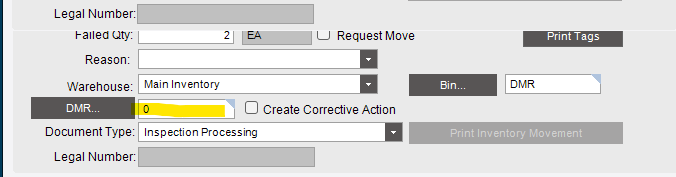
FYI, in the UI it is here:

1 Like

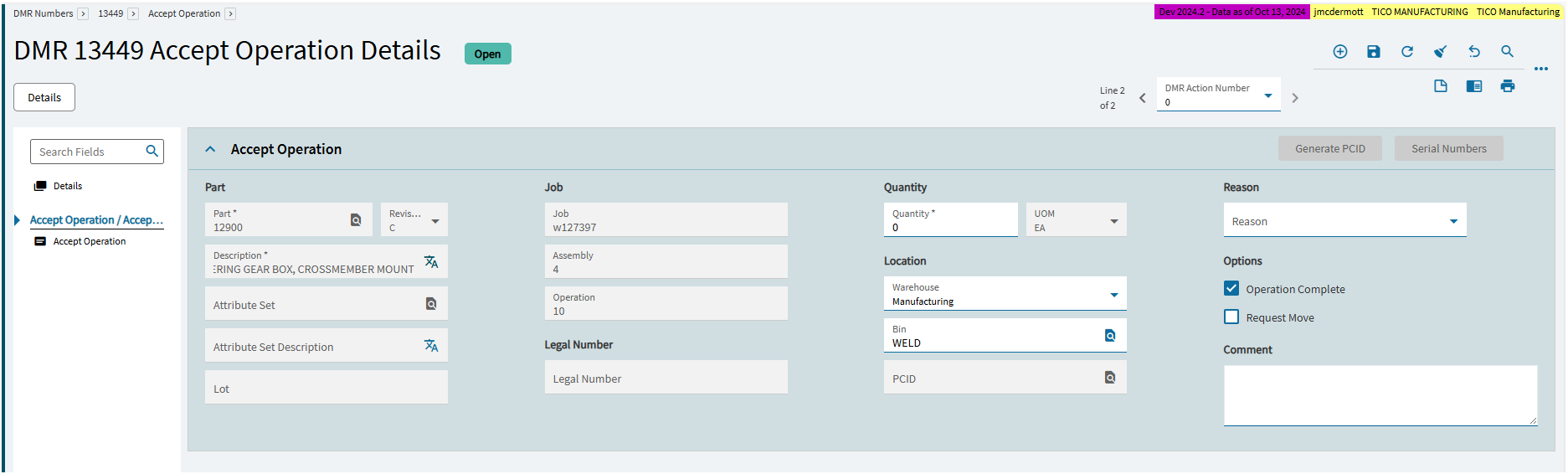
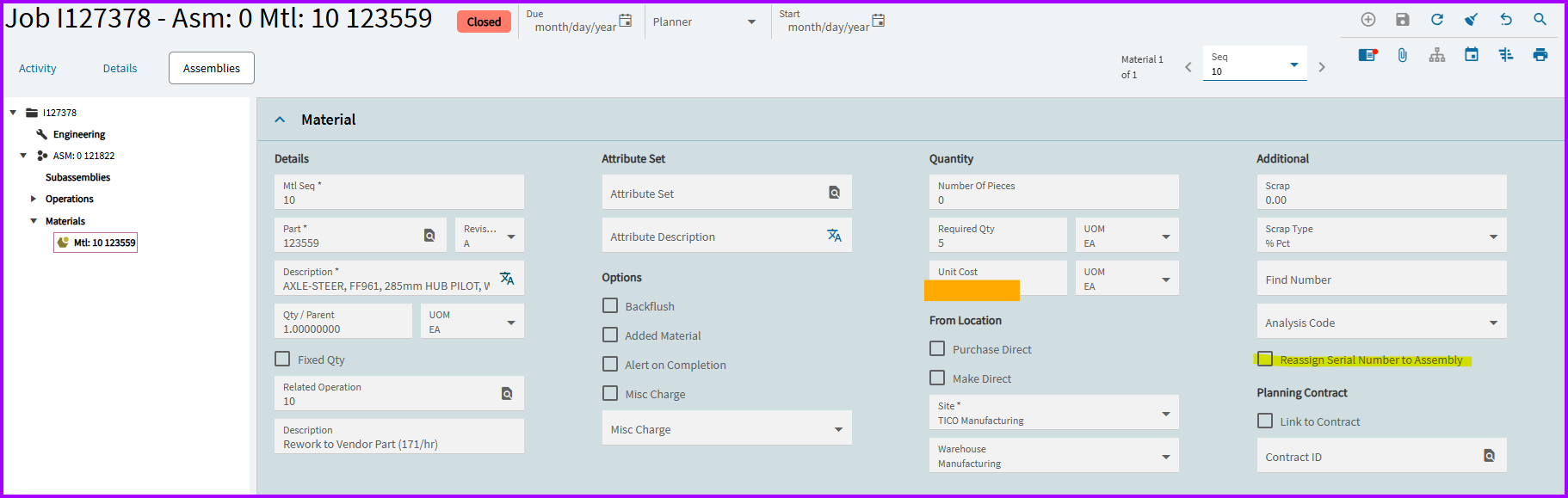
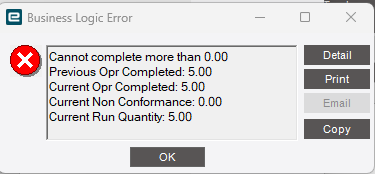
I played around with this here as well and the results were disappointing so far. I was able to add the parts back to the job operation just like you said, however even though I accepted the DMR parts as OK with a reason code of Rework, it automatically counted them as OK and completed the operation. I tried again and unchecked the Operation Complete box on the DMR accept screen however that simply didn’t complete the operation. The quarantined parts were still added to the good total, meaning when I tried to complete a rework activity from the MES screen and close that activity I got the below error. Since the operation is saying it has 5 good parts, I can’t complete rework or pass parts for that operation. So unless there’s a setting somewhere I’m not aware of, I don’t see how the post I linked is helpful as there isn’t a way to capture the time/cost of reworking parts. I’ll keep playing around in here to see if I can stumble upon something useful.

My IT forwarded me a Epicor webinar coming up regarding the DMR process; I’m planning to attend to see if they have any info on how best to incorporate rework in the DMR process. Maybe there’s a setting that my organization either turned off or never turned on that no one here is aware of (my understanding is that when we first got Epicor they did heavy modifications to make it “function” like their previous ERP system). Fun times.

1 Like