I am trying to streamline our DMR Process but I am new to Epicor and have very little idea how to do so. I’m also the quality engineer so I don’t have any scheduling power for jobs or anything, but I want to understand my options so that I can work with my management on the best path forward.
Our current setup is
operator creates a Nonconformance ticket.
Inspector determines if the part is OK or NG with Inspection Processing.
If OK, accepted and part goes back to WIP.
3.1) If NG, it is rejected and a DMR is created.
This is where things get difficult for me. Our DMR setup only allows rejection or acceptance of the DMR. If parts are rejected, it can be either scrap or return to supplier. If they are accepted, then parts automatically go back to the job step they were contained at or into WIP. We don’t really have a good way of capturing our rework process and that is what I am trying to do. I’ve seen some threads that say you can add DMR material to a rework job but I don’t understand how that works. Is there a place in the DMR screen that lets you create a rework job for the DMR parts, or is there another screen we’re supposed to use? Do you have to keep the DMR open until the rework is complete or is it closed once the rework job is created?
Related to the above - how do we capture rework costs for parts that we purchase from a supplier and fix in-house to put on the debit in the DMR? So for example parts come in rusty, we can clean them in-house as there’s nothing dimensionally wrong with them but how do I capture the cost of doing the rework in-house and charging it back to the supplier?
Irrelevant, but I was a SQE for 3 years here before switching to Epicor admin full time.
Good question - I’ve been doing this for nine years and only questioned it a couple weeks ago:
AFAIK, it’s manual and tedious.
Make DMR
Make job for part 123
Add material to job; material is also part 123 (1 per)
Accept DMR to job material
???
Meaning that step 5 is up to you. You could receive the finished part to stock, or I suppose to the job that started it all. I’ve never tried that, but I could see it.
Umm… no? Maybe?
Do you have a dev environment to test in?
I believe that dispositioning the DMR (in full) will close the DMR. So step 4 above would do it.
You imply something that has irked me forever, that DMRs close WAYYYYY before the problem is solved. Dispositioning to rework or RTV will close the DMR but the work is not done. We are still waiting on a supplier credit or the rework job to complete. I had to make a dashboard (BAQ) to keep tabs on it all.
Thanks for the response, I appreciate it! So if creating a rework job is manual, does that mean I have to go to Job Entry to create the rework job? Or is there somewhere on the DMR Processing screen that lets me start a rework job and then plug in the info (I’m assuming machine/location, time, etc.)? If there isn’t an option to flow from DMR Processing to Rework Job creation, there should be. It seems like that would be the logical next step if its not scrap and not use-as-is condition.
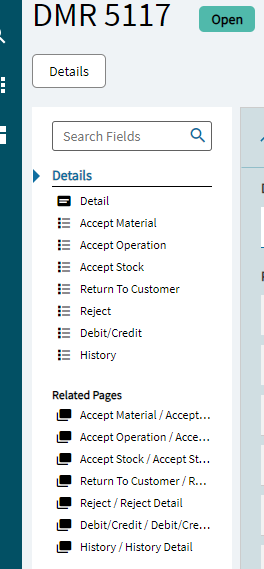
Perhaps one of the things confusing me is that our DMR bin is marked as non-nettable, so when parts are contained with a DMR they drop off of our inventory. How am I supposed to issue the parts as material to a rework job if they don’t show up? My DMR screen doesn’t have an option to issue parts to a rework job, is it supposed to? Below is what I can currently see.
Yes, creating the rework job is a manual process in Job Entry. Since you could go as simple as a single “rework” operation or as complicated as an entirely new method of manufacture to finish the parts, Epicor leaves that up to you to determine and to do. One of our shops has a button set up on DMR Processing that they can click to create a simple rework job with that one rework operation and with the material line item set up correctly. I don’t know if I have access to that source code to share, though.
When you create an NCR, the parts come out of inventory regardless of your bin nettable/not-nettable settings. NCRs and DMRs are not “on-hand stock” as far as Epicor is concerned since you don’t know yet if you can use the parts to satisfy demand. When you accept a DMR to Job Material, that acts as the “Issue Material” transaction except the parts come from a DMR instead of from stock. In your screenshot above, that would be the “Accept Material” option.
That sounds similar to our company. One of our facilities went crazy with non-nettable bins for “bad” parts instead of creating DMRs for them. Sales and Supply Chain had no idea why these parts were showing in stock in Epicor but MRP wouldn’t use them. Finally we get to physical inventory and accounting doesn’t know how to reconcile the massive write-offs with their stock statuses that never showed these parts.
We now have a total of zero non-nettable bins and a report that lets us know if anyone tries to make one.
So it is possible to link a rework job creation to DMR Processing, awesome. I thought there would have to be, as it just makes sense from a flow standpoint. If you can find/share that source code that would be great, we don’t have an Epicor person at my company to create codes so any help would be greatly appreciated.
My previous company used Plex, where Hold and OK status parts still showed up as your overall inventory so I’m still trying to wrap my head around how Epicor works.
Okay maybe this is a dumb question, but say I have a floor operator NCR a part in MES from the job screen, so it comes out as an NCR from Operations. If I create a DMR and rework job for that part, once the rework is done how does it go back to the operation step of the job it was quarantined from? Wouldn’t it be auto assigned back to the original job once the DMR is processed as complete? Or what happens if that original job had the quantity needed changed and closed out as complete before the rework took place?
It’s up to you (like a lot of things in Epicor). You could set up the rework job to supply back to the original job using a Make-to-Job demand link which would get the parts back on your original job to finish them. Or, you could set up the rework job with the rework step plus the rest of the process to produce the finished parts. We’ve done both ways depending on timing and the type of part: if it’s going to take a very long time to rework the parts, we’ll set up the rework job as the full process so we don’t have to keep the original job open. If it’s a short process, we will return back to the original job to finish the parts.
I appreciate the support - I guess it’ll be trial and error haha.
I don’t want that role, but at this point I may end up learning more about it just out of sheer desperation. I was told we used a system called BAAN previously, and that when they were implementing Epicor they tried to mimic it as much as possible rather than just implement Epicor the right way. Now we have almost exclusively MML/custom screens and no one here who knows what a majority of them even do let alone how to update them. It’s a giant mess.