Still the same. it doesn’t show up on the handheld.

Did you ever make it work? I’m having the same issue
Check out docs.biscit.com - that’s a public site that everyone should have access to.
@cisneroscpi Did you perform the DB regen and recycle the app pool after adding the columns?
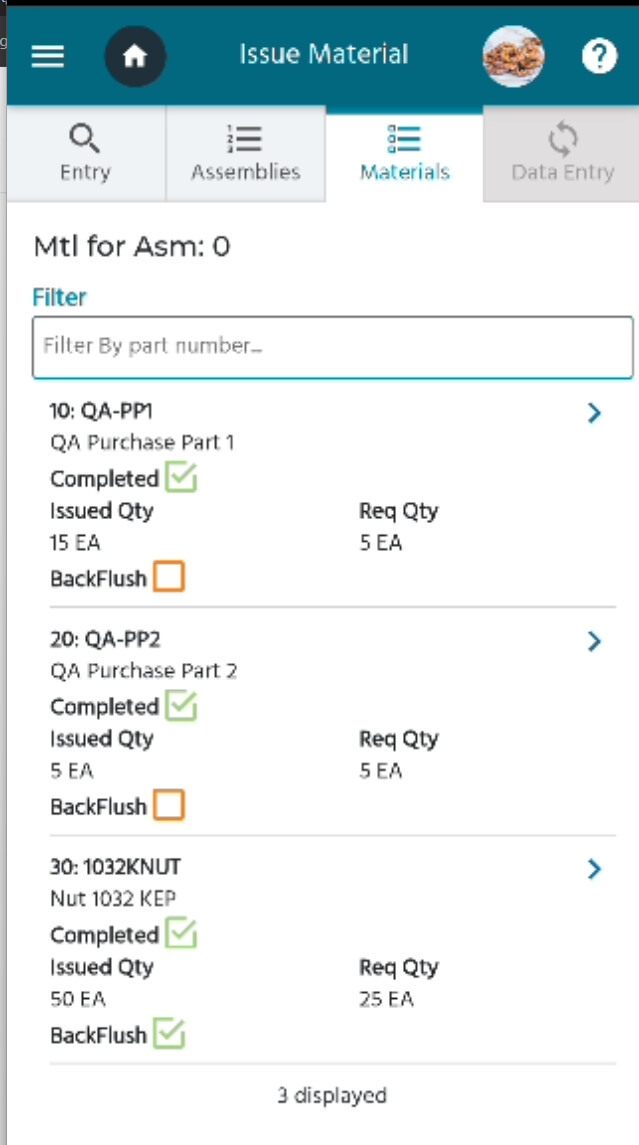
I wanted to share an example of a custom field that I included on the issue material page to display whether a part is a backflush part or not.
Things to remember - the UD Columns/fields are case sensitive and MUST be completed in this order.
You must regen the database and recycle the app pool after adding your fields.
If you make a mistake, you will need to delete anything after the mistake and redo the work (unless you have access to the SQL DB and more programming skills than I have).
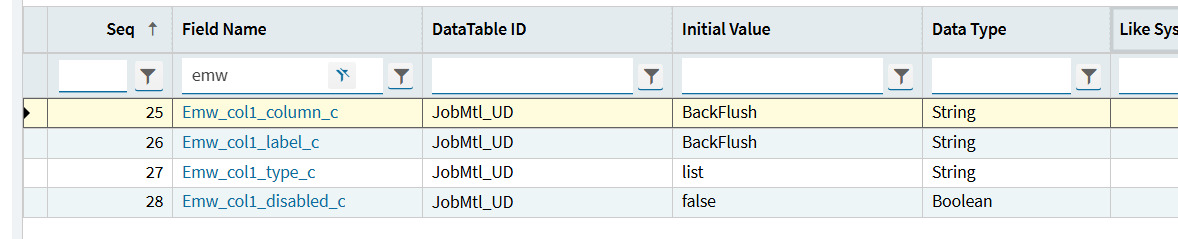
This page goes over which field types to use.
I did. Turns out the whole problem was I had the field originally as “text” and when I switched to “list” all the records on the database already had the wrong value. Once I went to SQL and fixed the records everything started showing as expected.
Did you add the custom fields on the MtlQueue table?