On a quote, our standard practice is to configure a part with the configurator and it produces a new BOM. We then go to line actions and “get MFG details” and we now have a new cost on the worksheet to be able to set a price for the part. We then have to reconfigure the part as the customer wants something added. We then have to go back to actions and “get mfg details”. The MFG detail did not delete the old MFg details and did not simply update the old MFG details with the added parts that were now part of the bom due to the part being reconfigured. I think the only solution is to have a button on the quote to delete the original MFG details before reconfiguring the part. Does anyone have any thoughts on what would be involved in having a button do that? Is that possible or an extremely time consuming customization?
There is already a context menu item to delete the BOM.
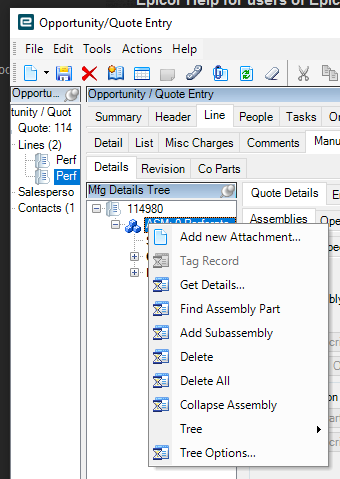
If you want a button in addition you would just run a trace log while using that context menu to see what BO methods are being run to delete the BOM. (In this case Erp.BO.QuoteAsmSvc/DeleteAllAssembly)
It wouldn’t be a difficult customization to make. The other question is why are you doing Get Details on the quote? you can put that off and then when you turn it into a job it will automatically pull the BOM from the configurator into the job. That way, you can reconfigure the quote as many times as you want without fiddling with the BOM on the quote.
Thanks! I didn’t notice that before. That worked perfectly. I have to get details everytime to go to worksheet in the quote and look at what the costs are. I have over 200 keep when rules on the BOM of the configurator a drastic change in the bom cost based on the options chosen during the configuration session. I need to use that worksheet to put a mark up on the worksheet to determine a selling price. I truly appreciate your fast response. You saved the day.
Ah, for our configurators we have it calculate the price based on the options selected and populate the price with that number for us. No work sheet
Normally this is for adjusting margin based (pricing) on cost (worksheet) and using the worksheet to ensure profitability especially if this is a make to order custom item or first run.
As do ours but our divisions use the costing worksheet on the configured to ensure good margins especially during model year changes.
I am traveling and just saw this. I put a call to the delete details and get details BOs in a document rule so that every time the configurator is saved a fresh get details happens. For some clients I pull the calculated price and delete the details if they just want the price. I can post the code when I get to my PC.
I
Would you mind posting that code for that document rule? I already have the document to set the sales price on the quote. I just need the code on the document rule to delete details and get details every time the configurator is saved. I also need to grab the quoteQty.TotMtlCost and throw to a UD Field.
@Jkinneman I didn’t realize you could call the BO’s in the rules (or I’ve forgotten already  ). I’m curious to see that code too.
I did figure out the code. I made a udmethod and then just called udmethod from document rules. I just need to grab that QuoteQty.TotMtlCost from the get details to populate another field before completing. I’m struggling with that. Users love not having to manually delete details from the quote now before reconfigurating.
Me too…
Sorry for not posting earlier, happy to answer any questions.
The Get Details routine uses a document rule to identify when a configurator has been saved. As a document rule it calls the method QuoteAsm.DeleteAllAssembly first to get rid of any existing MOM. Next it calls QuoteAsm.GetDetails which executes the Configurator Method Rules and builds the MOM. Any changes you make manually to the MOM will be lost if you reconfigure and save the configurator.
- Add following controls to target configurator. (This stores the original values of the part number and revision for later use).
a. Inputs.txtBasePartNumber, character field, read only, invisible
b. Inputs.txtBaseRevision, character field, read only, invisible - Add following code to target configurator “On Load” event. This saves the original values for use by the Get Details routine in cases where configurator has changed the part number.
if(Inputs.txtBasePartNumber.Value == String.Empty) { Inputs.txtBasePartNumber.Value = Context.PartNumber; Inputs.txtBaseRevision.Value = Context.PartRevisionNumber; }
- Load “GetDetails” into Configurator User Defined Methods screen.
a. Create a server-side method called “GetDetails”
b. Two String Parameters, PartNumber and PartRevision
c. Open Code editor
d. Click “Add References” in lower right-hand corner.
e. Check “Automatically Create user clauses”
f. Click “Assembly Selection” tab
g. Select Directory, pick primary directory.
h. Filter QuoteAsm, click Search
i. Pick “Erp.Contracts.BO.QuoteAsm.Dll” by checking checkbox to right of file
j. Click OK
k. Click “Referenced Assemblies” and verify DLL is listed, along with Using Clauses
l. Click Close
m. Add code from below
n. Save - Return to target configurator in Configurator Entry
- Document rules add following
a. Rule Description: GetDetails
b. Rule Condition: Always Execute
c. Action: Execute Specific Expression
d. Code: UDMethods.GetDetails(Inputs.txtBasePartNumber.Value, Inputs.txtBaseRevision.Value); - Approve configurator
- To Test
a. Configure a line on quote using target configurator
b. Save configurator
c. Click Manufacturing Tab
d. Take note of Method listing in tree
e. Right click on “Operations” in tree, pick “Add Operation”
f. Add any operation and save. Take note of how MOM looks.
g. Go back to line and click Configuration, no need to change anything just click “Save”
h. Go back to Manufacturing tab and notice that the operation you added is no longer there.
// code to create method from scratch
if(Context.QuoteLineNumber > 0 && Context.Entity == “QuoteDtl”)
{
Erp.Contracts.QuoteAsmSvcContract boQuoteAsm = null;
Erp.Tablesets.QuoteAsmTableset dsQuoteAsm = new Erp.Tablesets.QuoteAsmTableset();
int targetAsm = 0;
String sourceFile = “Method”;
int sourceQuote = 0;
int sourceLine = 0;
String sourceJob = String.Empty;
int sourceAsm = 0;
String sourcePart = PartNumber;
String sourceRev = PartRevision;
String sourceAltMethod = String.Empty;
Boolean useMethodForParts = false;
Boolean ipCompleteTree = false;
Boolean getCostsFromTemp = false;
String partErrors = String.Empty;
try
{
	boQuoteAsm = Ice.Assemblies.ServiceRenderer.GetService<Erp.Contracts.QuoteAsmSvcContract>(Db);
	dsQuoteAsm = boQuoteAsm.DeleteAllAssembly(Context.QuoteNumber, Context.QuoteLineNumber);

	boQuoteAsm.GetDetails(Context.QuoteNumber,
		Context.QuoteLineNumber,
		targetAsm,
		sourceFile,
		sourceQuote,
		sourceLine,
		sourceJob,
		sourceAsm,
		sourcePart,
		sourceRev,
		sourceAltMethod,
		useMethodForParts,
		ipCompleteTree,
		getCostsFromTemp,
		out partErrors);
}
catch(Exception ex)
{
	throw new Ice.BLException(ex.Message);
}
}
Thanks @Jkinneman !!
Thank you! 