Do DMRs for purchased components get recorded as scrap when I enter a ‘Reject’ entry if I mark the ‘Return to Supplier’ button?
My purchasing and accounting departments don’t want to RMA purchased components back when we send them for rework/repair, rather they want to simply add a no-cost line to the open PO for the reworked/replaced part to be able to be received in by our shipping personnel. The issue I have with this is that it will scrap the original part at full cost, while showing we have a second part for $0.01. I’m afraid that this will make it look like we’re scrapping parts in-house and eating that original part cost, so I thought I would ask how does a ‘Reject’ work when the ‘Return to Supplier’ box is checked?
I have to leave in a few minutes, so sorry for the brief answers.
FYI, look over this (it is actually about QA):
Return to Supplier is a DMR-REJ (reject) transaction, but you define the GL code for that, so, it’s up to you there.
That said, I don’t know how you mean “recorded as scrap.” Who says what scrap is? You mean financially? Then set the GL code to a scrap account or not scrap, as desired. Is it “scrapped” because it is DMR-REJ? Well, then yeah it is what it is.
Rewinding, I was trying to get the gist here. So these are warrantable components of what you sell? Like you sell a pen and they send back the cap as defective? And you buy the cap from some supplier?
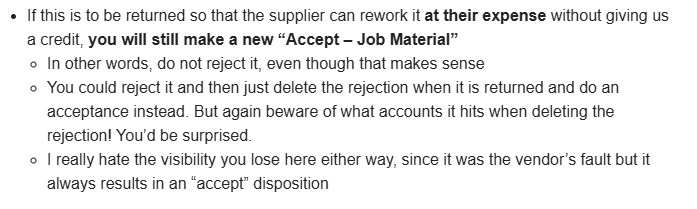
Thanks for the response. I looked at the other post you linked and the section regarding Return to Vendor where you talk about reworking at the supplier’s expense with no credit/debit being processed; why would it be Accept Material? Doesn’t that just put it back into a usable inventory status? We have a wonky setup here; one business unit receives component parts to stock and has an inventory bin system but the other business unit orders components as job material, so it doesn’t get entered into inventory stock. It just automatically gets added as job material once its received in and inspected as OK. Those parts never show up in inventory on-hand searches, only that we have purchased them. So if I accept a part for business unit B as OK, it will automatically get coded to the job as job material and show that the part is loaded to the job even though we sent it back for rework/replacement.
I think I understand what you’re saying - basically I have to find out how these are coded (scrap or nonscrap) for accounting purposes.
Not really - almost all of the issues we run into are during receiving inspection of component parts that go into our finished module, so it never makes it to the final customer.
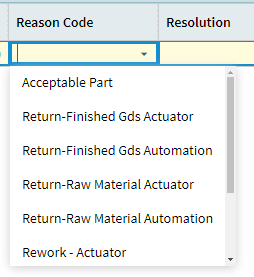
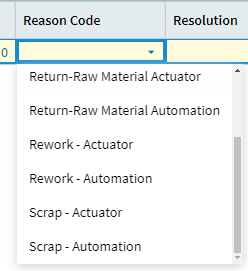
Just typing out my thoughts here - For the way we have things set up here, I need to determine what the reason codes mean accounting-wise and most likely need to do a DMR-REJ with reason code Return-Finished Goods or Return-Raw Material. This will close out the DMR and allow my purchasing team to add a secondary line to the open PO for the rework/replaced part to be able to be received in once it arrives. And since the supplier is routed to go through receiving inspection it will send it to QC a second time for inspection once it comes in.
First to clarify, “Accept Material” means it goes to job material. You said “usable inventory status” and to that I’d say no, it is not; it’s on a job.
But for the question, like I said you have 2 options
Accept DMR to a rework job
Reject it as RTV and then delete the rejection later
We actually do the reject option these days. It goes to a “vendor site” GL account to sit in limbo. It works… fine.
The note to beware the accounts - that’s a bug that was fixed a while back (you’re welcome - I was the one that submitted that to development). So it’s not the concern it used to be.
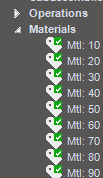
So “Accept Material” won’t add it to stock inventory, I get that. But if I accept it as OK and it gets added as the job material to the job it was purchased for, it will make the materials list checkmark green on the Job Tracker screen, saying that it is available for use (that is what that green checkmark means, right?).
But I don’t want to make this checkmark green, because that signifies to the assembly team that the part is available for them to use when its actually off being repaired/remade at the supplier. My assembly team and purchasing team use the job tracker materials information to know if parts have arrived/been pushed through receiving inspection and to know which suppliers they need to correspond with about parts (being late, etc.).
So do you leave your DMRs open until the part comes back in from the supplier in this scenario? I figured out how to delete a ‘Reject’ entry but I must be missing a piece of the puzzle because why would that be necessary? If you reject the part and a duplicate part is added to the PO as an additional line item, then when the supplier sends it back it can be received in against the duplicate (since the original line was already received against).
I meant making a separate job for the supplier rework; I guess the demand link of that job could be material on the other job, which would have to be flagged as make-direct if you don’t want anything to hit inventory… it would get really ugly; I’m not saying to do this.
We should, but no, we monitor them with a BAQ (this is code for “we forget about them.”)
Yeah we don’t do the PO. I get the logic; but the zero-dollar line kind of messes up other things.
I used to work in QA a decade ago, and even then, we hated this setup of “Send it back and we will rework it for free - promise!” We always said, can you just give us a credit for the part and then charge us for the replacement? Nope, never. The vendors hate that.
That’s what we currently do, but only for one business unit. They have Projects with multiple jobs assigned to the project, which then have make-direct components that we buy coded as job material. The other business unit seems to function “normally” inventory-wise (bin locations, stock, etc.). It’s a grand old time.
I would rather not do the PO zero-dollar line either, but that is what both my purchasing and accounting want to do so I’m overruled. I would much rather just RMA it back and order a replacement (like you said).
@JasonMcD has given AWESOME explanations here… but one point worth emphasizing. The word “scrap” in the Epicor Quality Pantheon means “I’m throwing this damn thing out the window never to reappear and I’m absorbing the cost to whatever GL account is on the Reason Code”. Once something is "“Scrapped” (or, from DMR terminology, “Rejected”), it ceases to exist. You can’t bring it back. That’s why the “Accept as (something)” is the correct option.