My company currently has a large backlog and is looking for a solution to drive demand sooner in Epicor then we’d typically see. Here’s the breakdown of our scenario.
Once a quote is won, within two weeks we have the complete list of the raw materials needed to build the part, but not what sub assemblies they’re going into.
Our Mechanical Engineers need several more weeks to build the model and define the final job structure, including sub assemblies. At that point they create the part masters for the sub assemblies and the finished good part, then they create the Job.
These materials have either a long lead time or we need a large quantity of them, so to drive demand earlier they cut RMAs for all of the materials.
RMA’s have been working ok, but the biggest issue is that they’re cutting them to stock because the Job isn’t built, but when they build the job, if the RMA hasn’t fulfilled yet, they’re getting double demand.
Any idea’s on another way to do this? MPS came to mind, that seems difficult to manage when dealing with hundreds of parts.
We don’t have a good solution but we have the same problem. We just put the job into with the materials to trigger the PO suggestions and try to fix it later, but sometimes that backfires.
I’ve done it before using the same process @aosemwengie1 describes… create a “dummy” job with all the raw material part numbers so that PO suggestions can get created.
But that’s not the only piece. You need to develop a process so that SOMEONE (typically in the planning group, but could also be in engineering or purchasing) is responsible for keeping track of how this quote/sale/job progresses, and when the final job structure is created and entered into Epicor, delete the “dummy” job so that demand isn’t duplicated. There will likely be several additional steps to this process, but it is a PROCESS issue, not truly an APPLICATION issue.
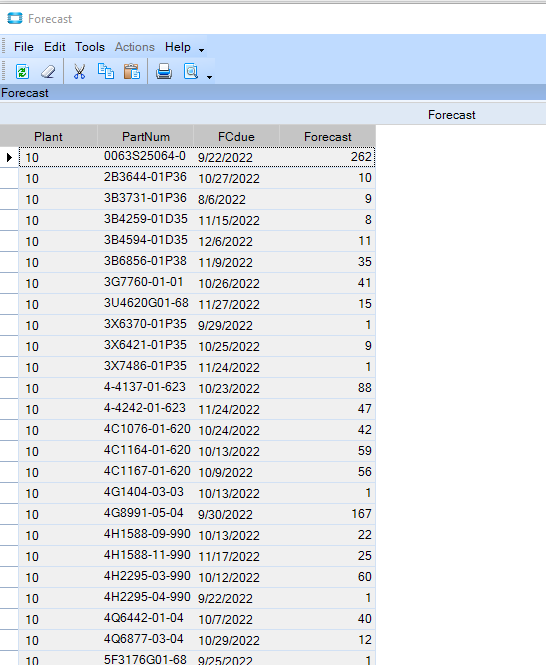
We have a BAQ/dashboard that provides a list of all of the parts that need to get demand load on them via a forecast. The list weekly gets exported to Excel and then brought back in as forecast. It’s not really too difficult even though it is a few hundred parts. We have not used MPS other than to test out a few years ago, and we decided to take the Forecast route since we have some forecasts for our parent parts occasionally also to input. However, if you went the route of MPS perhaps the same idea would help, to make a dashboard that creates your MPS data and then do an import of it periodically. Our sample forecast data (we use 0 days before, 0 days ahead and just project when we need it, so forecast is not consumed by other demands for same parts in system):
Some people use Planning Contracts too. It’s basically designed to order material ahead of time and to segregate the the material for that project/order.
We have the same issue right now. I have been trying to figure out how Planning Contracts works. Anyone have a video or step-by-step instructions? Epicor Learning Center has nothing…
We have considered the above idea with a “dummy bill” also and have the same issue with double demand once the actual bill gets released.
Your best bet is to go to your pilot/test/education database and put one in, then run MRP, then add an order, then add a job, then issue the material and watch what happens - because at some point, that’s exactly what you’re going to do. Also, search the forum here to see what people complain about planning contracts and see if that those issues might impact you.
Question for those who successfully use Planning Contracts… Why doesn’t the bin default to the planning contract bin when the PO is received?
For example, we created a PO that was directly linked to demand from the Planning Contract. Then, when I received the PO, the part just went into the regular “primary bin” and not the Planning Contract Bin. I thought that was the whole point that it would be received into the planning contract bin?
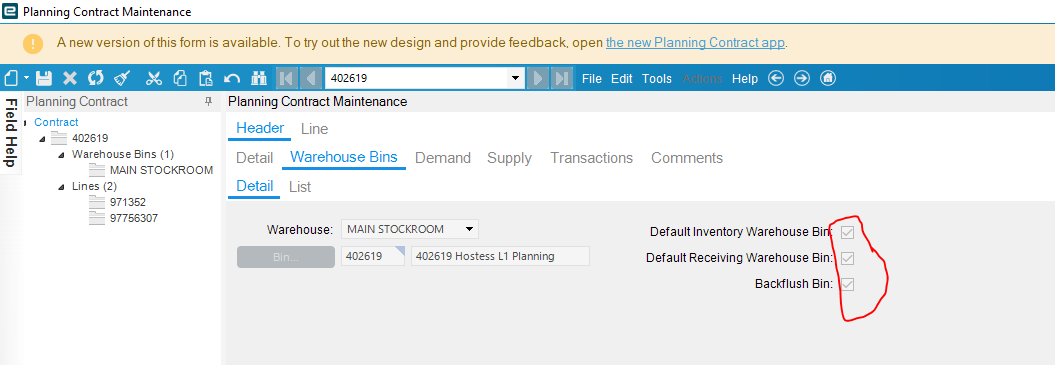
Below is how I have the bin setup on the Planning Contract Maintenance screen. Epicor would not let me “active and approve” the planning contract without checking the boxes. Not sure why. If you have a screen shot of how to setup the bins that would be helpful.