Different companies, not Sites, right? (Taxes and all…)
I believe that Tran Date is your apply date as well. You set the Time Zone in your Site Maintenance and that is the date used as the default times for that site, not the HQ TZ. At least that’s how it’s been working here.
[quote=“Mark_Wonsil, post:21, topic:41301”]
e is your apply date as well. You set the Time Zone in your Site Maintenance and that is the date used as the default times for that site, not the HQ TZ. A
Hello Mark,
Even though we have the Site Maintenance set to Seoul time, any new order uses the USA date rather than the Korea date. For example, I just entered an order and shipped it and while it’s 2:30am tomorrow in Seoul, all the default dates like Order Date, Shipment Date, etc. were today (USA time) because Korea is 13 hours ahead. Is there another setting in Epicor admin I’m missing? We are multitenant so they set the system up from that standpoint. Thanks for all the help too.
Great question and I’m having someone in another time zone do the same transaction to see the date/time in Part Tran. But to answer your question, no, I am in US CST time zone.
However, a query of the Korea PartTran table shows all their transactions occurring in the middle of the night.
Bernie brings up a good point. If you’re using RDP into the US then that could do it. Even so, there is a setting on the RDP server to respect the TZ of the remote computer. We used that with our Munich folks before our Dedicated Tenancy days.
I guess the question is: where is the Client Software running? Your server is MT Cloud but the user either has the software loaded directly on the machine in Korea or the user connects from the Korean computer to another computer which is running the Client Software that is connected to your MT Server. Do you know if you’re using Terminal Servers?
Mark,
Epicor really doesn’t easily have access to your system.
The main tech support group has said they don’t have access to a cloud environment.
My experience with supporting three customers on the cloud has been that tech support does not understand the cloud. They have asked for a screen shot of my license or don’t understand when I say the cloud, they still ask what version are you on.
They are getting better, just had to have a Apps server restarted to print something - only took one hour to have it restarted.
Yes. It is getting somewhat better but there still has been some team members who are not sure what I’m talking about. I put our SaaS system number all over the EpicCare tickets and that seems to help.
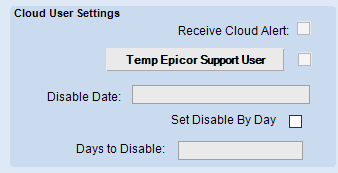
Yes, I’ve been through that with some. What I have done successfully is create an epicor user ID in our system and check the “Temp Epicor Support User” and specify a Disable Date. I imagine I’m using the feature for which it is intended. I enable the account, send the password to my email address. Make sure I can login and see the what the Analyst needs to see then change the password to something easier (but matches the password policy). I then send our SaaS ID, the username, and password to the tech. They just need to install a cloud client and they access our system.
Agreed. But honestly, this (and Data Model Regen) are things that should be automated. There’s no reason I can think of to have a tech do this by hand. That’s not how Microsoft built Azure and if Epicor wants to scale the Cloud product, it has to move towards more self-service.
 I enable the account, send the password to my email address. Make sure I can login and see the what the Analyst needs to see then change the password to something easier (but matches the password policy). I then send our SaaS ID, the username, and password to the tech. They just need to install a cloud client and they access our system.