Hey,
I’m trying to add some detail to the AR invoice form. I’ve already customized the RDD by un-excluding fields and adding them to the custom form. Works fine.
Now I need to add some tables to go out and grab more info. The RDD looks like it’s set up right. There are four new tables and relationships defined for all. I’ve unexcluded all the fields I need in the relationships and for output to the RDL.
When I run the report, the RDD doesn’t complain. But when I add the table in the RDL form’s dataset query, I get an error.
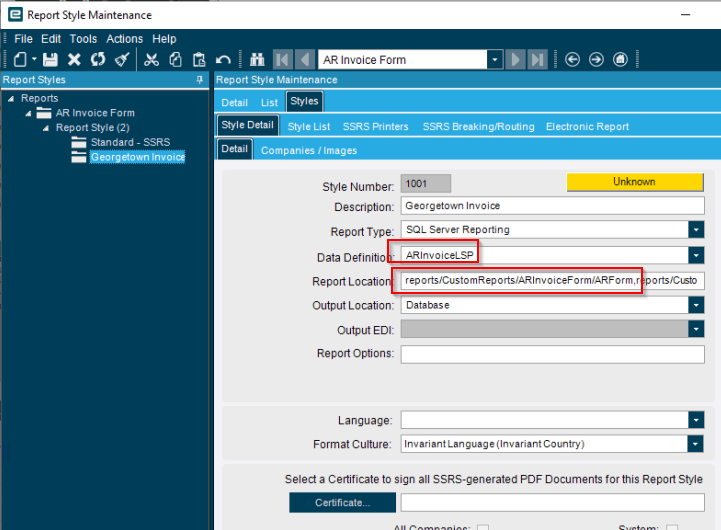
Here’s the style:
The RDD:

And the code:
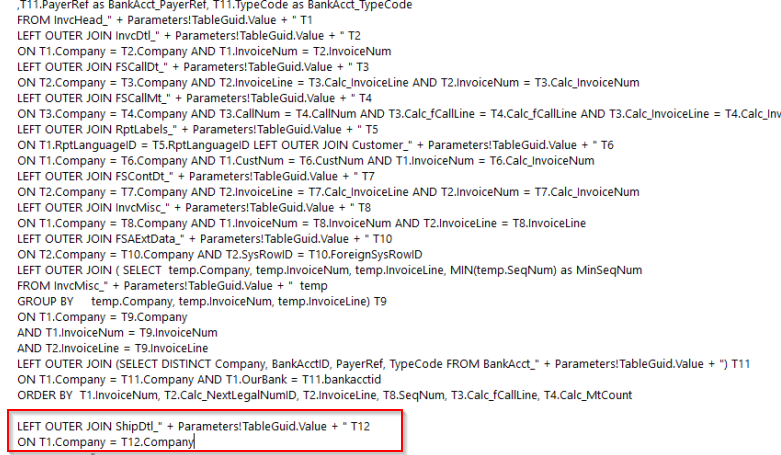
When I add the outer join line for ShipDtl or any of the other tables I’ve added I get this error:
Ice.Core.SsrsReportService.ReportExecutionSoapException: Exception of type 'Ice.Core.SsrsReportService.ReportExecutionSoapException' was thrown.
SOAP Fault: An error has occurred during report processing. ---> Microsoft.ReportingServices.ReportProcessing.ProcessingAbortedException: An error has occurred during report processing. ---> Microsoft.ReportingServices.ReportProcessing.ReportProcessingException: Query execution failed for dataset 'ARForm'. ---> System.Exception: For more information about this error navigate to the report server on the local server machine, or enable remote errors)
Detail: <ErrorCode xmlns="http://www.microsoft.com/sql/reportingservices">rsProcessingAborted</ErrorCode><HttpStatus xmlns="http://www.microsoft.com/sql/reportingservices">400</HttpStatus><Message xmlns="http://www.microsoft.com/sql/reportingservices">An error has occurred during report processing.</Message><HelpLink xmlns="http://www.microsoft.com/sql/reportingservices">https://go.microsoft.com/fwlink/?LinkId=20476&EvtSrc=Microsoft.ReportingServices.Exceptions.ErrorStrings&EvtID=rsProcessingAborted&ProdName=Microsoft%20SQL%20Server%20Reporting%20Services&ProdVer=15.0.1102.1002</HelpLink><ProductName xmlns="http://www.microsoft.com/sql/reportingservices">Microsoft SQL Server Reporting Services</ProductName><ProductVersion xmlns="http://www.microsoft.com/sql/reportingservices">15.0.1102.1002</ProductVersion><ProductLocaleId xmlns="http://www.microsoft.com/sql/reportingservices">1033</ProductLocaleId><OperatingSystem xmlns="http://www.microsoft.com/sql/reportingservices">OsIndependent</OperatingSystem><CountryLocaleId xmlns="http://www.microsoft.com/sql/reportingservices">1033</CountryLocaleId><MoreInformation
If I take the outer join code out of the RDL query, the report prints again.
I’ve tried adding the different tables, connecting them only on Company just to see if they run. Doesn’t seem to matter.
Sound familiar?
Thanks,
Joe