Is there a way to edit this huge search slide out panel in Fulfillment Workbench?
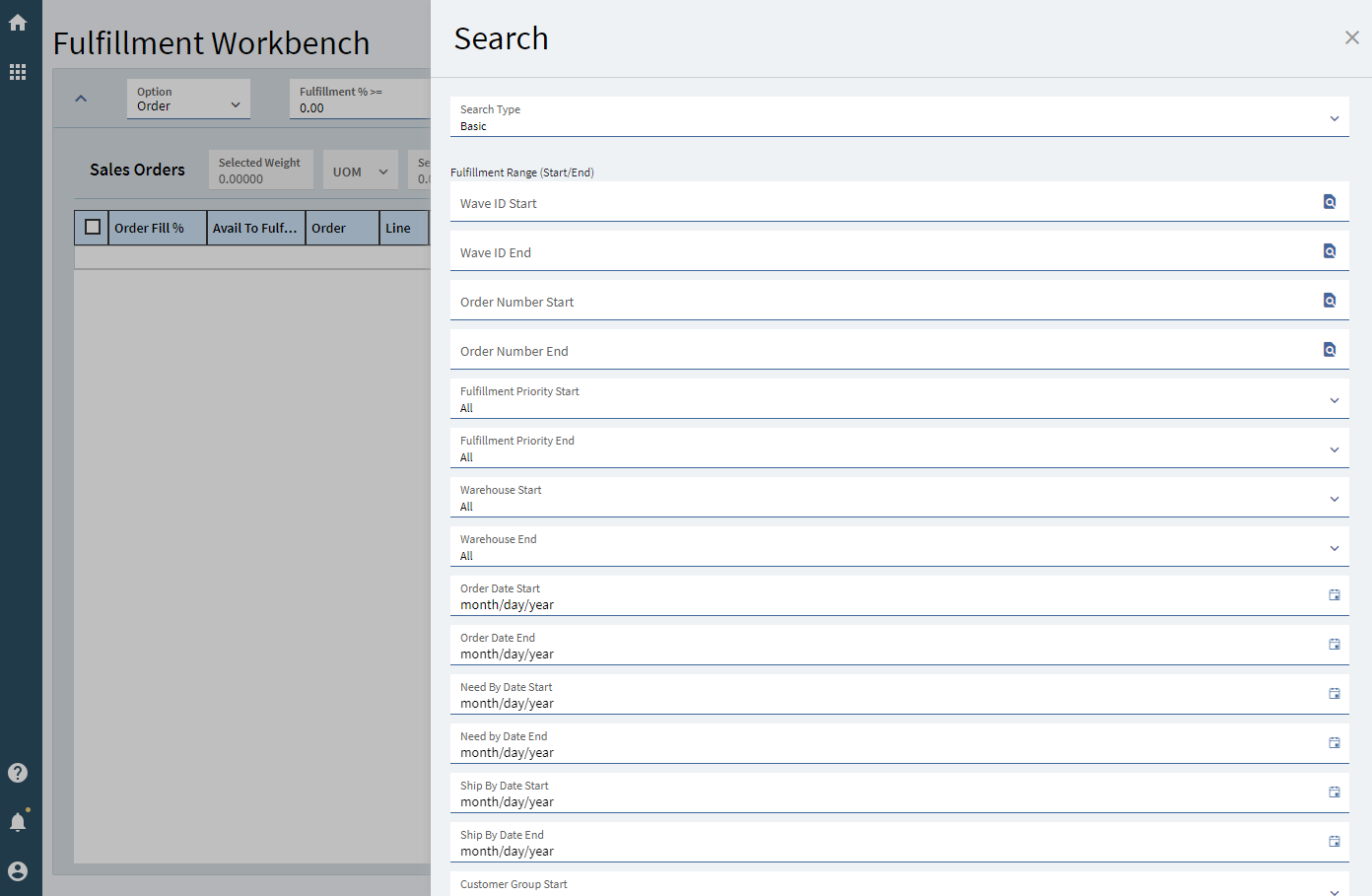
You can use a quick search but otherwise no
@timshuwy another candidate for rework ![]()
Have you considered using the Automated Fulfillment? doing so would most likely significantly reduce the need for this complicated search.
We have requirements to pick certain lots so I’m not sure if the Automated Fulfillment function would allow that. If the automation simply brings the records onto the bench then we should probably be able to work with it. Maybe I’m missing something here but who can use that search window that’s a mile long and you have to scroll all the way down to hit a button?
With everyone’s new-found App Studio experience, is it possible to edit the slide-out search panel? Personalizations doesn’t pick it up.
We’ve got 2 needs:
- Move the fields we adjust to the top of the search panel. We can ignore the dozens of other fields.
- Set dates dynamically, like in MRP. Seems like saving the search settings sets the date statically (I’ll check on Monday if today’s date still is 5/9/25 or if it updates to 5/12/25)
E.g. Needby Start Date = ‘today - 1 month’ and Needby End Date = ‘today’.
Yes, we need to look into Automated Fulfillment as well.
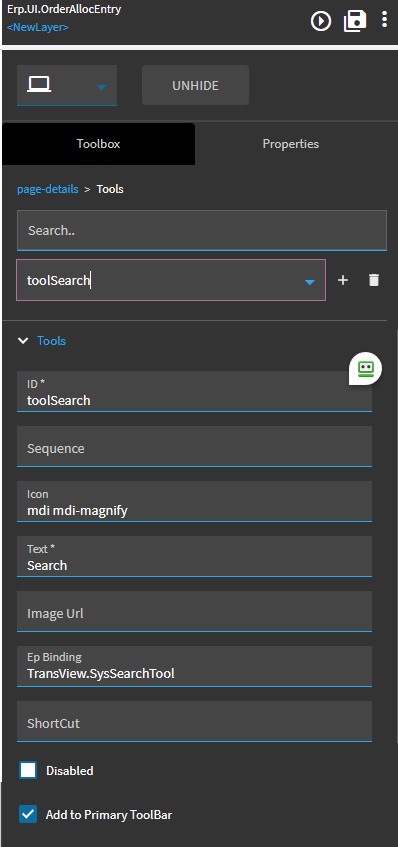
I didn’t find the slide-out panel to customize the UI. Looks like search button is is set on Tools > toolSearch and bound to ‘TransView.SysSearchTool’, and we go down that rabbit hole.
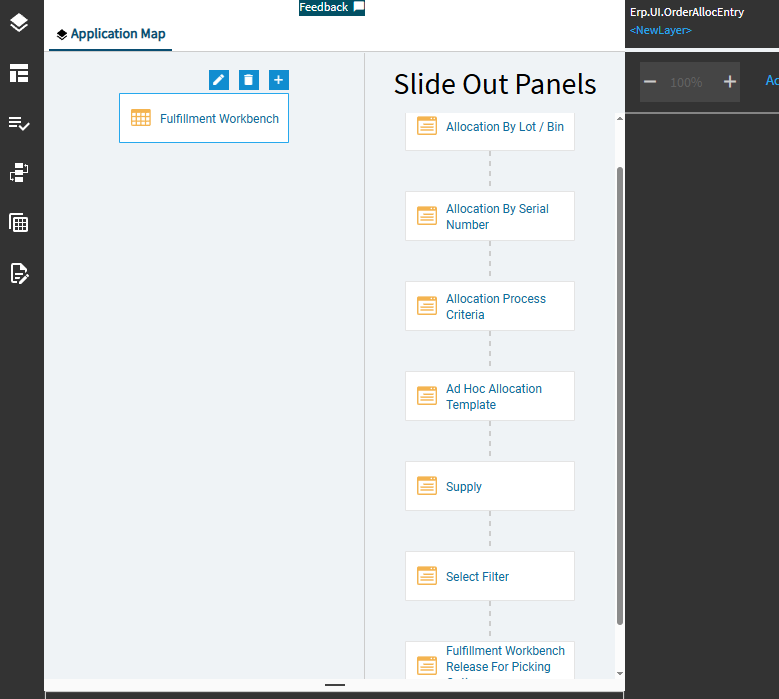
I’m in over my App Studio head!
Did you get a solution to this? I am looking to do the same thing while we work out auto fulfillment.
Hi, this seemed like an interesting challenge, so I cooked up a solution.
There is a set of apps “shared” that the server pulls from for this.
X:\EpicorServer\Apps\MetaUI\shared\search\PartDtl.SysRowID
In here you can see 4 subfolders:

In this case, tracing the network call, we can see that the request sets properties.SearchForm: default
4 objects in here,

These are returned by a call to Ice.MetaFX.GetSearch(EpMetaFXSearchRequest…);
We can see in ILSpy on Epicor.MetaFX.Core.dll that the return object from that call is a series of objects, which contain the json text output from these files.
the “SearchMetadata” object contains the good stuff.
There is a criteria.and object inside, and the order of the search box items is determined by the order of the objects in the and array.
So, lets reorder the array to move some things to the top.
We need to re-order things depending on which “Fulfillment Type” option is selected:
Put a post BPM on Ice.Lib.MetaFX.GetSearch. This code establishes a string array for the order of each possible generated search form, put your columns into the string array in the order you want. defaultOrder, jobsOrder, etc. Use dev tools to look at Fulfillment Workbench’s Response from the GetSearch call to see what the id is on the possibilities:
//Assembly References:
//Newtonsoft.Json
//Microsoft.Extensions.Logging.Abstractions
//Microsoft.Extensions.Logging
//Usings:
//using Microsoft.Extensions.Logging;
//using Ice.Logging;
string lfn = "BPM_MetaFX_GetSearch_ChangeFullmentWorkbenchOrder.log";
var logger = ApplicationLoggerBuilder.CreateBuilder().SetMinimumLevel(LogLevel.Information).AddFile(options =>
{
options.Session = this.Session;
options.FileName = lfn;
options.Folder = LogFolder.User;
options.MessageOptions.QuoteValues = false;
options.MessageOptions.ShowLogLevel = false;
options.MessageOptions.TimestampFormat = TimestampFormat.DateTime;
options.TruncateFile = true;
}).Build();
var log = new Action<string>(msg => { logger.LogInformation(msg); });
// column orders per SearchForm
string[] defaultOrder = new[] { "ipPartFrom", "ipPartTo" };
string[] jobsOrder = new[] { "ipJobNumFrom", "ipJobNumTo" };
string[] salesOrderOrder = new[] { "ipOrderNumFrom", "ipOrderNumTo" };
string[] transferOrder = new[] { "ipTransferFrom", "ipTransferTo" };
try
{
Ice.Lib.MetaFX.EpMetaFxSearchRequest epmsr = request;
log("request Before: like: " + epmsr.like);
log("request Before: properties.SearchForm: " + epmsr.properties.SearchForm);
log("result Before: " + result);
if (epmsr.like == "PartDtl.SysRowID")
{
string[] columnorder = null;
var sf = epmsr.properties.SearchForm;
if (sf == "default") columnorder = defaultOrder;
else if (sf == "Jobs") columnorder = jobsOrder;
else if (sf == "SalesOrder") columnorder = salesOrderOrder;
else if (sf == "Transfer") columnorder = transferOrder;
if (columnorder != null)
{
var json = Newtonsoft.Json.JsonConvert.SerializeObject(result);
var root = Newtonsoft.Json.Linq.JObject.Parse(json);
var searchMeta = (Newtonsoft.Json.Linq.JObject)root["SearchMetadata"];
if (searchMeta != null)
{
var criteria = (Newtonsoft.Json.Linq.JObject)searchMeta["criteria"];
if (criteria != null)
{
var andArr = (Newtonsoft.Json.Linq.JArray)criteria["and"];
if (andArr != null)
{
for (int i = 0; i < columnorder.Length; i++)
{
string id = columnorder[i];
var node = andArr.FirstOrDefault(n => (string)n["id"] == id);
if (node != null)
{
andArr.Remove(node);
andArr.Insert(i, node);
}
}
}
}
}
result = Newtonsoft.Json.JsonConvert.DeserializeObject(root.ToString());
log("result After: " + result);
}
}
}
catch (Exception ex)
{
string exinfo = "Exception: " + ex.GetType().FullName
+ " HResult: 0x" + ex.HResult.ToString("X")
+ " Text: " + System.Runtime.InteropServices.Marshal.GetExceptionForHR(ex.HResult).Message + "\n"
+ "Message: " + ex.Message + "\n"
+ "Source: " + ex.Source + "\n"
+ "HelpLink: " + ex.HelpLink + "\n"
+ "TargetSite: " + (ex.TargetSite != null ? ex.TargetSite.ToString() : "") + "\n"
+ "StackTrace: " + ex.StackTrace + "\n"
+ "Data: " + (ex.Data != null && ex.Data.Count > 0 ? string.Join("; ", ex.Data.Cast<System.Collections.DictionaryEntry>().Select(d => d.Key + "=" + d.Value)) : "") + "\n";
if (ex.InnerException != null)
{
var inner = ex.InnerException;
exinfo += "Inner Exception: " + inner.GetType().FullName
+ " HResult: 0x" + inner.HResult.ToString("X")
+ " Text: " + System.Runtime.InteropServices.Marshal.GetExceptionForHR(inner.HResult).Message + "\n"
+ "Message: " + inner.Message + "\n"
+ "Source: " + inner.Source + "\n"
+ "HelpLink: " + inner.HelpLink + "\n"
+ "TargetSite: " + (inner.TargetSite != null ? inner.TargetSite.ToString() : "") + "\n"
+ "StackTrace: " + inner.StackTrace + "\n"
+ "Data: " + (inner.Data != null && inner.Data.Count > 0 ? string.Join("; ", inner.Data.Cast<System.Collections.DictionaryEntry>().Select(d => d.Key + "=" + d.Value)) : "") + "\n";
}
log(exinfo);
}
Option All:
Option Order:
Option Job:
Option Transfer Order:
Here is modified code to remove existing boxes and inject some token combo boxes in their place:
//Assembly References:
//Newtonsoft.Json
//Microsoft.Extensions.Logging.Abstractions
//Microsoft.Extensions.Logging
//Epicor.MetaFX.Core
//Usings:
//using Microsoft.Extensions.Logging;
//using Ice.Logging;
//using System.Collections;
//using Newtonsoft.Json;
//using Newtonsoft.Json.Linq;
//using Ice.Lib.MetaFX;
string lfn = "BPM_MetaFX_GetSearch_ChangeFullmentWorkbenchOrder.log";
var logger = ApplicationLoggerBuilder.CreateBuilder().SetMinimumLevel(LogLevel.Information).AddFile(options =>
{
options.Session = this.Session;
options.FileName = lfn;
options.Folder = LogFolder.User;
options.MessageOptions.QuoteValues = false;
options.MessageOptions.ShowLogLevel = false;
options.MessageOptions.TimestampFormat = TimestampFormat.DateTime;
options.TruncateFile = true;
}).Build();
var log = new Action<string>(msg => { logger.LogInformation(msg); });
string[] defaultOrder = new[] { "ipPartFrom", "ipPartTo" };
string[] jobsOrder = new[] { "ipJobNumFrom", "ipJobNumTo" };
string[] salesOrderOrder = new[] { "ipOrderNumFrom", "ipOrderNumTo" };
string[] transferOrder = new[] { "ipTransferFrom", "ipTransferTo" };
var ipNeedByFromToken = new JObject(
new JProperty("id", "ipNeedByFrom"),
new JProperty("column", "ipNeedByFrom"),
new JProperty("paramName", "ipNeedByFrom"),
new JProperty("component",
new JObject(
new JProperty("sourceTypeId", "erp-combo-box"),
new JProperty("model",
new JObject(
new JProperty("labelText", "Need By / Required Start"),
new JProperty("epBinding", "PartDtl_SysRowID_Default.ipNeedByFrom"),
new JProperty("valueField", "value"),
new JProperty("textField", "display"),
new JProperty("appendList", true),
new JProperty("list",
new JArray(
new JObject(new JProperty("display", "Today"), new JProperty("value", "Today")),
new JObject(new JProperty("display", "Tomorrow"), new JProperty("value", "Tomorrow")),
new JObject(new JProperty("display", "Next Week"),new JProperty("value", "Next Week"))
))
))
))
);
var ipNeedByToToken = new JObject(
new JProperty("id", "ipNeedByTo"),
new JProperty("column", "ipNeedByTo"),
new JProperty("paramName", "ipNeedByTo"),
new JProperty("component",
new JObject(
new JProperty("sourceTypeId", "erp-combo-box"),
new JProperty("model",
new JObject(
new JProperty("labelText", "Need By / Required End"),
new JProperty("epBinding", "PartDtl_SysRowID_Default.ipNeedByTo"),
new JProperty("valueField", "value"),
new JProperty("textField", "display"),
new JProperty("appendList", true),
new JProperty("list",
new JArray(
new JObject(new JProperty("display", "Today"), new JProperty("value", "Today")),
new JObject(new JProperty("display", "Tomorrow"), new JProperty("value", "Tomorrow")),
new JObject(new JProperty("display", "Next Week"),new JProperty("value", "Next Week"))
))
))
))
);
try
{
EpMetaFxSearchRequest epmsr = (EpMetaFxSearchRequest)request;
log("request Before: like: " + epmsr.like);
log("request Before: properties.SearchForm: " + epmsr.properties.SearchForm);
log("result Before: " + result);
if (epmsr.like == "PartDtl.SysRowID")
{
string[] columnorder = null;
string sf = epmsr.properties.SearchForm;
if (sf == "default") columnorder = defaultOrder;
else if (sf == "Jobs") columnorder = jobsOrder;
else if (sf == "SalesOrder") columnorder = salesOrderOrder;
else if (sf == "Transfer") columnorder = transferOrder;
if (columnorder != null)
{
var json = JsonConvert.SerializeObject(result);
var root = JObject.Parse(json);
var searchMeta = (JObject)root["SearchMetadata"];
if (searchMeta != null)
{
var criteria = (JObject)searchMeta["criteria"];
if (criteria != null)
{
var andArr = (JArray)criteria["and"];
if (andArr != null)
{
if (sf == "default")
{
var existingFrom = andArr.FirstOrDefault(n => (string)n["id"] == "ipNeedByFrom");
if (existingFrom != null) andArr.Remove(existingFrom);
var existingTo = andArr.FirstOrDefault(n => (string)n["id"] == "ipNeedByTo");
if (existingTo != null) andArr.Remove(existingTo);
andArr.Insert(0, ipNeedByFromToken);
andArr.Insert(1, ipNeedByToToken);
}
for (int i = 0; i < columnorder.Length; i++)
{
string id = columnorder[i];
var node = andArr.FirstOrDefault(n => (string)n["id"] == id);
if (node != null)
{
andArr.Remove(node);
int baseIndex = (sf == "default") ? 2 : 0;
andArr.Insert(baseIndex + i, node);
}
}
}
}
}
result = JsonConvert.DeserializeObject(root.ToString());
log("result After: " + result);
}
}
}
catch (Exception ex)
{
string exinfo = "Exception: " + ex.GetType().FullName
+ " HResult: 0x" + ex.HResult.ToString("X")
+ " Text: " + System.Runtime.InteropServices.Marshal.GetExceptionForHR(ex.HResult).Message + "\n"
+ "Message: " + ex.Message + "\n"
+ "Source: " + ex.Source + "\n"
+ "HelpLink: " + ex.HelpLink + "\n"
+ "TargetSite: " + (ex.TargetSite != null ? ex.TargetSite.ToString() : "") + "\n"
+ "StackTrace: " + ex.StackTrace + "\n"
+ "Data: " + (ex.Data != null && ex.Data.Count > 0 ? string.Join("; ", ex.Data.Cast<DictionaryEntry>().Select(d => d.Key + "=" + d.Value)) : "") + "\n";
if (ex.InnerException != null)
{
var inner = ex.InnerException;
exinfo += "Inner Exception: " + inner.GetType().FullName
+ " HResult: 0x" + inner.HResult.ToString("X")
+ " Text: " + System.Runtime.InteropServices.Marshal.GetExceptionForHR(inner.HResult).Message + "\n"
+ "Message: " + inner.Message + "\n"
+ "Source: " + inner.Source + "\n"
+ "HelpLink: " + inner.HelpLink + "\n"
+ "TargetSite: " + (inner.TargetSite != null ? inner.TargetSite.ToString() : "") + "\n"
+ "StackTrace: " + inner.StackTrace + "\n"
+ "Data: " + (inner.Data != null && inner.Data.Count > 0 ? string.Join("; ", inner.Data.Cast<DictionaryEntry>().Select(d => d.Key + "=" + d.Value)) : "") + "\n";
}
log(exinfo);
}
This works so that the request is sent to server with value “Today”, in the appropriate field, etc.
So then, you need to do a BPM on Erp.BO.OrderAllocSvc/callGetListBasicSearch to translate these tokens back into real dates. which i will leave as an exercise for the user
Back in 2023 after researching how the system works, I found this form is located at on the app server at Server\Apps\MetaUI\Shared\search\PartDtl.SysRowID\SalesOrder but it’s not editable so I ended up creating my own Search interface. We were mostly interested in simplifying Sales Order search so what I implemented does just that but the concept should work for other searches.
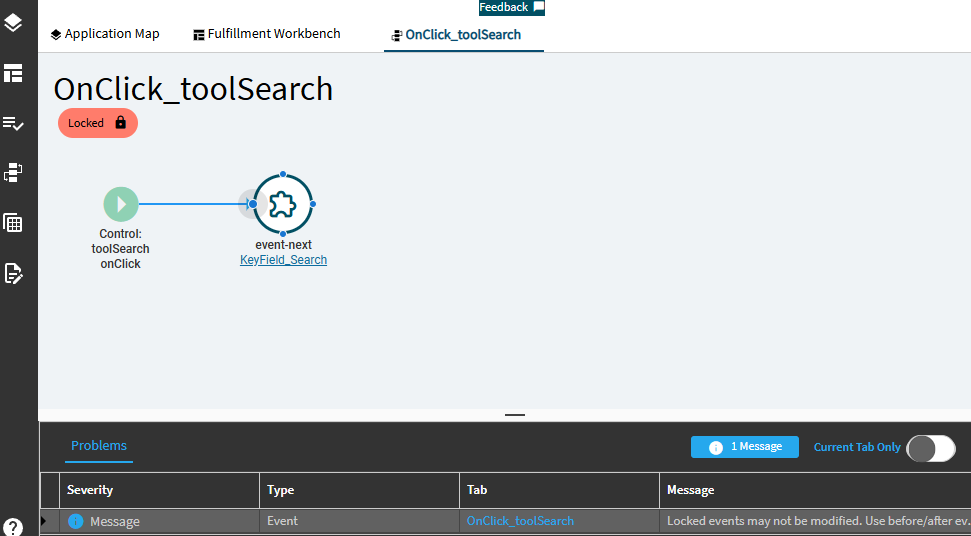
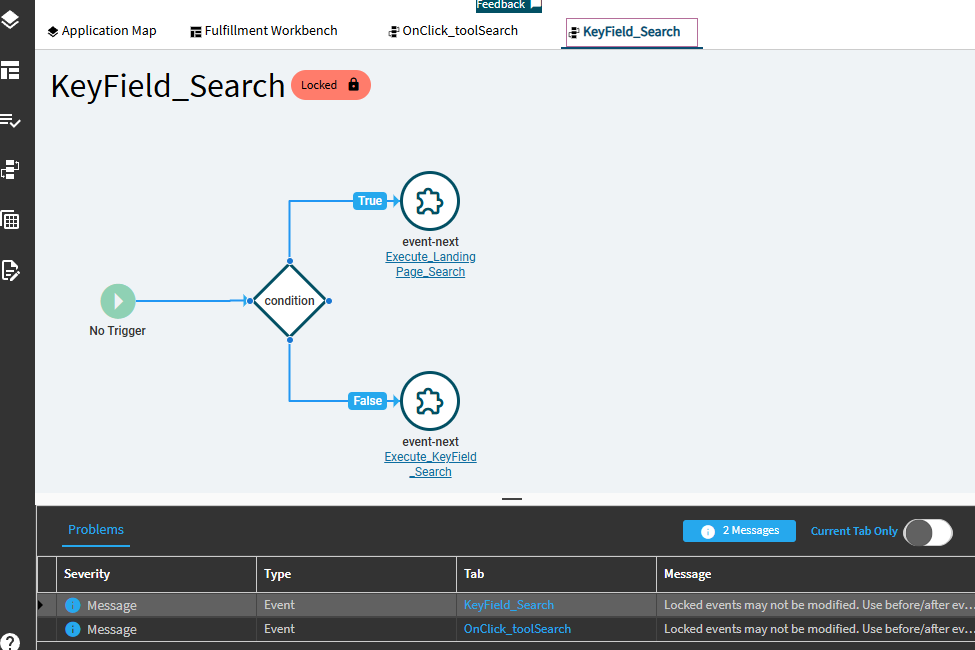
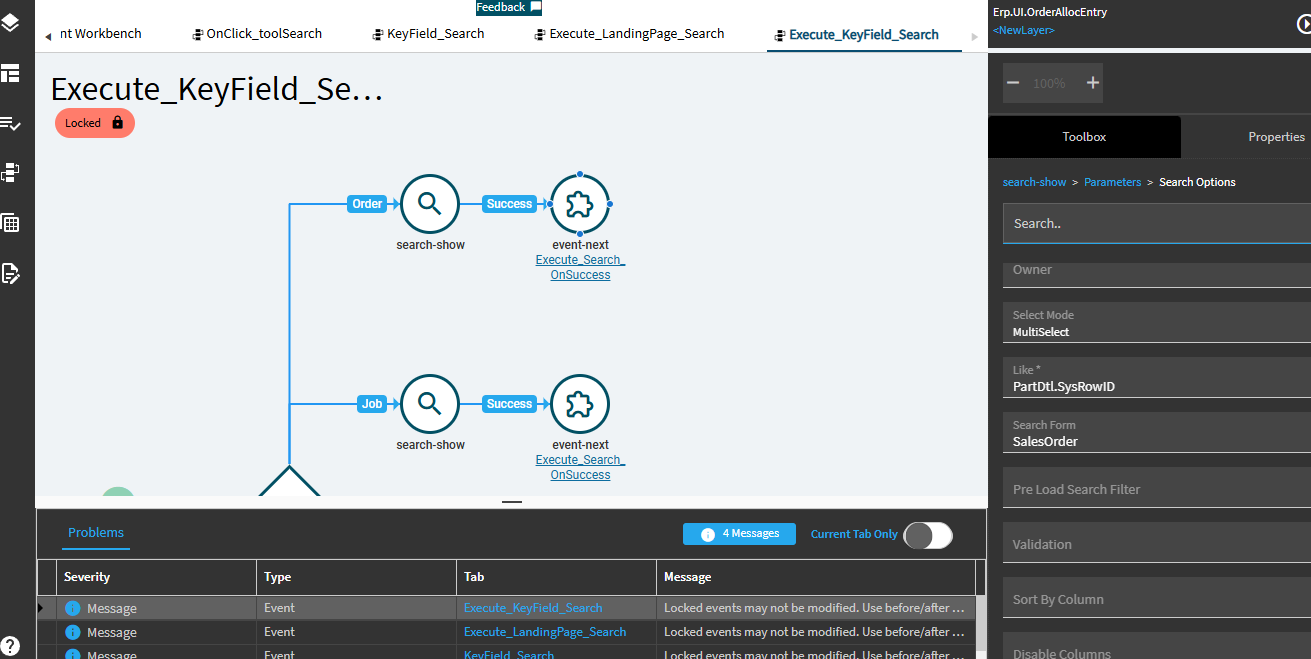
Looking at the base flow, the seach function OnClick_toolSearch calls KeyField_Search → Execute_KeyField_Search → Execute_Search_OnSuccess and CallMergeOrderAllocListsAndGetRows (the REST call). The key is to have all the parameters before calling the REST.
First, I created an event to initialize the required parameters. There are 51 parameters so if you’re manually entering, it will take some time. I cheated and edited the JSON directly.
Add a slider and design it however you like. I only needed these fields. Bind them to the SearchParam data view.
I added a button “Order Search” directly on the grid but you can add it anywhere or even replace the base search tool.
Wire the button to an event that initializes the search parameters, set any parameters you wish and open the custom slilder.
Finally, create an event to call the OrderAllocSvc to query data then populate the data view with CallMergeOrderAllocListsAndGetRows. Again, building this rest-erp can take time
If all goes well you can achieve this.

I hope this helps anyone looking to customize the base search form.