I have to. Thank you for the effort!
Business Objects return datasets, which often don’t perfectly with the DB tables.
Do you have access the the SQL server? If so, I’d take a peak at the data in the OrderXxx tables.
Like 100% fine? Meaning you can create a new order, close epicor, relaunch epicor, launch Order Entry, manually type that new order number in and its all good?
And that only when you try to load an order that was originally in Vantage - by either direct numeric entry, or by searching - it errors out.
The above two statments correct?
One other thing I would try is making a BAQ of just OrderHed, with a table criteria for a known offending order number. Add all columns. Does the BAQ run okay? If so data in that table is mostlikely fine. Next step would be to join the OrderDtl table, and again add all columns (probably safe to remove all the OrderHed columns). Keep adding related tables until the BAQ fails.
If you need it, here is a start. (This is most tables with all left joins)
Criteria is set on orderhed table for two orders - set one that works, one that doesn’t.
UTaylorStart.baq (125.0 KB)
If I recall correctly V8 had preset user columns (Character01, Character02, …, Number01, … ???) Your BAQ might not include them.
Were there separate columns for Integer and Decimal fields? Could be an offending value in one of those.
And the default tables in E10 don’t have those columns automatically built in. You can add them through Ext Table Maint. IIRC - While being “custom” columns, they name doesn’t automatically get the “_c” suffix.
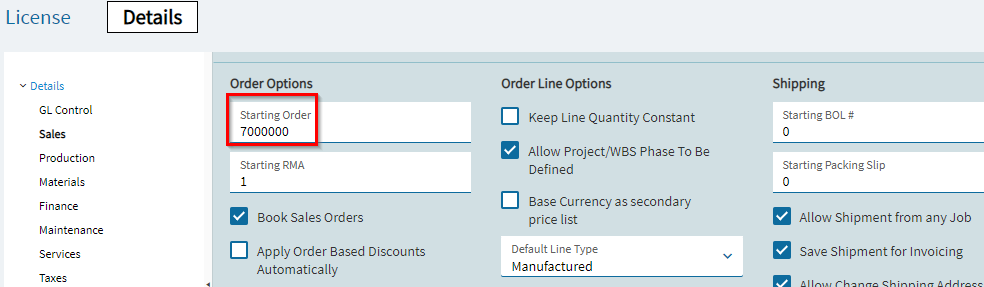
Hello fellow EpiUsers, first off thank you…
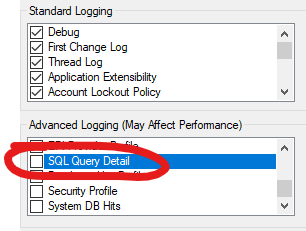
I think I found it by logging the DB queries like @ckrusen had mentioned above (although I hadn’t read the post yet). Went to admin console - app server settings and turned these on breifly.
Notice right after the CurrExChain DB query it errors… and funny enough there are 4 records in that table whereas there are a ton of recrods in there in my other environment’s database… one for each quote, order, apinv, etc… So it seems there are records missing for each of the old OrderHeds and other related table records.
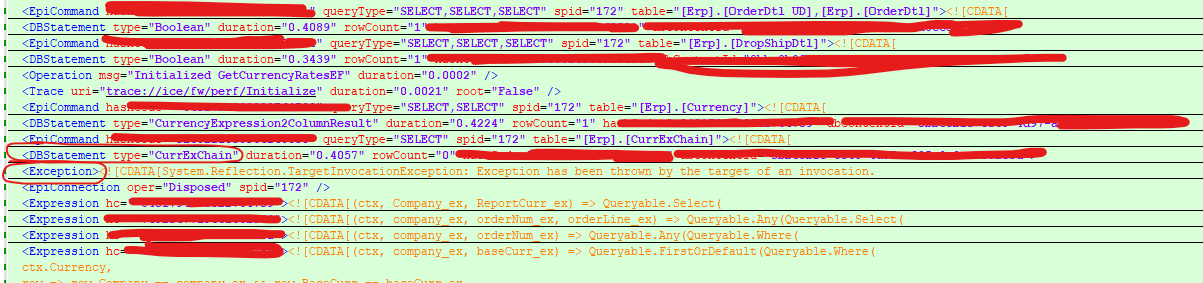
It’s not clear in the picture  but the very thinly, red, circled portions are where the query runs and the exception follows.
Craziest part about it is @klincecum is that the other objects work just fine even though they are missing entries in that table. I.e. all the quotes, invoices, etc…
Oh well. Thanks everyone.