What’s in the “UserCriteria” field?
few posts earlier, it gives me what you can see in the blue image, the xml
=Code.GetCriteriaPromptValue(First(Fields!UserCriteria.Value, "RptParameter"), "ProdCodeFilter")    gives me an error but
=Code.GetCriteriaPromptValue(First(Fields!UserCriteria.Value, "RptParameter"), "FiscalPeriod")      returns the Criteria Prompt entered in Report Options
Is it because my Filters are actually lists unlike the Prompt?
I can’t answer what is or isn’t, but based on what you’re seeing that’s what it is. You are coming to the conclusion by studying it yourself.
In that post I linked I give you the SQL syntax to pull those values out.
You might have to modify it though given what you’re extracting whether it’s a filter or whatever.
If you prompt AI and say, “this XML string (give it the actual XML provided there’s nothing secret in it) is found in this SQL field, in this table (give the actual field name, “UserCritera”, and the actual table “Reptparameter”) can you give me the SQL query to extract the values for the first filter called “whatever your filter name is” in the XML string”? You can get started with that query it gives you and it should extract your values.
You can write SQL in those datasets (that’s what’s being written to get the values of all those fields) and in doing so you could make a filter for yourself using SQL instead of trying to use the VB code expressions… I like SQL more, VB is fine too.
Once you have a query that returns the filter, either in a list form, or individually, you can go back to your main query dataset “SlsPartFP” and throw that in the where clause and say "where yourfield is in (THE QUERY FROM ABOVE that returns the values in list form that you want to query on)
MAybe I’m going down some crazy road that doesn’t lead at all to where you were trying to get to, but I hope I was able to show you something along the way that helps you on your path.
I’m trying to filter my rdl by using the report user provided filter criteria and I just can’t get to them 
You can see @MIR 's XML that’s stored in the user criteria field so we used this query to extract the filter values from FilterID1:
Remember that for some reason you need to re-do the apostrophes and quotes in the SQL below when you copy it from this site. They are not the proper characters and the SQL won’t run.
="SELECT FilterValue.value(‘.’, ‘nvarchar(50)’) AS FilterValue FROM dbo.[RptParameter_" + Parameters!TableGuid.Value + "] CROSS APPLY (SELECT TRY_CAST(REPLACE(UserCriteria, ‘<?xml version=""1.0"" encoding=""utf-8"" standalone=""yes""?>’, ‘’) AS XML) AS XmlContent) AS X CROSS APPLY XmlContent.nodes(‘/UICriteria/RptCriteriaFilter[FilterID=1]/FilterValues/FilterValue’) AS FV(FilterValue) WHERE XmlContent IS NOT NULL"
[FilterID=1] you would change this to =2. Cause your XML has the values in the FilterID2.
You can then use this query in your main dataset’s query and type WHERE FieldFromMAinQuery in (the query above that returns the value(s) that you want to filter on.)
We realized that if they leave the filter blank you’ll have to account for that because they want to return everything and the IN clause above would return nothing… so maybe need a case statement in the where clause.
All of this to say… you can do it with SQL or you can do it with code which is also covered above.
Thank you for all your help Utah!
It worked, but I knew there must be a simpler solution.
Because this is a Report based on BAQ, I was able to filter there by utilizing the Table Criteria

while the parameter is set up like this
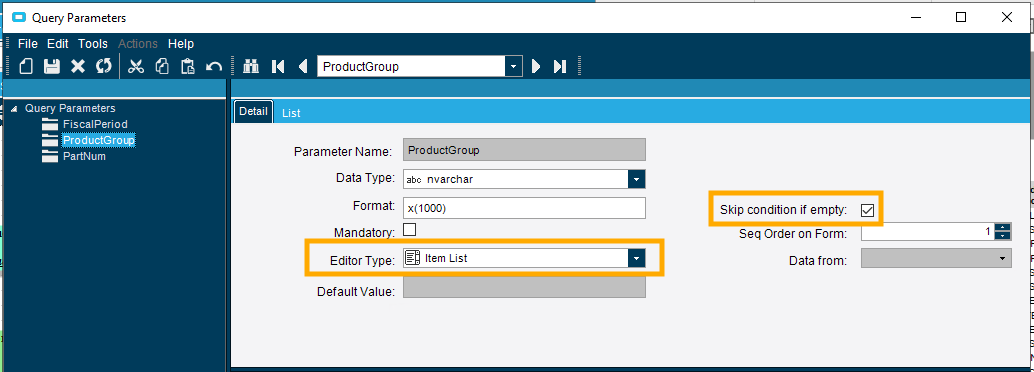
This way, I don’t need to bring these filters over to my RDL, the results are being filtered in BAQ before they get forwarded to RDL.
WHOOPEE!!!
Nice work!
did you have to manually type out the list that they can select from?
NO, in the BAQ when you test it, it comes up like this
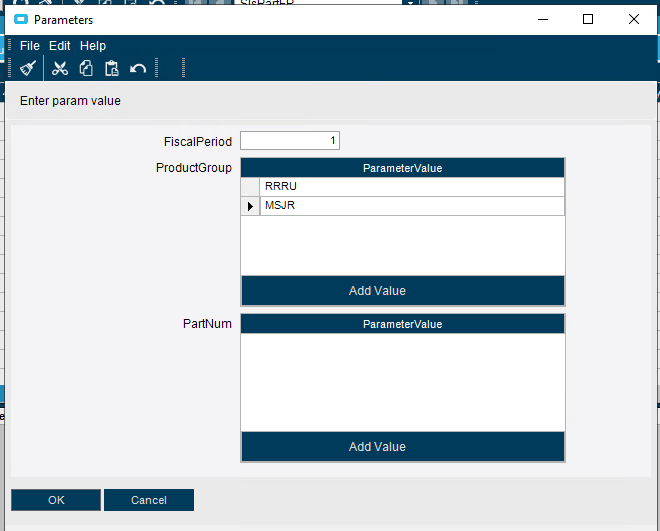
but the report itself uses its filters
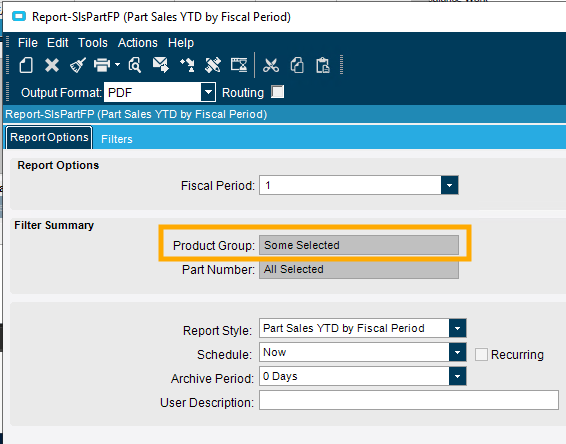
It all falls into place and works like a charm.
With a one but, in this report, I don’t need to show any summary of these filters on the printout itself. If that would be needed, I would have to extract the names from your method.
It just takes in the user selected filters, passes it to BAQ and returns filtered rows.
Nice! I wasn’t sure if the native filter actually works to populate the list control.
I am always testing it in Kinetic now, so it’s good to know it works in classic. In need to test this in Kinetic.
Just put it in our Kinetic cloud environment. It is working like a charm!

using a kinetic form or the classic form?
I just put the BAQ, Report + Report Style and RDD into a Solution Workbench in E10 and install that in Kinetic. It brought over my RDL, then I Generated the Kinetic Form on my Report Style and added the Kinetic app to my menu.
Great! That’s awesome. Nice work.