App studio!
I opened a ticket regarding the Themes issue.
Here’s some tools that we use to make your life a little easier
This post might be useful also.. at least so you know you have company.  Kinetic Dashboards - #20 by jlstraight1985
Jill, has there been any update on this?
additional pointless factoid…
In Latin and Germanic languages (most of Europe), the date when spoken begins with the day, then the month, then the year (in Spanish, hoy es el deiz de Junio, dos mil veintiséis )
In English, the date when spoken begins with the month, then the day and year (today is June tenth, twenty twenty-six).
Great Britain used the same “short date” written format that we do now in the US, but they changed to match the rest of Europe during the mid- to late-19th century, and it became ubiquitous by the 20th century.
Now that we’re in a MUCH more connected world, it’s just one more thing we can complain about.
Hi Utah,
We had to make copy of our BPM, disable the old one and enable the new one and then run a test. This worked for us for the most part. We did have to change a little bit of our code due to the scenario we were trying to solve. So give the copying of the BPM and making the copy the enabled one and test it out.
Let me know how it goes!
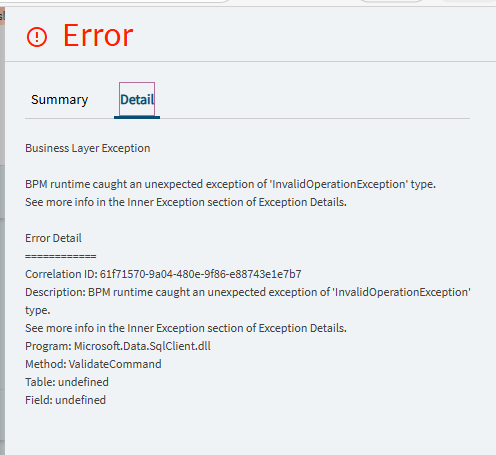
We’re seeing the “InvalidOperationException” stuff here too…Sales Order Entry BPMs. Good times.
Go check for queries within queries, and ef core issues.
And if it makes sense, use the BOs instead. (situational of course)
Anyone noticing problems with parametered BAQs in Kinetic dashboards? As far as I can tell from creating several fresh ones to pin it down:
A dashboard with only ONE parameter in the whole screen works as it should, and the grid or kinetic-baq widget can be bound to a dataview field.
As soon as there’s a second BAQ with a parameter, or the BAQ has more than one parameter, any parameter binding is ignored and the slide-out parameter panel triggered, which overrides anything that was set. And in fact that doesn’t then work, because the BAQ will return “Bad SQL” as a response even if it’s simple, fresh, and working in other circumstances like BAQ Designer or a dashboard without the extra parameters.
I’m not seeing anyone else talking about it, but it’s very clear behaviour in the systems I’ve been testing?
Also, hitting the tab key while in the Dataview part of App Studio crashes the App Studio page entirely, but I admit it doesn’t take much to do that anyway.
Nope. Sounds like the parameters and grid are not wired up properly if that is what is happening. Its not an app studio issue.
Well, they were working and now aren’t, so something has changed. And it’s reproducible as a problem.
Can you show your parameter setup? Maybe its different than the examples I am looking at.
OK, the type that works is set up this way:
A BAQ with one parameter (I used the Part table to experiment, with PartNum parameter and a table criteria record). A dataview for that BAQ. A dataview for parameters, with a field named the same as the parameter. A textbox in the app screen bound to the parameter dataview and field. An event on load adding a row to that dataview with a default. A grid bound to the BAQ dataview, with provider settings bound to the BAQ itself, and the BAQ parameter to the parameter dataview and field. Another event with a kinetic-baq widget loading the BAQ, with the parameter bound to the other dataview and field, like the grid. A button that calls that event.
Set up like that, the dashboard loads with the default setting and the grid shows the row expected. And if the user changes the parameter textbox and refreshes using the button, it reloads based on the new value.
If exactly the same thing is done but the BAQ has two parameters or more, so the parameters dataview has two fields, there are two textboxes, and the grid and the widget are bound to both parameter fields, the binding is ignored, the parameter slide-out is triggered, and the BAQ returns no data whatever the user puts in.
Shoot, Im lucky to even get application studio to load a layer correctly most of the time.
The past 2 months it just loads blank screens with nothing in the application map or events.
why would you have provider model AND a baq get event. Should be one or the other.
Probably, you’d need to get the serverlog and reference the correlation id. But that’s the error we get when it’s a code not being compatible to EF Core issue.
Until this latest upgrade, it’s been kinetic-baq get only, but that produces the same behaviour since the upgrade. In testing I tried both widget and provider model in case it was now needed, and it seemed fine with the single parameter so I left it that way.