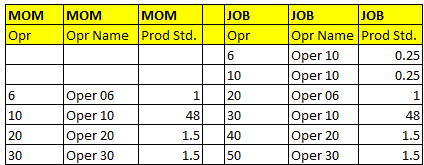
We have a part with an 8-material MOM and four operations. When I create a job using quick job entry, Epicor adds two extra instances (at 0.25 hours each) of the second operation before the first operation and then re-sequences the rest. It happens when jobs are created other ways, too.
So, what you have run into is a really cool feature if you are expecting it… but if you came from another system that didn’t handle things the same as Kinetic, it might be a surprise.
we have two unusual concepts:
Pull As Assembly: These are sub assemblies within one job. The sub-assembly has both operations and materials.
Phatoms: a Phantom part number is a part that has a list of sub-components.. but the phantom part number “disappears” when it is pulled into the job, and only the components of the phantom show.
The unusual part in Kinetic is how Phantoms are handled. many systems ignore phantom operations.. that means that if the phantom is pulled into a job, only the materials are populated, and the job does not get the operations that are part of the phantom…
BUT KINETIC DOES include the operations from the phantom. So, if your top part has 5 material and 5 operations, and you have a phantom part that has 2 materials and 3 operations… the JOB will inherit it all… you will now have 7 materials and 8 operations. Not only that, but whatever operation you associate the phantom to will be shifted down by the three operations (the three ops are inserted into the list of ops.
Example:
TopPart Operations
10 tpStep1
mtl 10 tpStuff1
mtl 20 tpStuff2
20 tpStep2
mtl 30 tpStuff3
30 tpStep3
PhantomPart Operations (linked to operation 20 above)
10 ppStep1
mtl 10 ppStuff1
mtl 20 ppStuff2
20 ppStep2
Resulting Jobs Operations will look like this:
10 TPStep1
mtl 10 tpStuff1
mtl 20 tpStuff2
20 ppStep1
mtl 30 ppStuff1
mtl 40 ppStuff2
30 ppStep2
40 tpStep2
mtl 50 tpStuff3
50 tpStep3
Notice how all the operations AND Material sequence numbers got shifted down. This is because the phantom was inserted into the process.
Note that this feature can also be used for really good things.. we have had companies that had “revision controlled Routings” that were generic to an entire product line of 100 parts. They could create a phantom that only had operations to insert. They could then revise the routing, and it fixed all assemblies that used that routing.
One question — our phantoms do NOT have any operations. They might include a sub-assembly that did have an operation when it was made, but the phantom itself has no operations.
Does Epicor look back into the manufacturing process of a part in a phantom, even though that part is already completed?
I must do some testing on this, but figured you might know the answer.
We have been on Epicor for 10 years and this behavior just started happening. We are on 2024.2 and have been for months.
to directly answer your question… if you have a phantom that includes a subassembly, i am fairly sure that the entire list in the BOM will be imported as a phantom, eliminating all lower level sub-assemblies, and including all the operations.