So we have been on ECM for a while and just recently when to Cloud. ECM is still on prem. With in the last week or two I noticed that additional folders are be created when someone attached a document from Kinetic. The documents are not in the new folder but in the correct folder. I have attached some screen shots I took. Is anyone else seeing this?
Yes, I have seen it in our ECM. The new folders are empty and like you said, the attached document goes into the correct folder. I noticed it a couple of weeks ago and deleted the empty folders, but then noticed this week that there were more added. I haven’t opened a case yet since this was a lower priority than some of the other issues we are having with the last update
Kinetic 2026.100.7. ECM 26.1.83. Not sure when it initially started, it was something I wasn’t looking for until I stumbled upon it a few weeks ago. I thought it was just our set up.
Just based on what I’m seeing in your screenshots, and not having practical experience from which to draw, it appears to me that it’s creating temp files as the documents are being processed into Epicor. But that’s just an educated guess based upon the folder naming convention of those empty folders.
i created on too. Didn’t get much head way. I had created with the EMC group but he says it is Kinetic. I asked when he passes it Kinetic will I get it is EMC issue. LOL
They definitely changed something with the update. Users are asking why attachments in Non Conformance are gone. They show in the slideout but won’t open. Had a support call with ECM, and they said there’s been an issue since the upgrade for multiple customers and are assigning it to the Kinetic team.
Check out your File Attachment Maintenance app in Kinetic. There’s a “Default attachments” type that I don’t remember seeing before, and that appears to be where all uploads are going. When I open it, in the Attachment File References grid is filled with my missing documents, pointing to an “\Import” folder - which I also don’t see in ECM.
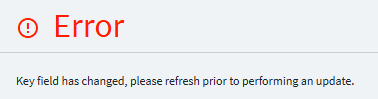
I checked this (Attachment Path Maintenance is how it shows in the menu) and saw the same default attachments. I tried to go into one of the other folders and get this error.
Note: I included this in the Epicor case. Thanks Chris.
They now have a problem # for this issue, PRB0320735 that was submitted to development. The comments said: We now have three customers reporting same issue all are Hosted for both Kinetic and ECM and on same builds
Chris, we had an issue back on the 2025 update with attachments where we didn’t have to have a “DocumentFileType” in the attachment and it was using the default and then all of a sudden that didn’t work that way anymore and we had to DMT all of the records’ DocumentFileType to be one we made up. Idk what exactly this has to do with it, but I’m just noting that some change was made a while back regarding the functionality.