Kinetic dashboard input Value in to dashboard filter

Hello All,

I need your help with the Kinetic Dashboard.

I have created a Kinetic dashboard with a tracker and deployed it successfully. When I run the report, all the data is displayed correctly, which is working fine.

My requirement is: when I select a specific record from the result grid, the system should automatically take the selected values and pass them into the tracker filters.

For example, in the result grid I have columns like Employee Name, ID, and Address. In the tracker, I have filters for Employee Name and Address. After the data is loaded, if I select a particular employee, the selected Employee Name and Address should automatically populate the tracker fields.

Please let me know how this can be achieved.

Set the tracker fields epbinding to the same dataview and field names that are on the grid.

Okah I will check this. Thanks. In that case also if I give input value manually in that case also tracker works properly.?

No it will not.

If you want the tracker to work for manual input, leave it like you had before if it worked properly, and try filling the field with a row changed event.

I tried with row update event, but it is not working for multiply fields update. It is working on first field tracker only.

That would be great if you could share the update event reference for updating multiple fields.

I have tried setting the tracker fields’ EpiBinding to the same data view and field names as those on the grid. However, after updating, the filter is not working with the values taken from the bound fields.

I’m not sure if I’m following correctly, but… I THINK this is the set-up you want:

Tracker Fields (Parameters):

  • ParamDV.EmployeeName
  • ParamDV.UserID
  • ParamDV.Address
  • etc.

I’m assuming you have a button? “Search” for example. This runs a BAQ query?

Results come back and populate your results dataview.

Result Grid Columns would include:

  • ResultsDV.EmployeeName
  • ResultsDV.UserID
  • ResultsDV.Address
  • etc.

If the user clicks a row in the results grid… you want those values to over-write your tracker “parameters”.

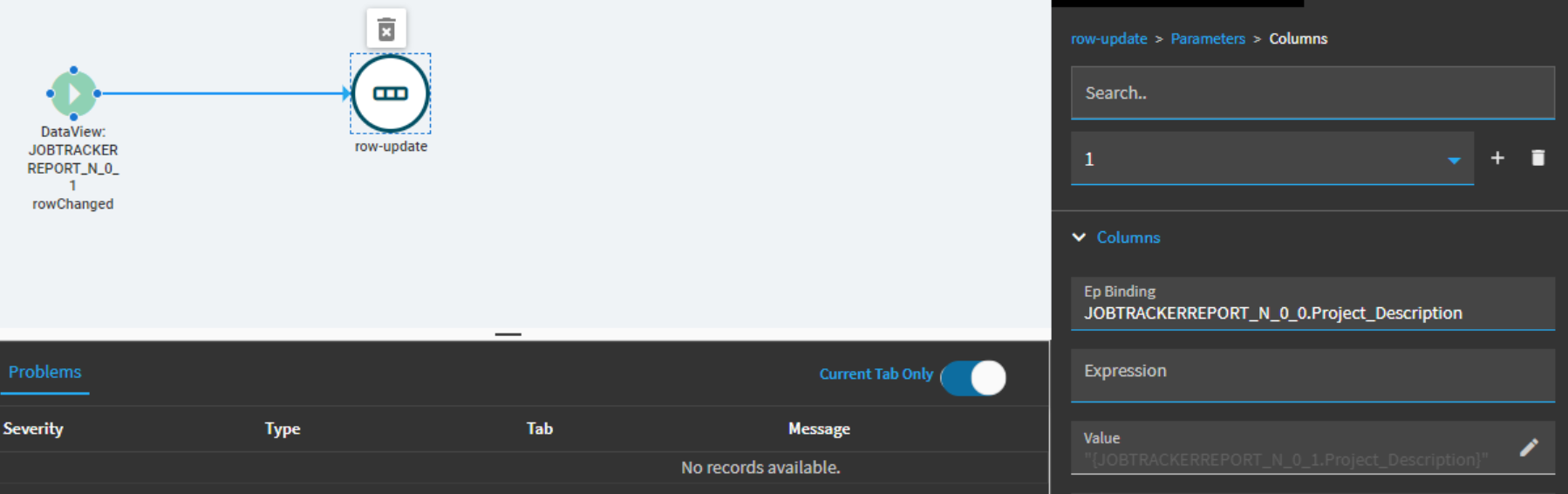
If that is the case, you would want a rowChanged event on your ResultsDV which calls a row-update action. In that action, you need to define each ParamDV column you want to over-write:

Column1:
Binding: ParamDV.EmployeeName
Value: "{ResultsDV.EmployeeName}"

Column2:
Binding: ParamDV.UserID
Value: "{ResultsDV.UserID}"

etc.

This row-update would then take the values of the ResultsDV and over-write them into the ParamDV columns.

Then you could click your “Search” button again… or whatever your doing here… to re-run your query.

Alternatively, you could manually type values into the ParamDV column fields to manually update them.

I guess, in summary, if you want the Tracker fields and the results grid to always be the same… then just tie them to the same dataview.

But if you want to make changes to the Tracker fields, independent of the results grid, then they need to be different dataviews and you can pass values from one to the other via events.

But, without knowing what your dashboard is doing with the data, its tough to provide additional detail.
Hi , Thanks a lot.
That would be great you could help me in this too.

Tracker Fields :
JOBTRACKERREPORT_N_0_0.Project_Description
JOBTRACKERREPORT_N_0_0.JobHead_PersonID

Grid Gields :

JOBTRACKERREPORT_N_0_1.Project_Description
JOBTRACKERREPORT_N_0_1.JobHead_PersonID

If I do row update

Then how event will hit

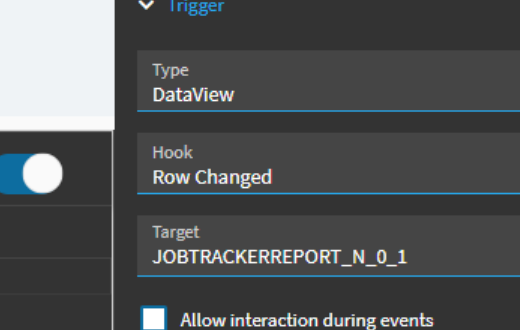
An event with a trigger of:

  • Dataview
  • Row Changed
  • Target: JOBTRACKERREPORT_N_0_1

event action > row-update

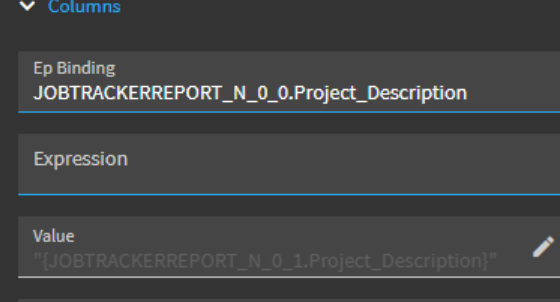
Column1:
Binding: JOBTRACKERREPORT_N_0_0.Project_Description
Value: "{JOBTRACKERREPORT_N_0_1.Project_Description}"

Column2…
Column3…
Column4…

etc.

This event would trigger/fire if the user selects a row in the results datagrid and it would take the value from the results and overwrite the tracker dataview columns.

Hi, I tried the solution, but it’s not working. After selecting a value in the grid, nothing changes in the tracker. The same issue still persists.

Show the entire event chain.

Any idea on this ?