Missing reference Erp.Data.910100

Hi,

We are testing our customizations in 2025.2, but a few BPMs are failing due to a missing assembly, Erp.Data.910100. The exact error message is:

“The type ‘ErpContext’ is defined in an assembly that is not referenced. You must add a reference to assembly ‘Erp.Data.910100, Version=11.2.100.0, Culture=neutral, PublicKeyToken=323cab74146a1cd3’.”

Below is a snippet of code from one of the BPMs:

Does anyone know a solution to this error? I saw someone mention it in another post, but I’m not sure if there was an actual answer.

I wonder if its in ntsSQL (3rd party) assembly? Epicor has renamed Erp.Data.910100.dll it is now Erp.Data.Model.dll

Thanks, Haso.

I tried using Erp.Data.Model, but I’m still getting the error. Yes, that is an external DLL that was built by someone who has since left the company. I guess I may have to look at the source code for that DLL and make the necessary changes there. :sweat_smile:
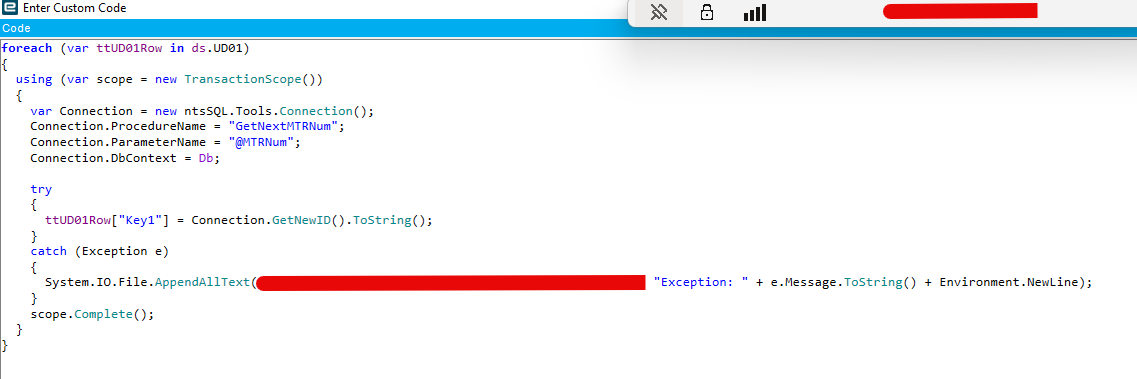
Is it actually failing when you save? I bet it saves fine.

If it’s failing in design, that’s a client problem. Blow it all away.

Edit: Reading is hard. Are you saying compiled BPMs are failing?

Yes, the error appears in the custom code editor, and the BPM is marked as outdated due to the error.

May be completely unrelated… but I found a few of my BPMs were “outdated” when testing in the new CR 2026.1.

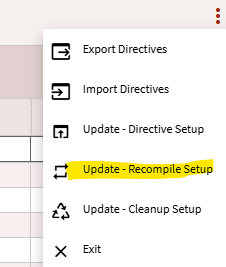
I had to run the update-Recompile setup option in the overflow menu, and it seemed to repair them.

Can’t say it will fix the issue you’re having specifically. But it worked for me with my issue.

Thanks David, I will give it a try. Should the outdated BPM disappear from the list after clicking Start Recompile?