Problem in GetNewIssueReturn, I need a movement "STK-SHP"

Hi, I need to perform a “SHT-SHP” move but in the adapterIssueReturn.GetNewIssueReturn method (pcTranType, pcMtlQueueRowid, pcCallProcess); I do not know what pcCallProcess is.

Anyone have any idea

Thanks.

                                          string Secuencia="207036"; 

					/*Local Variables*/				
					bool userInput = false;
					string legalNumberMsg = string.Empty;
					string partTranPKs = string.Empty;	
		                        string IssueReturnTs;
					bool more;
					DataSet mtlDatos = new DataSet();
					MaterialQueueAdapter tranAdapter = new MaterialQueueAdapter(this.oTrans);
					tranAdapter.BOConnect();

					SearchOptions optsTrans = new SearchOptions(SearchMode.AutoSearch); 
					optsTrans.PageSize = 0; 
					string whereTrans = string.Format("MtlQueueSeq = " + Secuencia + " and TranStatus <> 'HOLD' BY PartNum"); 
					optsTrans.NamedSearch.WhereClauses.Add("MtlQueue",whereTrans); 							
					mtlDatos = tranAdapter.GetRows(optsTrans,out more);							

	                if (mtlDatos != null)
	                {
						IssueReturnAdapter adapterIssueReturn = new IssueReturnAdapter(oTrans);
						adapterIssueReturn.BOConnect();

						string msg;
				        bool reqInput;
				        string lgl;
				        string partTran;
	                    
						adapterIssueReturn.GetNewIssueReturn("STK-SHP", Guid.Empty, "");
	
	                    if (mtlDatos.Tables[0].Rows != null)
	                    {	
							foreach (DataRow row in mtlDatos.Tables[0].Rows)
						   {
								MessageBox.Show(row["MtlQueueSeq"].ToString());	
								adapterIssueReturn.IssueReturnData.IssueReturn[0].TranQty = (decimal)Convert.ToDouble(row["Quantity"].ToString());//Cantidad Quantity
								adapterIssueReturn.IssueReturnData.IssueReturn[0].PartNum= (string)row["PartNum"].ToString();
								adapterIssueReturn.IssueReturnData.IssueReturn[0].OrderNum = (int)Convert.ToInt32(row["OrderNum"].ToString());
								adapterIssueReturn.IssueReturnData.IssueReturn[0].OrderLine = (int)Convert.ToInt32(row["OrderLine"].ToString());
								adapterIssueReturn.IssueReturnData.IssueReturn[0].OrderRel = (int)Convert.ToInt32(row["OrderRelNum"].ToString());
								adapterIssueReturn.IssueReturnData.IssueReturn[0].FromWarehouseCode = (string)row["FromWhse"].ToString();
								adapterIssueReturn.IssueReturnData.IssueReturn[0].FromBinNum = (string)row["FromBinNum"].ToString();
								adapterIssueReturn.IssueReturnData.IssueReturn[0].ToWarehouseCode = (string)row["ToWhse"].ToString();
								adapterIssueReturn.IssueReturnData.IssueReturn[0].ToBinNum = (string)row["ToBinNum"].ToString();
								adapterIssueReturn.IssueReturnData.IssueReturn[0].UM =(string)row["IUM"].ToString();
															
						   }

							//Movimiento
							adapterIssueReturn.PrePerformMaterialMovement(out userInput);								
							adapterIssueReturn.PerformMaterialMovement(false, out legalNumberMsg, out partTranPKs);
							
							/*Cleanup adapters*/
							adapterIssueReturn.Dispose();
							
					 	   MessageBox.Show("Proceso terminado.");
	                    }
					    else
					    {
					 		MessageBox.Show("Error: No se encontro el articulo seleccionado.");
					    }
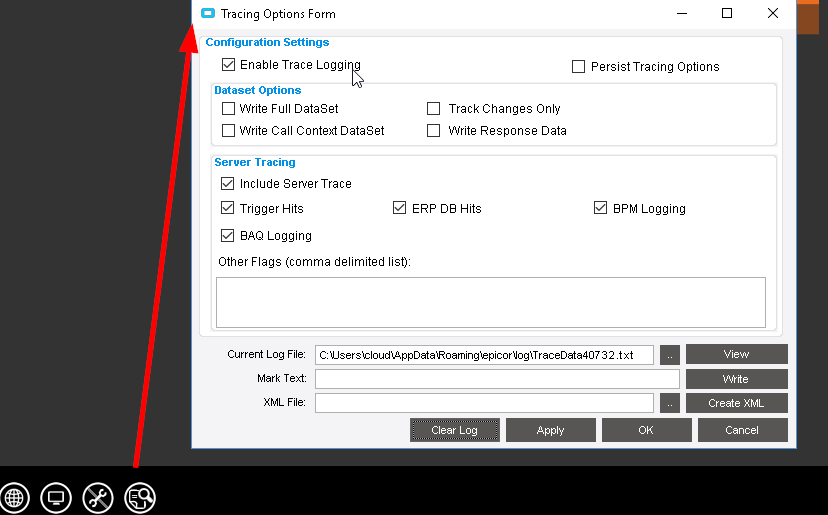
If you run a trace it should show you. As I recall, it was “CustShipEntry” but dont trust me, trust a trace.

How i run a trace or where? You say me it was maybe
“CustShipEntry” is te value of pcCallProcess?
Thanks

Also, the guide: Sign In

Thanks so much!! Now I know what is the parameter :smile:
But i do not know How I set value to parameter “Guid”

-----> Guid sysRowId=?;

adapterIssueReturn.GetNewIssueReturn("",Guid, “MaterialQueue”);

Thanks

Thanks, the correct is
Guid parameter=new Guid(“Value”);

If you’re generating a new GUID, it’s Guid sysRowId = Guid.NewGuid(); use this one
If you’re generating a purposefully empty GUID, it’s Guid myEmptyGuid = new Guid();

I believe if you use the string overload for the Guid constructor, you’ll need specify some guid formatting which is only going to be correct if you specify the standard formatting.

Hate to necro like this, but does anyone know what the process for IssueMaterial STK-MTL is? MaterialQueue or something else?

While you can probably use that method to some extent, I’ve had the most luck using this method when creating a STK-MTL from IssueMaterial:
hIssueReturn.GetNewJobAsmblMultiple("STK-MTL", Guid.Empty, "IssueMaterial", ref jads, out vMsgText);

I hope this helps!
-Joseph

I was able to get it working with ia.GetNewIssueReturnToJob(irr.ToJobNum, 0, "STK-MTL", tranGuid, out msg); then setting all the appropriate fields on the ia.IssueReturnData.IssueReturn[0]

If anyone follows the same path as me in the future, make sure to check for negative quantities and I had to manually trigger the IssuedComplete flag

if (Convert.ToInt32(Convert.ToDecimal(tranQty.Value.ToString())) >= row.QtyRequired - row.QtyPreviouslyIssued)
			row.IssuedComplete = true; 
ia.NegativeInventoryTestTran(row.PartNum, row.FromWarehouseCode, row.FromBinNum, row.LotNum, "", row.DimCode, row.DimConvFactor, tranGuid, row.TranQty, out testTran, out testMsg);

Lastly, I did the three transaction methods. I don’t know if the MasterInventoryBinTests is needed, or what it flags, but if we have issues in the future with this customization, I will dive into that one more. The rest is just fluff to do what the original screen does (i.e. clearing, but keeping the job number ready to continue transactions on). I included your suggested GetNewJobAsmblMultiple at the end, because it was present when I traced the base when inputting the original job number. I don’t know if I even need that.

		if (!testTran.Contains("Stop"))
		{
			issueBtn.ReadOnly = true;
			issueBtn.Enabled = false;

	        ia.PrePerformMaterialMovement(out reqInput);

		ia.MasterInventoryBinTests(out pcNeqQtyAction, out pcNeqQtyMessage, out pcPCBinAction, out pcPCBinMessage, out pcOutBinAction, out pcOutBinMessage);

	        ia.PerformMaterialMovement(true, out lgl, out partTran);

			issueBtn.ReadOnly = false;
			issueBtn.Enabled = true;

			MethodInfo mi1 = typeof(EpiBaseForm).GetMethod("handleToolClick", BindingFlags.Instance | BindingFlags.NonPublic);

			mi1.Invoke(IssueMaterialForm, new object[]{"ClearTool",new Infragistics.Win.UltraWinToolbars.ToolClickEventArgs(IssueMaterialForm.MainToolManager.Tools["ClearTool"],null)});

			jobNb.Value = row.ToJobNum;
			jobNb.Focus();
			System.Windows.Forms.SendKeys.Send("{TAB}");

			MethodInfo mi2 = typeof(EpiBaseForm).GetMethod("handleToolClick", BindingFlags.Instance | BindingFlags.NonPublic);

			mi2.Invoke(IssueMaterialForm, new object[]{"RefreshTool",new Infragistics.Win.UltraWinToolbars.ToolClickEventArgs(IssueMaterialForm.MainToolManager.Tools["RefreshTool"],null)});

			string asmblMsg = "";
			ia.GetNewJobAsmblMultiple("STK-MTL", Guid.Empty, "IssueMaterial", out asmblMsg);

		}
		else
			MessageBox.Show("Transaction exceeds available parts in lot.");