Hello all,
We are trying to set up sales kits where you can pick alternative parts depending on the customer request. The idea is we’d only have to create 20 sales kits with many alternative part options instead of hundreds of specific sales kits. I have set up alternative parts for several of the components of the kit.
When i add the sales kit to the order line, I do not see a way to choose an alternative part. If I put an individual component on a sales order line, the alternative parts option works fine.
Is each component of a sales kit supposed to create a separate order line automatically when added? I see there are “sales kit lines”, but there is just one line for the order with the sales kit. My thought was if each child component of the sales kit were on a separate sales order line, then the “alternative part button” would be enabled for each of those component child parts of the kit.
THere are a couple of quesitons here and a couple of answers.
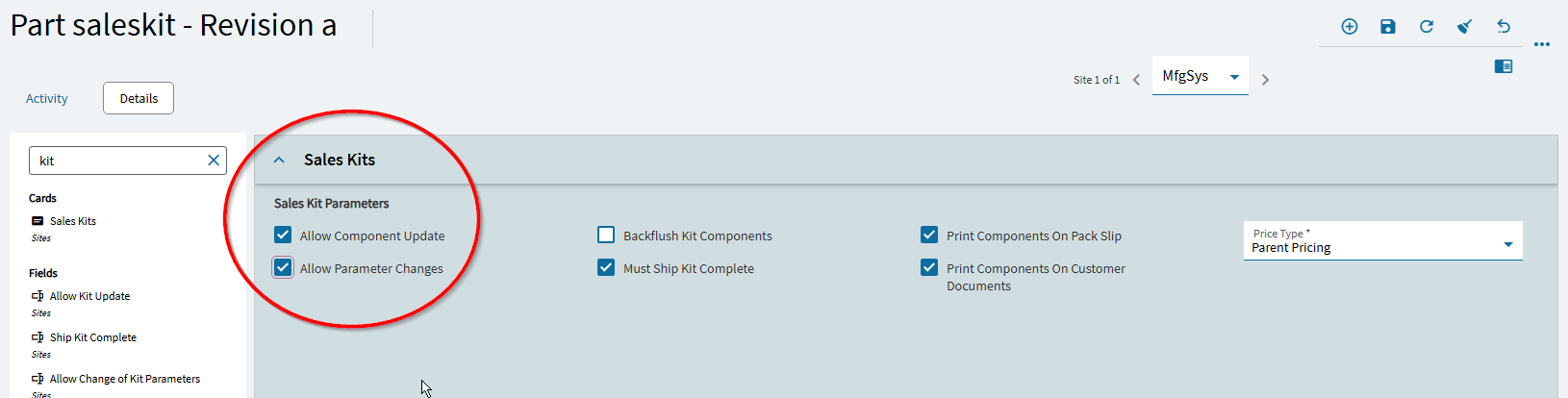
Yes, you CAN change the components on the sales kit… but only if you specify that in the sales kit definition on the part… You must mark it with “Allow component update” which allows you to change the part numbers… or you can “allow parameter changes” which allows quantity change on that component.
There is somehting called a Sales Kit Configurator. With this feature, you build the configurator to ask questions, and then the configurator makes the decision as to what parts are included in the kit.
Note that when adding sales kits to a sales order, it DOES add a new line for each part/component that is in the kit… so if your kit as 7 items, you add line 1, and you will get 7 more lines that are the components of the kit… when you add the next line item, it will be line 9 (which admitedly can cause some confusion of you dont print those components on customer documents (see image above).