Here’s what I have:

-
The Condition is the same as posetd above
-
I created two variables OrdList and OrdNum
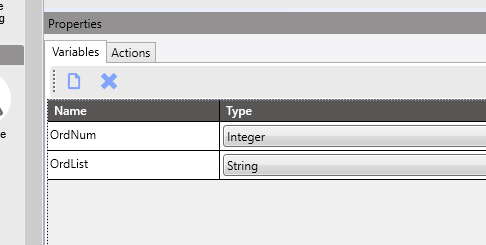
-
Set the OrdList variable
ttSysTaskParam
.Where( r =>r.ParamName == "OrderList")
.Select( r =>r.ParamCharacter)
.DefaultIfEmpty("Not Found")
.FirstOrDefault()
- Set the OrdNum Variable
Convert.ToInt32(OrdList)
- Custom Code Block (code via @Aaron_Moreng (link to post)
//This code will update the JE_JobNum_c on OrderHed
//this uses a technique called LINQ (Language Integrated Query) to have SQL-like syntax in C#

//Define your tables that we will reference below
//Ice/Erp tables can look like this
//the first part is the type, the second is the variable name
Erp.Tables.OrderHed OrderHed;

//now we are going to look for the OrderHed record that matches this variable OrdNum. Make sure to also search by company, like any SQL query. The Session object is good for this.
//this will select, in this case, a single ShipHead record from the database

OrderHed = (from OrderHed_row in Db.OrderHed
where OrderHed_row.Company == Session.CompanyID && OrderHed_row.OrderNum == OrdNum
select OrderHed_row).FirstOrDefault();

//if the record is not null, we will continue
if(OrderHed !=null)
{
  //now we will set the field on the OrderHed record
  OrderHed.JE_JobNum_c = "PRNTD";
}