Scheduling - Sales Ship By

Hi Everyone! I hope you are having a great day today!
I am looking at our schedule for upcoming jobs. We don’t use MRP. We manually schedule the jobs as they are released. Often times the due date that the job is scheduled with is a placeholder date. We will process the job and ship it on our schedule, but that may not align with the dates in Epicor. Sales order demand dates are not reliable. This is due to many confounding circumstances, but it boils down to customer demands.

So, we have a list of jobs that are scheduled to ship in the next few months. From this list, I want to take a subset of jobs, and do a what-if schedule for them to see what will change if all these jobs are scheduled to ship this month (instead of in the next three months).

To this end I have setup a UD field in JobHead.Date08. This stores what I am calling the sales ship by date. This is the target our sales department wants to hit in order to make their monthly ship goals.

I used DMT to push in a sales ship by date into JobHead.Date08, for about 250 jobs. Now I want to use the date in date08, to run a wi schedule for the jobs in my list.

The only way I can see to do this, is to export my existing ReqDueDate for each job, then use DMT to update the ReqDueDate to the same values as Date08. Then I just sit back and wait for Global Scheduling to run and then look at my new schedule. If I don’t like it, I have to DMT the old dates back in to correct them, and then wait for global scheduling to reposition all the jobs again.

Am I missing something in the functionality that would make this easier? Open to ideas!
Thanks for your time!
Nate

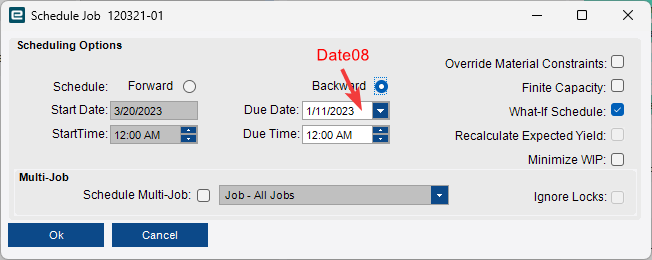
I think you could write a function that would loop through your jobs (however you determine that list is up to you), call the Schedule Job method (whatever it is specifically named) and pass it your Date08 value with What-If Schedule = true.

To automate this?
image

1 Like

I think that is the right idea. Most of my jobs should already be scheduled somewhere, so setting a new date, (usually earlier) and then doing a WI schedule might do the trick. I haven’t gotten into functions yet, but I was thinking I could take this route with BPM widgets.

I am using a UD table to hold my jobs numbers and sales ship by dates.

I would encourage you to give Functions a try. You can build it with widgets, just like a BPM. Then you can call the Function from just about anywhere, including from a BPM.

That’s great that your jobs are already stored in a UD table. You’re part way there.

Have fun :+1:t2:

1 Like

As I trace the BOs and methods involved in rescheduling a job, I am finding some weirdness.
This is the sequence of methods that I see. Though I am not sure which actually matter. There are so many that only provide an output without any input.

ScheduleEngine.GetMultiSchedTypeCodes - Output only
ScheduleEngine.GetScheduilngFlags - Output only
ScheduleEngine.MoveJobItem - input of ScheduleEngineTableset (Where does it get defined?)
ScheduleEngine.GetSchedTypeCodes - Output only
ScheduleEngine.GetSchedulingMultiJobFlags - Output only

Then we go to the JobEntry BO with these methods:
JobEntry.ValidateJobDuomAttributes - Inputs only
JobEntry.CheckEngineered - Output only
JobEntry.GetDatasetForTree - Inputs and a JobEntryTableset output, but where is it used?

Then we go to the SchedulingBoard BO with these methods:
SchedulingBoard.ValidateAccess - Output only
SchedulingBoard.BuildJobLine - in-out ScheduilngBoardTableset

I used Jose’s trace parser to get these BOs and methods. Normally I would expect to pull a dataset into a temporary tableset or something then use update table by query to modify the table before using .Update to save the record changes.

I don’t see any of that going on in my trace.

For clarity, I traced rescheduling an existing job. I opened in Job Entry, went to Actions > Schedule > Job Scheduling… Then I entered the new date in the backward due date box. I use finite scheduling, and I choose not to use what if scheduling. The job is not locked. While it did move the new due date sooner, it didn’t quite make it all the way to my new due date. I guess other jobs are restricting it from being pulled in any sooner.

Has anyone else ever setup a function or used methods to replicate the scheduling of a job? What am I missing in the list of BOs and methods?

Thanks again!

I’m pretty sure that MoveJobItem is the one actually doing the work when you click OK on the Schedule Job dialog. The parameters are defined in that dataset (What If Scheduling, Forward/Backward, Due Date, etc)

Yeah! So, normally I would start by setting up that dataset with a getbyid or getdatasetfortree, or something like that. But I don’t have that in ScheduleEngine BO. How can I get a ScheduleEngineTableset to pass into the MoveJobItem method?

I can’t figure this out. The scheduling BOs and methods are so weird. I am going to just use DMT. Giving up on functions again…

Using the Schedule Job template in the DMT, I am finding the records are processing extremely slowly. Less than 10RPM! I guess I expect that based on how long it takes the system to schedule one job.

I am trying to use the MoveJobItem method. I am not getting very far. This is what I have setup in my UBAQ BPM:


I have a UBAQ that joins my UD07 table with JobHead. My UD07 table just has a list of job numbers and new dates. The goal is to look at the job listed in UD07, then (backwards, finite) schedule that job using the new date.

In the BPM the condition is looking for the Calculated_Flag field to be unchecked. As long as there are unchecked flags, the loop continues. Once all the flag fields are checked, the loop should end, having scheduled all the jobs on the UD07 list to the new dates.

The first Custom Code Widget: Look at the BAQ and pull the first row that is not flagged.

var xRow = (from ttResults_Row in queryResultDataset.Results where ttResults_Row.Calculated_Flag == false select ttResults_Row).FirstOrDefault();
MyJob = xRow.JobHead_JobNum;
NewDate = xRow.UD07_Date01;

The second Custom Code Widget: Schedule the job on this row using the new date.

var schedDS = new Erp.BO.ScheduleEngineDataSet();
var sp = (Erp.BO.ScheduleEngineDataSet.ScheduleEngineRow)schedDS.ScheduleEngine.NewRow();
sp["Company"] = callContextClient.CurrentCompany;
sp["JobNum"] = MyJob;
sp["AssemblySeq"] = 0;
sp["OprSeq"] = 0;
sp["OpDtlSeq"] = 0;
sp["StartDate"] = NewDate;
sp["StartTime"] = 0;
sp["EndDate"] = NewDate;
sp["EndTime"] = 0;
sp["WhatIf"] = false;
sp["Finite"] = true;
sp["SchedTypeCode"] = "jj";
sp["ScheduleDirection"] = "End";
sp["SetupComplete"] = false;
sp["ProductionComplete"] = false;
sp["OverrideMtlCon"] = true;
sp["OverRideHistDateSetting"] = 2;
sp["RecalcExpProdYld"] = false;
sp["UseSchedulingMultiJob"] = false;
sp["SchedulingMultiJobIgnoreLocks"] = false;
sp["SchedulingMultiJobMinimizeWIP"] = false;
sp["SchedulingMultiJobMoveJobsAcrossPlants"] = false;
sp["SysRowID"] = Guid.NewGuid();
sp["RowMod"] = "A";
schedDS.ScheduleEngine.AddScheduleEngineRow(sp);
using (Erp.Proxy.BO.ScheduleEngineImpl boSched = Ice.Assemblies.ServiceRenderer.GetService<Erp.Proxy.BO.ScheduleEngineImpl>(Db))
{
boSched.MoveJobItem(schedDS, out finished, out Msg);
}

Third Custom Code Widget: Check off the row that has now been scheduled.

var xRow = (from ttResults_Row in queryResultDataset.Results where ttResults_Row.Calculated_Flag == false select ttResults_Row).FirstOrDefault();
xRow.Calculated_Flag = true;

When I try to run this code I get this error:

Server Side Exception

Type 'Erp.Proxy.BO.ScheduleEngineImpl' is not a service contract.

Exception caught in: Epicor.ServiceModel

Error Detail 
============
Description:  Type 'Erp.Proxy.BO.ScheduleEngineImpl' is not a service contract.
Correlation ID:  7d7c8306-83f0-4d39-af2e-152d984e3ed1
Program:  Epicor.System.dll
Method:  ResolveService
Line Number:  115
Column Number:  17


Client Stack Trace 
==================
   at Ice.Cloud.ProxyBase`1.CallWithCommunicationFailureRetry(String methodName, ProxyValuesIn valuesIn, ProxyValuesOut valuesOut, RestRpcValueSerializer serializer)
   at Ice.Cloud.ProxyBase`1.CallWithMultistepBpmHandling(String methodName, ProxyValuesIn valuesIn, ProxyValuesOut valuesOut, Boolean useSparseCopy)
   at Ice.Cloud.ProxyBase`1.Call(String methodName, ProxyValuesIn valuesIn, ProxyValuesOut valuesOut, Boolean useSparseCopy)
   at Ice.Proxy.BO.DynamicQueryImpl.RunCustomAction(DynamicQueryDataSet queryDS, String actionID, DataSet queryResultDataset)
   at Ice.Adapters.DynamicQueryAdapter.<>c__DisplayClass43_0.<RunCustomAction>b__0(DataSet datasetToSend)
   at Ice.Adapters.DynamicQueryAdapter.ProcessUbaqMethod(String methodName, DataSet updatedDS, Func`2 methodExecutor, Boolean refreshQueryResultsDataset)
   at Ice.Adapters.DynamicQueryAdapter.RunCustomAction(DynamicQueryDataSet queryDS, String actionId, DataSet updatedDS, Boolean refreshQueryResultsDataset)
   at Ice.UI.App.BAQDesignerEntry.BAQTransaction.<>c__DisplayClass379_0.<CallRunCustom>b__0(Int32& rowReturned)
   at Ice.UI.App.BAQDesignerEntry.Forms.BAQDiagramForm.ShowQueryResults(DataSet dsResults, getQueryResult getResults, ReportAdditionalInfo additionalInfo)
   at Ice.UI.App.BAQDesignerEntry.BAQTransaction.CallRunCustom()

I thought I had all the right pieces in place. What am I missing? I am also not sure how to define the start date. The whole point of scheduling is to figure out that start date. But I can’t leave it blank without error. How does Epicor define the start date for the Schedule Engine dataset that gets fed into MoveJobItem?
Thanks!
Nate
using (Erp.Contracts.ScheduleEngineSvcContract boSched = Ice.Assemblies.ServiceRenderer.GetService<Erp.Contracts.ScheduleEngineSvcContract>(Db))
{
    boSched.MoveJobItem(schedDS, out finished, out Msg);
}

Updated code to:

var schedDS = new Erp.BO.ScheduleEngineDataSet();
var sp = (Erp.BO.ScheduleEngineDataSet.ScheduleEngineRow)schedDS.ScheduleEngine.NewRow();
sp["Company"] = callContextClient.CurrentCompany;
sp["JobNum"] = MyJob;
sp["AssemblySeq"] = 0;
sp["OprSeq"] = 0;
sp["OpDtlSeq"] = 0;
sp["StartDate"] = NewDate;
sp["StartTime"] = 0;
sp["EndDate"] = NewDate;
sp["EndTime"] = 0;
sp["WhatIf"] = false;
sp["Finite"] = true;
sp["SchedTypeCode"] = "jj";
sp["ScheduleDirection"] = "End";
sp["SetupComplete"] = false;
sp["ProductionComplete"] = false;
sp["OverrideMtlCon"] = true;
sp["OverRideHistDateSetting"] = 2;
sp["RecalcExpProdYld"] = false;
sp["UseSchedulingMultiJob"] = false;
sp["SchedulingMultiJobIgnoreLocks"] = false;
sp["SchedulingMultiJobMinimizeWIP"] = false;
sp["SchedulingMultiJobMoveJobsAcrossPlants"] = false;
sp["SysRowID"] = Guid.NewGuid();
sp["RowMod"] = "A";
schedDS.ScheduleEngine.AddScheduleEngineRow(sp);
using (Erp.Contracts.ScheduleEngineSvcContract boSched = Ice.Assemblies.ServiceRenderer.GetService<Erp.Contracts.ScheduleEngineSvcContract>(Db))
{
boSched.MoveJobItem(schedDS, out finished, out Msg);
}

Returns the compile error:

Argument 1: cannot convert from 'Erp.BO.ScheduleEngineDataSet' to 'Erp.Tablesets.ScheduleEngineTableset'
1 Like
Erp.Tablesets.ScheduleEngineTableset schedDS = new Erp.Tablesets.ScheduleEngineTableset();

Erp.Tablesets.ScheduleEngineRow sp = (Erp.Tablesets.ScheduleEngineRow)schedDS.ScheduleEngine.NewRow();
 
  sp.Company = callContextClient.CurrentCompany;
  sp.JobNum = MyJob;
  sp.AssemblySeq = 0;
  sp.OprSeq = 0;
  sp.OpDtlSeq = 0;
  sp.StartDate = NewDate;
  sp.StartTime = 0;
  sp.EndDate = NewDate;
  sp.EndTime = 0;
  sp.WhatIf = false;
  sp.Finite = true;
  sp.SchedTypeCode = "jj";
  sp.ScheduleDirection = "End";
  sp.SetupComplete = false;
  sp.ProductionComplete = false;
  sp.OverrideMtlCon = true;
  sp.OverRideHistDateSetting = 2;
  sp.RecalcExpProdYld = false;
  sp.UseSchedulingMultiJob = false;
  sp.SchedulingMultiJobIgnoreLocks = false;
  sp.SchedulingMultiJobMinimizeWIP = false;
  sp.SchedulingMultiJobMoveJobsAcrossPlants = false;
  sp.SysRowID = Guid.NewGuid();
  sp.RowMod = "A";

  
schedDS.ScheduleEngine.Add(sp);

using (Erp.Contracts.ScheduleEngineSvcContract boSched = Ice.Assemblies.ServiceRenderer.GetService<Erp.Contracts.ScheduleEngineSvcContract>(Db))
{
    boSched.MoveJobItem(schedDS, out finished, out Msg);
}
2 Likes

That did the trick! I knew I was close, but brute forcing the syntax wasn’t working.
Thank you!!!

You try all the time and I see constant improvement.

I don’t mind helping you at all.

1 Like

When I schedule a job in JobEntry, I just choose a target end date, then backwards finite schedule it to find the planned start date. However, the MoveJobItem method is requiring the ScheduleEngineTableset to include a start date. Is there another method that somehow creates this start date from the op standard estimates?

I’ll read this again and maybe go find my notes.

I only messed with this with a project that is on hold and not in my system.

1 Like

I wonder… since I am backwards scheduling does it make sense to just set the start date to today? :thinking:

Sorry to jump in on this thread was just going to mention a use case for function that I use especially given that we are MTO.

//Overview
//This following code performs the following tasks:

//1. Queries the database for jobs where the JobHead.ReqDueDate does not match the first drop in the linked demands (OrderRel) where the job is not complete and is released.
//2. Updates the JobHead.ReqDueDate for the jobs.
//3. Schedules the updated jobs through the Job Scheduling Engine.
//4. Collects any errors that occur during the process and includes them in an email.

var context = Ice.Services.ContextFactory.CreateContext<IceContext>();

// Create an empty dictionary to store any errors that occur during the processing

Dictionary<string,string> ErrorList = new Dictionary<string,string>();

//The below query retrieves the top 25 jobs where there are mismatches between the JobHead.ReqDueDate and the first drop in the linked demands. 
//It performs joins between various tables (JobPart, JobHead, JobProd, and OrderRel) to retrieve the required data. The result is stored in the result variable.

var result = (from jobPart in Db.JobPart
              join jobHead in Db.JobHead on new { jobPart.Company, jobPart.JobNum } equals new { jobHead.Company, jobHead.JobNum }
              join jobProd in Db.JobProd on new { jobHead.Company, jobHead.JobNum } equals new { jobProd.Company, jobProd.JobNum }
              join orderRel in Db.OrderRel on new { jobProd.Company, jobProd.OrderNum, jobProd.OrderLine, jobProd.OrderRelNum } equals new { orderRel.Company, orderRel.OrderNum, orderRel.OrderLine, orderRel.OrderRelNum }
              where jobPart.WIPQty > 0 && jobPart.Company == "MyComp" && jobHead.JobReleased == true && jobHead.JobComplete == false
              group new { jobHead.JobNum, jobHead.ReqDueDate, orderRel.ReqDate, orderRel.NeedByDate } by new { jobHead.JobNum, jobHead.ReqDueDate } into g
              let calculated_FirstDrop = g.Min(x => x.ReqDate)
              let calculated_FirstNeedBy = g.Min(x => x.NeedByDate)
              where calculated_FirstDrop != g.Key.ReqDueDate && calculated_FirstDrop != null
              orderby calculated_FirstDrop, g.Key.JobNum 
              select new
              {
                  JobHead_JobNum = g.Key.JobNum,
                  JobHead_ReqDueDate = g.Key.ReqDueDate,
                  Calculated_FirstDrop = calculated_FirstDrop,
                  Calculated_FirstNeedBy = calculated_FirstNeedBy
              }).Take(25).ToList();

//Make sure there are records that require processing
if (result.Count > 0)
{  
    string EmailBody = string.Empty;
    
    
    //Set Email Body - Table Headers
        
     EmailBody += @"<table width='100%' align='center' border='1' cellpadding='5' style='font-family: Arial; font-size: 10pt;' style='border-collapse: collapse;' bordercolor='#CCCCCC'>"
     + "<th>Job Number</th>"
     + "<th>Orignal Date</th>"
     + "<th>New Date</th>"
     + "<th>First Drop</th>"
     + "</tr>";

    foreach (var job in result)
    {   
          try 
          {
     
              // Use the Job Entry BO -> Get By ID (JobNum) -> Update the ReqDueDate
              using (var jobEntrySvc = Ice.Assemblies.ServiceRenderer.GetService<Erp.Contracts.JobEntrySvcContract>(context))
              {
              Erp.Tablesets.JobEntryTableset JobEntryTS = new Erp.Tablesets.JobEntryTableset();
              JobEntryTS =  jobEntrySvc.GetByID(job.JobHead_JobNum);
              var updatedRow = (Erp.Tablesets.JobHeadRow)JobEntryTS.JobHead.NewRow();
             
              //Copy row in unmodified state to ensure the attachments are not lost
              BufferCopy.Copy(JobEntryTS.JobHead[0], updatedRow);
              JobEntryTS.JobHead.Add(updatedRow);
            
              updatedRow.ReqDueDate = job.Calculated_FirstDrop;
              updatedRow.RowMod = "U";
             
              jobEntrySvc.Update(ref JobEntryTS);  
              
              //Set Table rows
              
              EmailBody +=
                    "<tr>"
                    + "<p style='background-color:Dyn;'>"
                    + @"<td align='center'>" + updatedRow.JobNum  +"</td>"
                    + @"<td align='center'>" + job.JobHead_ReqDueDate  +  "</td>" 
                    + @"<td align='center'>" + job.Calculated_FirstDrop + "</td>"
                     + @"<td align='center'>" + updatedRow.ReqDueDate + "</td>"
                    +"</p>"
                    + "</tr>";  
                
                 // Run updated job through the Job scheduling Engine
                 if (updatedRow != null)
                 {
                      using (var scheduleEngineBO = Ice.Assemblies.ServiceRenderer.GetService<Erp.Contracts.ScheduleEngineSvcContract>(context))
                      {
                      Erp.Tablesets.ScheduleEngineTableset scheduleEngineDS = new Erp.Tablesets.ScheduleEngineTableset();
                      Erp.Tablesets.ScheduleEngineRow row = (Erp.Tablesets.ScheduleEngineRow)scheduleEngineDS.ScheduleEngine.NewRow();
                      
                      row.Company = updatedRow.Company;
                      row.JobNum = updatedRow.JobNum;
                      row.AssemblySeq = 0;
                      row.OprSeq = 0;
                      row.OpDtlSeq = 0;
                      row.StartDate = DateTime.Today;
                      row.StartTime = 0;
                      row.EndDate = updatedRow.ReqDueDate; // Job Head Required Date
                      row.EndTime = 0;
                      row.WhatIf = false;
                      row.Finite = false;
                      row.SchedTypeCode = "JA"; // Job - Assembly 
                      row.ScheduleDirection = "End";
                      row.SetupComplete = false;
                      row.ProductionComplete = false;
                      row.OverrideMtlCon = true;
                      row.OverRideHistDateSetting = 2;
                      row.RecalcExpProdYld = false;
                      row.UseSchedulingMultiJob = true;
                      row.SchedulingMultiJobIgnoreLocks=false;
                      row.SchedulingMultiJobMinimizeWIP = false;
                      row.SchedulingMultiJobMoveJobsAcrossPlants = false;
                      
                      bool finished = false;
                      string message = string.Empty;
    
                      scheduleEngineDS.ScheduleEngine.Add(row);
    
                      scheduleEngineBO.MoveJobItem(scheduleEngineDS, out finished, out message); 
                      }             
                 }         
                  
              }
        
           }
           
           // If there are errors add them to the error list for reporting purpose within the email.
           catch (Exception ex)
           {
           ErrorList.Add(job.JobHead_JobNum,ex.Message);   
           }
        
        } 
    
    // Cycle thru the error list to build the error table within the Email body
    if (ErrorList.Count > 0)
    {
        EmailBody +=  "</table>";
        EmailBody +=  "<BR><BR>";
    
        EmailBody += @"<table width='100%' align='center' border='1' cellpadding='5' style='font-family: Arial; font-size: 10pt;' style='border-collapse: collapse;' bordercolor='#CCCCCC'>"
         + "<th>Job Number</th>"
         + "<th>Error Message</th>"
         + "</tr>";
    
        foreach (var errorLine in ErrorList)
        {
        EmailBody +=
                "<tr>"
                + "<p style='background-color:Dyn;'>"
                + @"<td align='center'>" + errorLine.Key +"</td>"
                + @"<td align='center'>" + errorLine.Value + "</td>" 
                +"</p>"
                + "</tr>";  
        }
    
    }
 
    // Set up mailing service and send email
    using (Ice.Mail.SmtpMailer mailer = new Ice.Mail.SmtpMailer(this.Session))
    {
     
    var message = new Ice.Mail.SmtpMail();
    message.SetFrom("from@");
    message.SetTo("to@");
    message.SetSubject("Schedueling Function");
    message.SetBody(EmailBody);
    message.IsBodyHtml = true;
        
    //Send
    mailer.Send(message);
    }      

}
 
3 Likes

This is so cool! Let me make sure I understand you.
We have jobs that have demand linked in from sales order releases. We might have 100 releases in a sales order, and only 10 of them are applied as demand on a job. The releases might represent 10 parts a week or something similar.

I think you are saying that this code looks at the current job schedule, and updates it based on the next due release date from the linked demand. Is that right?