Specify email attachment name in code

Has anyone specified an email attachment name via code?

I’m sending an Epicor standard report (several customized styles) to our customers based on criteria - A number of email address and recipient decisions must be made, therefore I’m executing the logic in a function which then sends the reports via email.

If I were using APR, I could set the attachment file name for each Style (and include helpful info). However, since I’m doing this all within code, I can’t seem to find the appropriate parameter to set.

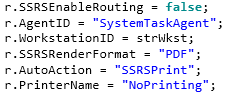
For context, I’m setting the parameters in the Report’s parameter row:

image

I’m using FaxSubject for email subject:

image

Any thoughts?

I’m pretty sure @klincecum has put code up where he’s doing this or it was someone else here. It’s on here somewhere.

un momento

Multiple Kevin’s have cracked this nut.

@klincecum this was not a tag to get you to provide/work on figuring out the code either, not a lazy tag.

I crave distractions.


and chicken :delicious:

I felt pretty sure someone would have done this, but multiple searches returned APR and other (non-workable) options.

Before I answer, are you providing the chicken, or Utah? :delicious:

It most certainly is in the submit to agent step if I am not mistaken, whether someone did this with their own call or they did this in a BPM step I can’t recall.

Dude haha I am not asking for this solution! But I like chicken too so I’ll bring it the next time.

Yes. Utah is providing the chicken!
(Utah, I’ll reimburse!)

Here is my function, does everything you want.

Let me read it and understand what I did, and I can explain your exact answer.

https://www.epiusers.help/t/lets-share-useful-functions-sharing-is-caring/100371/2?u=klincecum

will this do what you want?

https://www.epiusers.help/t/lets-share-useful-functions-sharing-is-caring/100371/46

Here is the relevant bit:

  Dictionary<string, Stream> attachmentsDictionaryStream = new Dictionary<string, Stream>();      
  Dictionary<string, byte[]> attachmentsDictionaryBytes = null;
  
  try { attachmentsDictionaryBytes = JsonConvert.DeserializeObject<Dictionary<string, byte[]>>(attachmentsDictionaryJson); } catch {}
  
  if(attachmentsDictionaryBytes != null)
  {
      foreach(var item in attachmentsDictionaryBytes)
      {
          attachmentsDictionaryStream.Add(item.Key, new MemoryStream(item.Value));
      }
  }
  
  if(attachmentsDictionaryStream.Count() > 0)
  {
      mailer.Send(email, attachmentsDictionaryStream);
  }
  else mailer.Send(email);

Uh… it looks like the answer. It’s a bit more (real) coding that I typically do in Epicor, but I guess it’s time to broaden the ole horizons. I will dust off my reference books, grab some chicken, and see if I can digest (Lol!) this. Thank you!

If you want to modify your code to see how to fit it in, I don’t mind helping.

Or you could just use my library, or @kve has one similar.

Oh, I re-read the top post, and now I see what you are actually doing.

Hmmmm, new thoughts are forming.

image

2 Likes

Does it have a description field? That’s probably where the file name comes from.

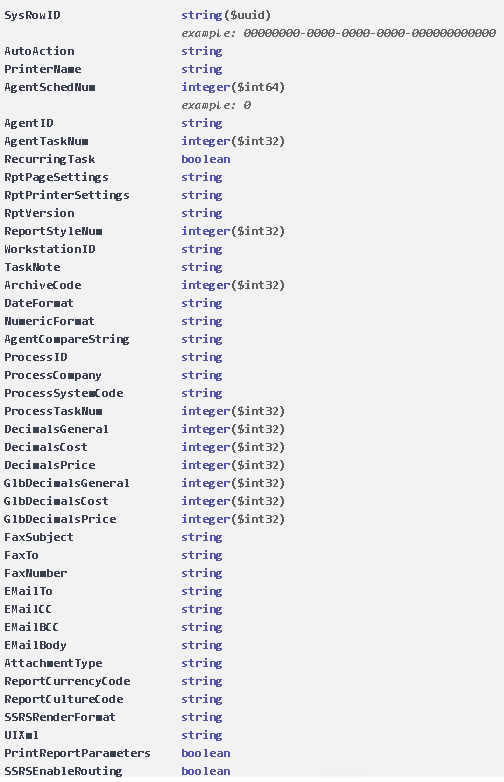
Looking at the parameters in API Help, I see no description field.

Poking it.

I will say, if we can’t finagle the submit to agent call, I can show you how to use RunDirect to grab the report and do it the hard way. (It’s not that hard.)