Thanks Randy for correcting me
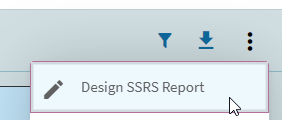
In the system monitor, its called Design SSRS. In the screen where you are printing the report its called Generate for design. Unfortunately Design SSRS doesn’t work in the kinetic system monitor.
3 Likes
Thank you both for confirming the straightforwardness of the process.
You generate for design at print then design in system monitor using the archived data, a little 1-2 punch… thank you.
1 Like
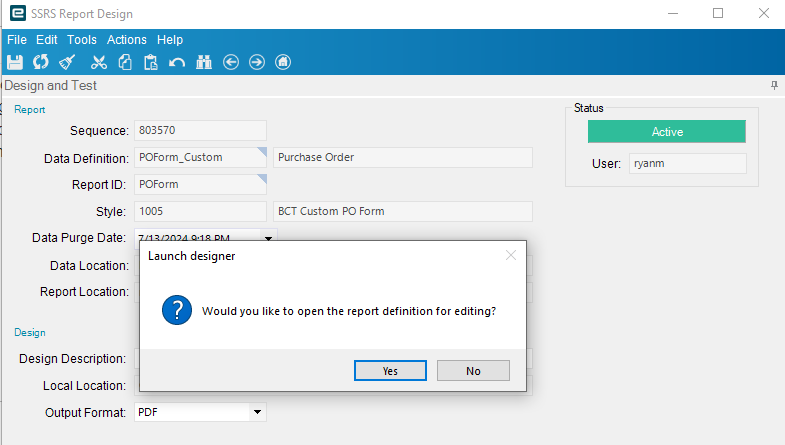
Today we got this working for the first time. We had to create a Menu item for the classic program Ice.UI.SsrsReportDesign.dll so we could use the classic SSRS Report Design app. Launching from the smart client had launched the kinetic version of SSRS Report Design and that would not download and prompt to Launch Designer.
3 Likes
Hey All - Sorry for the issue introduced in Pilot with Update 8 when running a modified SSRS report. The problem was temporarily addressed Wednesday and resolved the issue for anyone trying to run a custom SSRS report but the problem would return for anyone modifying / uploading a report definition. A permanent fix is available and will be applied to the Pilot environments en masse next week.
The Production Update to 2024.1.8 coming this weekend for all DCs except US Central and Canada will include the corrected code.
Problem was introduced due to “adjustments” in the code added in 2024.1 that now stores your custom RDL definitions in the Kinetic DB. With 2024.1, when the Live DB is copied to Pilot / Additional, the custom SSRS definitions from Live will now automatically move with the DB.
Again, apologies for the inconvenience.
6 Likes
Thanks for the update @Rich.
I picked the wrong week to convert my e10 reports to kinetic. 
6 Likes
Production update, it said the 19th? So next weekend! And yet I have a user stating they have a version mismatch on the client .5 vs .8, if they updated SaaS users Live this weekend after only doing Pilot last weekend with no release notes for .8 even released yet…man I am going to seriously consider moving back on prem.
We are having a similar issue (with latest update) - we are on-prem. Putting in a support ticket now… 
FYI, Our Error is this:
Program Ice.Services.Lib.RunTask when executing task 1943 raised an unexpected exception with the following message: RunTask:
System.MissingMethodException: Method not found: 'System.String Ice.Tables.ReportStore.get_ContentHash()'.
   at Ice.Core.SsrsReporting.ReportProcessorBase.DeployReportIfNeeded(String printProgram, String fullReportPath, SsrsConfigurationInformation configurationInfo, Func`1 reportingServiceCreator)
   at Ice.Core.SsrsReporting.ReportProcessorBase.RenderReport_HttpClient(String ssrsRenderFormat, String printProgram, Boolean ignorePageSettings) in C:\_releases\ICE\ICE4.3.100.8\Source\Server\Internal\Lib\TaskLib\SsrsReporting\ReportProcessorBase.cs:line 372
   at Ice.Core.SsrsReporting.ReportProcessorBase.RenderReport(String ssrsRenderFormat, String printProgram, Boolean ignorePageSettings) in C:\_releases\ICE\ICE4.3.100.8\Source\Server\Internal\Lib\TaskLib\SsrsReporting\ReportProcessorBase.cs:line 277
   at Ice.Core.SsrsReporting.ReportProcessorBase.RenderReportForPreviewOrGenerate(RenderedSsrsReport renderedReport) in C:\_releases\ICE\ICE4.3.100.8\Source\Server\Internal\Lib\TaskLib\SsrsReporting\ReportProcessorBase.cs:line 615
   at Ice.Core.SsrsReporting.ReportProcessorBase.ProcessReportPart(String reportLocation) in C:\_releases\ICE\ICE4.3.100.8\Source\Server\Internal\Lib\TaskLib\SsrsReporting\ReportProcessorBase.cs:line 165
   at Ice.Core.SsrsReporting.StandardReportProcessor.ProcessReportParts() in C:\_releases\ICE\ICE4.3.100.8\Source\Server\Internal\Lib\TaskLib\SsrsReporting\StandardReportProcessor.cs:line 31
   at Ice.Core.SsrsReporting.ReportProcessorBase.ProcessReport(ReportDatabaseBuilder reportDatabaseBuilder, ReportInstanceInformation reportInstanceInformation) in C:\_releases\ICE\ICE4.3.100.8\Source\Server\Internal\Lib\TaskLib\SsrsReporting\ReportProcessorBase.cs:line 94
   at Ice.Core.RptBase.ReportSsrsDatabaseBuilder.<>c__DisplayClass18_0.<RenderUnroutedSsrsReport>b__0(ReportInstanceInformation instance) in C:\_releases\ICE\ICE4.3.100.8\Source\Server\Internal\Lib\TaskLib\RptBase\ReportSsrsDatabaseBuilder.cs:line 362
   at Ice.Core.RoutingAndBreaking.ReportPersister.Persist(ReportInstanceInformation reportInstance, Func`2 reportsRenderer, Action`1 fillSysRptLstRow, Action`2 processReport, Func`3 filterTableAttachmentsFunc) in C:\_releases\ICE\ICE4.3.100.8\Source\Server\Internal\Lib\TaskLib\RoutingAndBreaking\ReportPersister.cs:line 58
   at Ice.Core.RptBase.ReportSsrsDatabaseBuilder.RenderUnroutedSsrsReport() in C:\_releases\ICE\ICE4.3.100.8\Source\Server\Internal\Lib\TaskLib\RptBase\ReportSsrsDatabaseBuilder.cs:line 360
   at Ice.Core.RptBase.ReportSsrsDatabaseBuilder.RunSsrsReportIfEnabled() in C:\_releases\ICE\ICE4.3.100.8\Source\Server\Internal\Lib\TaskLib\RptBase\ReportSsrsDatabaseBuilder.cs:line 243
   at Ice.Core.RptBase.ReportSsrsDatabaseBuilder.ProcessUnroutedReport() in C:\_releases\ICE\ICE4.3.100.8\Source\Server\Internal\Lib\TaskLib\RptBase\ReportSsrsDatabaseBuilder.cs:line 236
   at Ice.Core.RptBase.ReportSsrsDatabaseBuilder.ProcessReportWithDataInPlace(Func`2 executeCommand, Func`2 executeReader, SqlObjectsCreated sqlObjectsCreated) in C:\_releases\ICE\ICE4.3.100.8\Source\Server\Internal\Lib\TaskLib\RptBase\ReportSsrsDatabaseBuilder.cs:line 121
   at Ice.Core.RptBase.ReportDatabaseBuilder.ProcessReportWithDataInPlace(SqlConnection connection) in C:\_releases\ICE\ICE4.3.100.8\Source\Server\Internal\Lib\TaskLib\RptBase\ReportDatabaseBuilder.cs:line 135
   at Ice.Core.RptBase.ReportDatabaseBuilder.XMLClose() in C:\_releases\ICE\ICE4.3.100.8\Source\Server\Internal\Lib\TaskLib\RptBase\ReportDatabaseBuilder.cs:line 96
   at Ice.Core.RptTaskBase`1.XMLClose() in C:\_releases\ICE\ICE4.3.100.8\Source\Server\Internal\Lib\TaskLib\RptBase\RptTaskBase.cs:line 230
   at Erp.Internal.EQ.QuotForm.RunProcess(Int64 instanceTaskNum, String outputFileName) in C:\_releases\ERP\ERP11.3.100.0\Source\Server\Internal\EQ\QuotForm\QuotForm.cs:line 266
   at Ice.Hosting.TaskCaller.InnerExecuteTask(IceDataContext newContext) in C:\_releases\ICE\ICE4.3.100.8\Source\Server\Framework\Epicor.Ice\Hosting\TaskCaller\TaskCaller.cs:line 70
   at Ice.Hosting.TaskCaller.ExecuteTask() in C:\_releases\ICE\ICE4.3.100.8\Source\Server\Framework\Epicor.Ice\Hosting\TaskCaller\TaskCaller.cs:line 61
   at Ice.Lib.RunTask.BpmFriendlyTaskLauncher.Run(String sessionIdPrefix, IceContext db, Action taskRunner) in C:\_releases\ICE\ICE4.3.100.0\Source\Server\Services\Lib\RunTask\BpmFriendlyTaskLauncher.cs:line 57
   at Ice.Services.Lib.RunTaskSvc.InnerRunTask(Int64 ipTaskNum, Boolean suppressTransaction) in C:\_releases\ICE\ICE4.3.100.0\Source\Server\Services\Lib\RunTask\RunTask.cs:line 457
Haven’t custom report data definitions always moved with the database? Its the rdls that don’t move.
1 Like
Was this fixed? Updated to 2024.1.8 over the weekend and getting the same error this morning.
1 Like


1 Like
Well the wording is confusing so that is why I am looking for clarification. Usually definitions means RDDs not RDLs. I also find it hard to believe this problem that has existed forever is finally going to be solved, especially with zero communication from epicor (doesn’t Tim usually come on here and make a big deal every time an idea with a lot of votes is finally getting released)? Even in the controlled release there was nothing said about this. Even though the release notes do talk about storing the report styles in the common database, it isn’t explicitly stated what this means in the context of different environments and copying one to another. So all of that is to say, I don’t want to get too excited without confirmation that it wasn’t just a slip of the fingers.
3 Likes
Yes, is a little odd.
I swear there was a post on it it, but I’ll be damned if I can find it.
All I can find is one where @josecgomez mentioned it in passing, but I already knew about it so I must have heard it from somewhere.
Who knows? lol

1 Like
Interesting that you linked that other post from Simon because that’s the exact file path that was throwing errors for me the last time, I tried to do the in place upgrade of my dev app server.
EDIT: not the exact file path, sorry. It was program data MSSQL
1 Like
Simon always has interesting posts.
Not always coherent, but interesting nonetheless…
2 Likes
Sorry for the inexact wording - let me try again.
Starting with the 2024.1 Release, Base SSRS RDL report definitions will be delivered in the ICE Common DB referenced via ice.ReportStore in the Kinetic DB. For 2024.1 and on-prem, the base report RDL definitions will also be delivered in the Report zip file as in the past but that will be discontinued with 2024.2.
Also with the 2024.1 Release, Customized SSRS RDL report definitions will be stored in the Kinetic DB in a new table - ice.CustomReportStore and version information will be stored in ice.CustomReportStoreHistory.
With these changes, the reporting framework will validate that the RDL report definition present in the SSRS Database (used during the actual report generation) is either the latest Base definition from ICE Common or is the latest Custom definition from the ice.CustomReportStore. If the SSRS Database RDL report definition is not the latest version, it will be updated prior to report execution.
The existing Kinetic Report Data Definition and the Report Style Definition have not changed and the data for those continues to be stored in the Kinetic database.
The work to update how Kinetic manages SSRS RDL definitions was done under Jira Epic ERP-156538 and included approximately 24 Stories. The work done is also included in the current documentation / help.
4 Likes

 Worth the pain if this is the ultimate result. Reports will automatically move between Prod & Pilot, etc when the DB is restored. fistbump
2 Likes
So what happens when I made some modifications to my report in Pilot?
It just automatically overwrites live??