hoping, thanks
Hi Jose, any update on this ? thanks
@josecgomez, I sent you an earlier email. I’ve tried the link from VS Marketplace to downloadthe helper libraries for 10.2.700.x, but I get an error saying the connection was closed on josegomez.com . Is the install file available on Github, and what file(s) need to be downloaded?
Sorry about that , here you go
Thank you, Jose! You’re the best!
Here’s 2023.1.x
I am seeing a strange error with the Extension…(Saas, Pilot, 2023.1.5)
I just updated to your latest version, once files have been copied to Epicor folder and I launch Epicor I get an error when trying to log in:
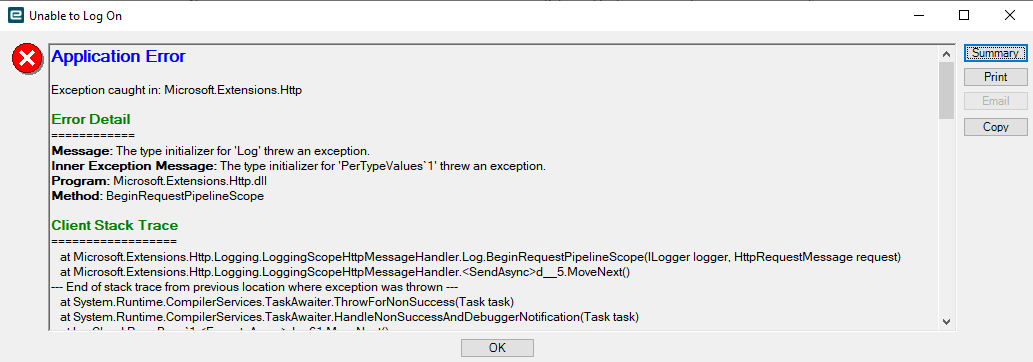
I reinstalled Epicor (removing the extension binaries) and I can log in again,
I tried copying the binaries again and noticed one of the 4 overwritten files was quite different:

I tried skipping overwriting that file and I can still log into my epicor client,
but when I use the extension and it tries to log me in, it fails
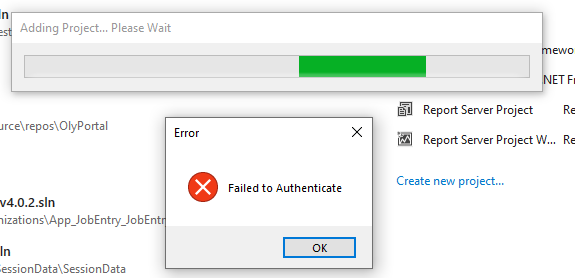
also tried uninstalling/reinstalling the actual extension that does not change the behavior
I repeated all the steps, same behavior…Catch-22
I don’t have access to SaaS to test this, it works fine with our version of 2023.X I wonder if they changed something in the authentication for SaaS…
Poll:
Has anyone else tried this with 2023.1.5 Self-Hosted ?
Has anyone else tried this with 2023.1.5 Saas ?
thx
I was going to try it for you, but it seems it does not like VS 2022.
Your too bleeding edge, lol, I’m on VS2017, thanks tho
I have encountered the unhandled exception as below:
Could not load file or assembly 'Ice.Core.Session, Version=4.1.200.0"
After checking the DLL version in my client folder, the actual version is 4.1.100.0.
Could this be the root cause of the issue? If yes, how can I bypass this error?
You need to download the right version to the library for your Epicor version
Actually, I tried all versions before posting the question. I think the minimum version supported by 2021.1.x is 4.1.200.0 which is a little bit higher than my actual version.
I downloaded the extension for my visual studio 2019 ver 16.11.29. After finishing the settings, I tried to click the Open button and my visual studio just crashed no matter how many times I tried.
I looked into the Event Viewer and here’s the log:
Application: devenv.exe
Framework Version: v4.0.30319
Description: The process was terminated due to an unhandled exception.
Exception Info: System.ComponentModel.Win32Exception
at System.Diagnostics.Process.StartWithCreateProcess(System.Diagnostics.ProcessStartInfo)
at System.Diagnostics.Process.Start()
at VSExtension.EpicorTWControl.runCommand(System.Text.StringBuilder, Boolean)
at VSExtension.EpicorTWControl.BtnOpen_Click(System.Object, System.Windows.RoutedEventArgs)
at System.Windows.RoutedEventHandlerInfo.InvokeHandler(System.Object, System.Windows.RoutedEventArgs)
at System.Windows.EventRoute.InvokeHandlersImpl(System.Object, System.Windows.RoutedEventArgs, Boolean)
at System.Windows.UIElement.RaiseEventImpl(System.Windows.DependencyObject, System.Windows.RoutedEventArgs)
at System.Windows.UIElement.RaiseEvent(System.Windows.RoutedEventArgs)
at System.Windows.Controls.Primitives.ButtonBase.OnClick()
at System.Windows.Controls.Button.OnClick()
at System.Windows.Controls.Primitives.ButtonBase.OnMouseLeftButtonUp(System.Windows.Input.MouseButtonEventArgs)
at System.Windows.UIElement.OnMouseLeftButtonUpThunk(System.Object, System.Windows.Input.MouseButtonEventArgs)
at System.Windows.Input.MouseButtonEventArgs.InvokeEventHandler(System.Delegate, System.Object)
at System.Windows.RoutedEventArgs.InvokeHandler(System.Delegate, System.Object)
at System.Windows.RoutedEventHandlerInfo.InvokeHandler(System.Object, System.Windows.RoutedEventArgs)
at System.Windows.EventRoute.InvokeHandlersImpl(System.Object, System.Windows.RoutedEventArgs, Boolean)
at System.Windows.UIElement.ReRaiseEventAs(System.Windows.DependencyObject, System.Windows.RoutedEventArgs, System.Windows.RoutedEvent)
at System.Windows.UIElement.OnMouseUpThunk(System.Object, System.Windows.Input.MouseButtonEventArgs)
at System.Windows.Input.MouseButtonEventArgs.InvokeEventHandler(System.Delegate, System.Object)
at System.Windows.RoutedEventArgs.InvokeHandler(System.Delegate, System.Object)
at System.Windows.RoutedEventHandlerInfo.InvokeHandler(System.Object, System.Windows.RoutedEventArgs)
at System.Windows.EventRoute.InvokeHandlersImpl(System.Object, System.Windows.RoutedEventArgs, Boolean)
at System.Windows.UIElement.RaiseEventImpl(System.Windows.DependencyObject, System.Windows.RoutedEventArgs)
at System.Windows.UIElement.RaiseTrustedEvent(System.Windows.RoutedEventArgs)
at System.Windows.UIElement.RaiseEvent(System.Windows.RoutedEventArgs, Boolean)
at System.Windows.Input.InputManager.ProcessStagingArea()
at System.Windows.Input.InputManager.ProcessInput(System.Windows.Input.InputEventArgs)
at System.Windows.Input.InputProviderSite.ReportInput(System.Windows.Input.InputReport)
at System.Windows.Interop.HwndMouseInputProvider.ReportInput(IntPtr, System.Windows.Input.InputMode, Int32, System.Windows.Input.RawMouseActions, Int32, Int32, Int32)
at System.Windows.Interop.HwndMouseInputProvider.FilterMessage(IntPtr, MS.Internal.Interop.WindowMessage, IntPtr, IntPtr, Boolean ByRef)
at System.Windows.Interop.HwndSource.InputFilterMessage(IntPtr, Int32, IntPtr, IntPtr, Boolean ByRef)
at MS.Win32.HwndWrapper.WndProc(IntPtr, Int32, IntPtr, IntPtr, Boolean ByRef)
at MS.Win32.HwndSubclass.DispatcherCallbackOperation(System.Object)
at System.Windows.Threading.ExceptionWrapper.InternalRealCall(System.Delegate, System.Object, Int32)
at System.Windows.Threading.ExceptionWrapper.TryCatchWhen(System.Object, System.Delegate, System.Object, Int32, System.Delegate)
at System.Windows.Threading.Dispatcher.LegacyInvokeImpl(System.Windows.Threading.DispatcherPriority, System.TimeSpan, System.Delegate, System.Object, Int32)
at MS.Win32.HwndSubclass.SubclassWndProc(IntPtr, Int32, IntPtr, IntPtr)
This is my settings:
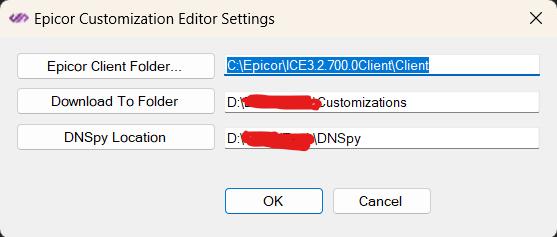
I’m looking for some help.
Did you download the helper lirbaries?
And Deploy them to your Epicor client folder?
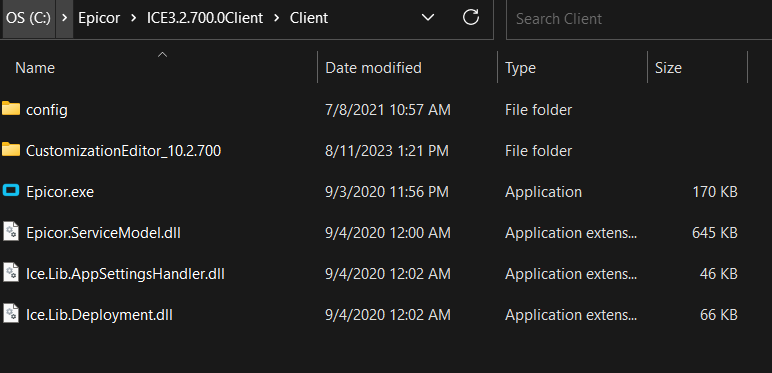
it shouldn’t be in a separate folder, it needs to be in the client directory
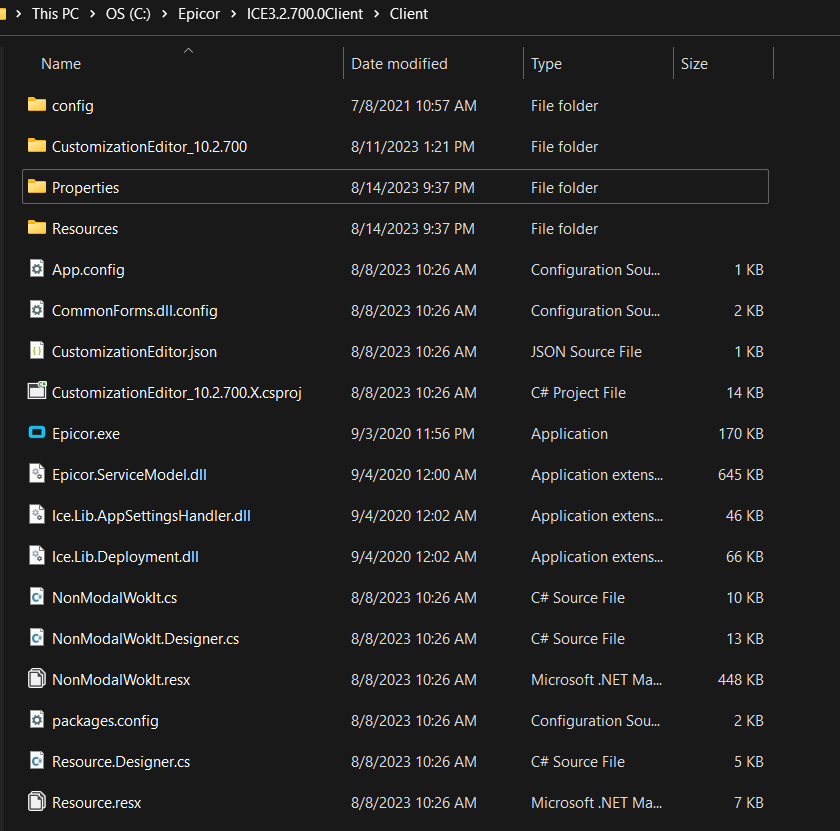
You seem to be missing a bunch of files… there should be an Exe and several others.
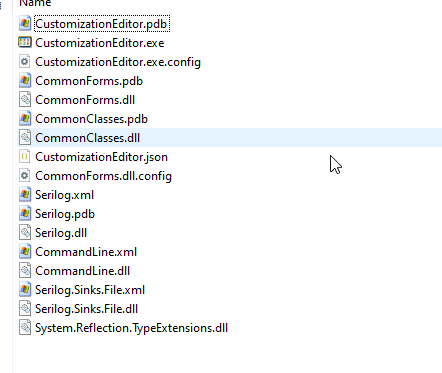
Why do you have the source code in there?.. You need to download the zip file that is compatible with your version of Epicor in the above link. Compiled code… not source code.