Forgive the rant, but I was curious if anyone else is wondering “What’s the point of ECMP?.”
We quickly realized that CMP wasn’t really adding anything to our environment management because Epicor was going to force upgrade our environments anyways. With 2025.2.16, we were told that our test environments would be force-updated 48 hours prior to the official window. With that, our production update would’ve been happening in the middle of the week on a self-managed plan so we quickly opted out.
The end of March came and went, and only one of our test environments updated to 2025.2.16 – the Epicor-managed one. Our pilot system (self-managed) didn’t update despite the repeated warning messages in ECMP.
Then, we waited for LIVE to update, but LIVE never updated. We never received any failure notice either. ECMP shows no attempted update logs.
Naturally I’ve opened a support ticket to get things aligned, but it keeps begging the question, “What does ECMP even do?” and what’s the point if I just end up submitting endless tickets?
I genuinely am curious if I’ve just misunderstood the tool or something. Can anyone share their perspectives or experience? Maybe even a suggestion for me to recoup my sanity
I’m hoping the CMP might one day provide some nice logging and analysis tools bringing things together without extracting files from every other thing.
I have often wondered the same thing. What’s the point? When I actually have a need for it, where’s the documentation? The help file is practically empty for CMP. I want to know how to take a live snapshot and update my pilot database. This is probably documented in a half-baked KB article somewhere. It would be great if someone just showed us how to use it. I still request support for everything they think we should be using the CMP for.
I do this in CMP often, much faster than putting in a ticket.
Open CMP, find Pilot instance > More Details
Go to Database tab > Refresh DB
Select date of backup
Select environment you want to copy from (Live)
Type Confirm
Wait ~30 min
???
Profit
Schedules are still there, but disabled with no scheduled tasks underneath them.
Reports come over and we have to export/save what we have worked on in Pilot prior to refreshing.
I have a list of things to do/check after refreshing, including:
Verify Azure SSO Settings (although it does seem to keep the Pilot SSO settings in place, I’ve never had to change it)
Update Email Settings (we use Mailtrap as our ‘blackhole’, all Pilot emails go there)
Update, test, and save API Keys
Update Attachment Type Maintenance to switch from Production ECM to Dev ECM
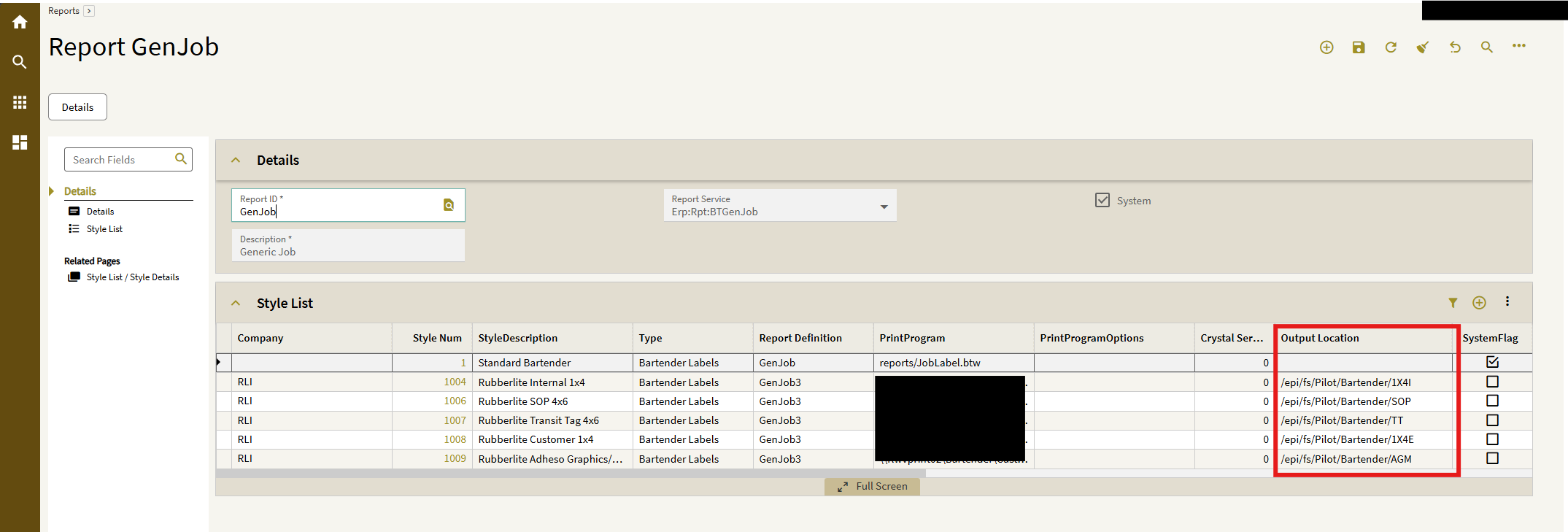
Update Report Style Output Paths (recently the file paths do convert to linux paths automatically, but are still pointed to Production subfolders instead of Pilot subfolders)
Update Payment Method Maintenance (similar to above, Output File Path is a Production subfolder and needs updated to Pilot)
Last and certainly not least (in my opinion lol), I update the Context Bar Site Color to Yellow in Site Maintenance and enable Themes in Profile > Settings > Preview Features. This makes Kinetic yellow and tells me ‘you are for sure in Pilot’
Basically, anything we drop in our Azure File Share does now get the root path converted from '\TENANTID.file.core.windows.net' to ‘epi/fs’, but it still has the Production subfolders, so we just update to the Pilot subfolders and Save
I’ve had repeated failures occur previously as well. In those cases I asked CS to fix the underlying cause of the root failure (because they initially just did the refresh for me, marked the case as suggested resolution, and moved on) - after they investigated and gave me an RCA, I could use CMP.
In my case, supposedly it was backed up queued refreshes that had never completed, preventing any future refresh attempts from succeeding… doesn’t explain why the first one failed, but at least it works now…
Within Kinetic there are on-demand videos in the online help. If you access the online help and search for Cloud Management Portal, there are several videos walking through provisioing and executing different services.