"Attempted to perform an unauthorized operation" error: client side function

I deployed a client side customization that utilizes the RestClient assembly and consumes an API key. All of this worked great when I developed and tested it.

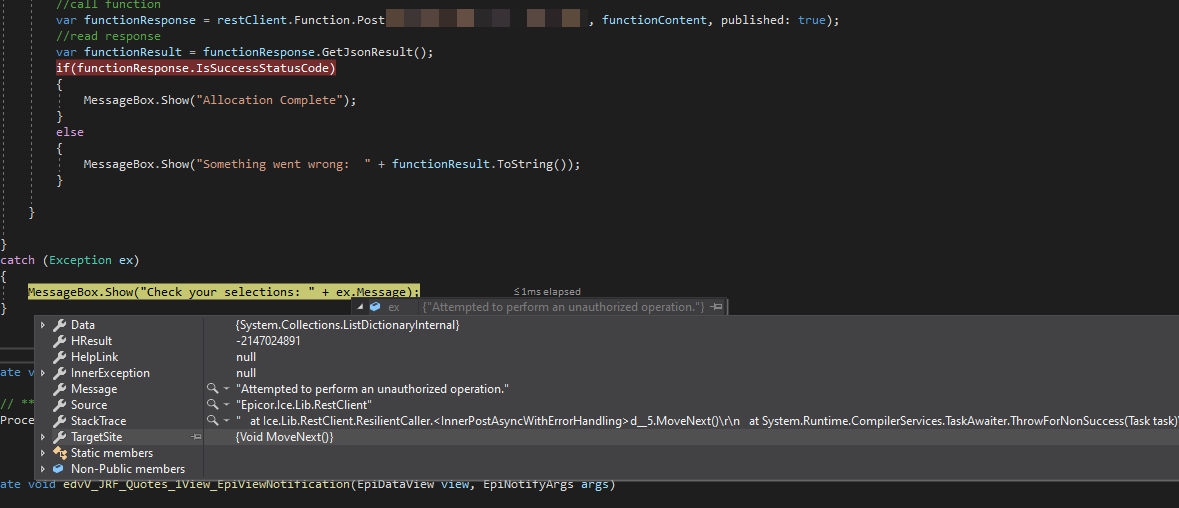
When I run it under a different user, it throws an exception when I try to call a function. The only message I am seeing is “attempted to perform an unauthorized operation” when I debug. The event viewer on the server show no error.

If I call the same function from Postman using the same credentials (not my own), same API key, etc, the function works just fine.

I am not really sure what I am missing here. The client side code works just fine for my user, but fails for other users. I’d think it’s some sort of permissions thing, but that wouldn’t gel with the Postman success.
Any tips?

Is the test/dev system different than Prod?

You’re not ignoring Cert errors in Postman, are you?

the test /dev is a copy of prod (data) but on a different box.
I do believe I have postman ignoring cert errors, however I’m not 100% sure.

Just for me, whenever it works on one box and not another, it’s often a CERT issue. Not always, but…

In this case, it’s working on either box for my user, but not for other users regardless of environment.
It also works on postman for either environment under any user.

It seems to be an issue with the Epicor.Ice.Lib.RestClient class, but I am not sure

When I run it on my same machine, running epicor as a diff user, it still fails. I am doubtful it is certificate related but I am never sure. It seems like a permissions thing related to the RestClient

If you previously installed the cert on your machine’s Trusted Store, then it could work for others on your machine. However, if it works for you on other machines, I’d say it isn’t cert related.

1 Like

Does “run as a different user” count as changing the trusted store? I am not logging in as the user to my machine, just running as their user

Changing the Epicor user would still use your User store cert but if the cert was installed in the local machine store then any windows login would work on your machine. So, as always in IT, it depends… :rofl:

1 Like

Of course it’s Insights and everyone is gone too lol

Here’s another interesting piece of the puzzle. I demoted the libraries used out of production so that they aren’t callable. Attempting to call with Postman, etc. gives a 404 as expected.
Restarting a new Epicor session with a different user gives the same “attempted to perform an unauthorized exception”, whereas if I run it with my user, it gives a REST error (404 not found, as expected).
This tells me that there is something preventing the usage of the RestClient library by other users prior to it even calling the function.

Try enabling the rest trace flag in the appserver.config file, it the error comes from the server I would think it should appear in the server log file. Otherwise like you said it’s not even making it that far before failing.

1 Like

Ok I did that and threw the exception with the “bad” user, and then also showed it getting to the function (albeit it with a failure since i demoted the lib) with my user.

What should I tell you?

Is there anything for the calls on the ServerLog.txt file?

Yes, so for the failed one (failure to even reach calling the function) it looked like this:
I removed machine names and user, fyi.

The first weird thing is a failure on Ice.BO.GenXData/GetByID (no idea what this is)

<Op Utc="2021-07-14T21:27:45.4653565Z" act="Ice:BO:GenXData/GenXDataSvcContract/GetByID" correlationId="566c78eb-411e-4be0-81da-13d3b7042077" dur="4.6166" cli="172.28.67.162:60654" usr="OMITEDUSER" machine="OMITEDMACHINE" pid="8372" tid="11">
  <Exception><![CDATA[Ice.Common.RecordNotFoundException: Record not found.
   at Ice.TablesetBound`3.InnerGetByID(IceDataContext dataContext, Int32 pageSize, Int32 absolutePage, Boolean& morePages, TFullTableset tableset, IEnumerable`1 queryParameters) in C:\_Releases\ICE\UD10.2.600.5FW\Source\Framework\Epicor.Ice\Services\TablesetBound.cs:line 742
   at Ice.Services.BO.GenXDataSvc.GetByID(String company, String productID, String typeCode, String cgCCode, String key1, String key2, String key3) in C:\_Releases\ICE\RL10.2.600.0FW\Source\Server\Services\BO\GenXData\GenXData.Designer.cs:line 492
   at Ice.Services.BO.GenXDataSvcFacade.GetByID(String company, String productID, String typeCode, String cgCCode, String key1, String key2, String key3) in C:\_Releases\ICE\RL10.2.600.0FW\Source\Server\Services\BO\GenXData\GenXDataSvcFacade.cs:line 429
   at SyncInvokeGetByID(Object , Object[] , Object[] )
   at System.ServiceModel.Dispatcher.SyncMethodInvoker.Invoke(Object instance, Object[] inputs, Object[]& outputs)
   at Epicor.Hosting.OperationBoundInvoker.InnerInvoke(Object instance, Func`2 func) in C:\_Releases\ICE\UD10.2.600.5FW\Source\Framework\Epicor.System\Hosting\OperationBoundInvoker.cs:line 59
   at Epicor.Hosting.OperationBoundInvoker.Invoke(Object instance, Func`2 func) in C:\_Releases\ICE\UD10.2.600.5FW\Source\Framework\Epicor.System\Hosting\OperationBoundInvoker.cs:line 47
   at Epicor.Hosting.Wcf.EpiOperationInvoker.Invoke(Object instance, Object[] inputs, Object[]& outputs) in C:\_Releases\ICE\UD10.2.600.5FW\Source\Framework\Epicor.System\Hosting\Wcf\EpiOperationInvoker.cs:line 23
   at System.ServiceModel.Dispatcher.DispatchOperationRuntime.InvokeBegin(MessageRpc& rpc)
   at System.ServiceModel.Dispatcher.ImmutableDispatchRuntime.ProcessMessage5(MessageRpc& rpc)]]></Exception>
</Op>

The next one of note is related to the REST api call itself and simply shows it being called:

<RESTApi msg="Incoming request https://<<server>>/Epicor10DEV/api/v2/efx/JRF/UD100Functions/Allocate" machine="OMITTEDMACHINE" pid="8372" tid="30"/>
<RESTApi msg="Request https://<<server>>/Epicor10DEV/api/v2/efx/JRF/UD100Functions/Allocate, Auth Header scheme Basic " machine="OMITEDMACHINE" pid="8372" tid="30"/>

Next, I logged in as my user and attempted the same test.
I note no exceptions on my user session.
I then called the function the same way as before:

<RESTApi msg="Incoming request https://<<server>>/Epicor10DEV/api/v2/efx/JRF/UD100Functions/Allocate" machine="DEV01" pid="8372" tid="132"/>
<RESTApi msg="Request https://<<server>>g/Epicor10DEV/api/v2/efx/JRF/UD100Functions/Allocate, Auth Header scheme Basic " machine="OMITTEDMACHINE" pid="8372" tid="132"/>
<Op Utc="2021-07-14T21:29:47.2891143Z" act="" correlationId="27326099-5927-4237-b238-2f2ccc20ce8f" dur="19.111" cli="172.28.67.162:60711" usr="amoreng" machine="OMITTEDMACHINE" pid="8372" tid="132">
  <RESTApi msg="Principal: amoreng" />
</Op>

That’s the two place I see of note

I am getting reports from other users that this is working great, however the user I am testing with as well as a service account I am testing with are both failing. UGH!
Ice.BO.GenXData can be ignored. Look for other messages.

Are you sure API key is sent?

Yes api key is being sent in both the client app and in rest client calls
It only fails on the client app and only for certain users, same code in every client case

is there access scope assigned to the user?

There is an access scope assigned to the api key and the access scope has access to the proper functions and libraries. I’ve test with and without adding the access scope to the api key but same results.
The users themselves do not have access scopes attached to them

The RestClient builder uses the transaction object session to identify the user, and like I said it seems to be failing prior to even reaching the function itself. I wonder if it is somehow related to a user configuration?

I’m not sure this error is coming from the server as I am no logging anything weird with the serverlog and the restapi flag set to true. The other weird thing is I am not showing anything odd in a client trace log

What is the full stack of the error?