AppServer Connection: https://Epicor10.ikicorp.com/KineticTest
Form Name: Job Status Maintenance
Customization Name: DemandRef
Menu ID: JCGO3033
Software Version: 11.2.200.0
============
Business Layer Exception
BpmData form feedback has been received from client but not processed by server code
Exception caught in: Epicor.ServiceModel
Error Detail
============
##!Correlation ID:##! 86b23fa7-f2dd-4a03-9e77-278dfe239bbe
##!Description:##! BpmData form feedback has been received from client but not processed by server code
##!Program:##! Epicor.Customization.Bpm.dll
##!Method:##! FinalizeBpmContextUsage
##!Line Number:##! 251
##!Column Number:##! 13
Client Stack Trace
==================
at Ice.Cloud.ProxyBase1.CallWithCommunicationFailureRetry(String methodName, ProxyValuesIn valuesIn, ProxyValuesOut valuesOut, RestRpcValueSerializer serializer) at Ice.Cloud.ProxyBase1.CallWithMultistepBpmHandling(String methodName, ProxyValuesIn valuesIn, ProxyValuesOut valuesOut, Boolean useSparseCopy)
at Ice.Cloud.ProxyBase`1.Call(String methodName, ProxyValuesIn valuesIn, ProxyValuesOut valuesOut, Boolean useSparseCopy)
at Erp.Proxy.BO.JobStatusImpl.MassUpdate(JobStatusDataSet ds)
at Erp.Adapters.JobStatusAdapter.MassUpdate()
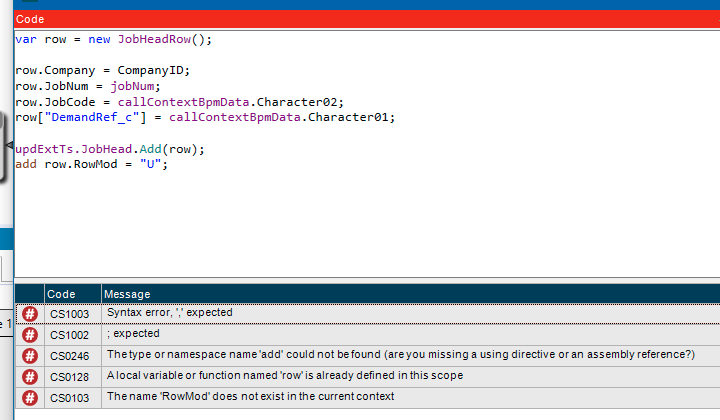
add row.RowMod = "U"; after the row[“DemandRef_c”] line.
I always forget that one. I’m guessing, without telling explicitly telling the system you’re updating an existing row, it assumes you’re adding one. Thus the “you’re not allowed to add a JobHead record” error.
The BPM processes and I get the data form but I now get this error. I’m the only one in this database.
System Information
==================
AppServer Connection: https://Epicor10.ikicorp.com/KineticTest
Form Name: Job Status Maintenance
Customization Name: DemandRef
Menu ID: JCGO3033
Software Version: 11.2.200.0
============
Business Layer Exception
Row has been modified by another user and couldn’t be updated.
Exception caught in: Epicor.ServiceModel
Error Detail
============
##!Correlation ID:##! 5cf3a62d-40e0-4741-8f44-b015d537b6f9
##!Description:##! Row has been modified by another user and couldn’t be updated.
##!Program:##! Erp.Services.BO.JobStatus.dll
##!Method:##! MassUpdate
##!Line Number:##! 737
##!Column Number:##! 13
##!Table:##! JobHead
##!Field:##! MRP00000000013
Client Stack Trace
==================
at Ice.Cloud.ProxyBase1.CallWithCommunicationFailureRetry(String methodName, ProxyValuesIn valuesIn, ProxyValuesOut valuesOut, RestRpcValueSerializer serializer) at Ice.Cloud.ProxyBase1.CallWithMultistepBpmHandling(String methodName, ProxyValuesIn valuesIn, ProxyValuesOut valuesOut, Boolean useSparseCopy)
at Ice.Cloud.ProxyBase`1.Call(String methodName, ProxyValuesIn valuesIn, ProxyValuesOut valuesOut, Boolean useSparseCopy)
at Erp.Proxy.BO.JobStatusImpl.MassUpdate(JobStatusDataSet ds)
at Erp.Adapters.JobStatusAdapter.MassUpdate()
I see that the BPM does update the fields but the job doesn’t firm and release. If I check Firm and Release again and click Process again it will firm and release the job and will retain the DemandRef_c and JobCode fields with the SO.
Move our little BPM to Post-Proc. That way, we’re updating the fields after the release has succeeded.
It’s probably not firming/releasing the job because (on a pre-proc bpm) we’re updating the row in between the time you click the button and the base method fires.
Note that the usual “post-proc doesn’t update the DB” rules don’t apply here because we’re calling our own update method.
Well, yes. I moved it to a post BPM and it sort of works. I still get an error that the row can’t be updated but it still is and the job doesn’t firm the first time. I have to run the process a second time. I uploaded a video of the process so you can see what is happening.
No, this is attached to ChangeJobHeadFirm. When I attach it to ChangeJobHeadRelease the BPM doesn’t run. When I look at the trace log the method ChangeJobHeadRelease doesn’t show is if its not being triggered.
For anyone following this my process doesn’t work for 2 reasons:
My BPM was a preprocess method and when firming jobs anything from a preprocessing method gets erased. To make it work you need to call a post process BPM with the data form and update there.
According to Epicor support the fields in the grid view are read only and can’t be directly edited. What we’ve eventually done as a work around was to update the Job Code field with the sales order number using DMT tool for large quantities of jobs and just entering it on the detail screen for one or two jobs.