No, the code doesn’t update anything. I get the bpm form, enter the order number but the fields don’t update. I even added a showmessage after to see if it completed. I get the message but nothing updates.
I tested the code in a post bpm and it does weird things. The job firms but the MRP unfirm job still shows in a row. The UD filed looks like it updates but as soon as you click off the row it disappears.
No offense intended, but you’ve got to get that out of your head.
In pre, you have the option of changing things so the bo can handle stuff for you.
In post, you have to do it yourself. Changing variables etc in post without acting on it yourself only passes that data back to the form.
The form sometimes uses that info, sometimes not. Sometimes you may get lucky and a post on one bo method does get used by the form and gets passed on to a pre-processing method somewhere else. But that’s usually just in validations and build tasks for datasets.
You have to really understand the process for those last situations I described.
In general, pre is where you’ll want to be for situations like this. There will always be gotchas, but that’s what this forum is for.
Something wrong with UD fields here.
I would try to create UD and bpm to update it on some simple service. UD0x or AbcCode.
If you cannot make it working on simple Update, then you are doing something wrong. If it only fails on the method above, then maybe something was wrong with that method, but I doubt so.
No offense taken, I’m pretty thick skinned.
I tested the UD fields this morning and they work. I built a pre-bpm on Job Entry.Update to call the data form and set the fields when the job is released. The process works exactly as we expected and updated the fields correctly.
I then went back to Job Status and turned on tracing. Before the MassUpdate it calls the methods ChangeJobHeadFirm and GetByID so I built the same bpm for each one to try. Both bpms run but neither update the fields.
I am concluding that there is something with Job Status Maintenance that just won’t allow the fields to get updated. Maybe something with the MassUpdate method overwrites everything.
My current workaround is to use the DMT tool to add the order number to multiple jobs. Thats still cumbersome and no one else has access to DMT. I wouldn’t trust anyone without admin access to play with a database tool.
I welcome any advise on other work arounds and I genuinely thank everyone for all their time on this. Truly thank you.
Maybe something was changed in the processing between yours and current version as it works for Kevin…
As for this:
it is easy to explain - in post-processing only thing you update is the record in memory that is returned to client. So you see it like updated, but as soon as it is refreshed from server again, you don’t see that change anymore.
I don’t think we’ll be updating to 2023 for a year or two. It took us 15 years to update from 9.05. I will start looking at the change logs for the patches to see if there’s any mention of it.
I also tested the code in the Job Entry BPM and it works correctly.
I was thinking maybe I could add a custom button to Job Status and run some code after firming the jobs to update the fields. That would be a longer term project as C# is my nemesis.
I wouldn’t make that assumption going forward. Even if you usually do them altogether, that isn’t necessarily always going to be the case.
If your rule is that every firm/real job needs a sales order, then use JobFirmed. If your rules is that every job released to the floor needs a SO, use JobReleased.
After you’ve picked a method, should be straightforward:
Create your BPMForm widget.
Create UpdateExt widget and populate it.
Between your popup and UpdateExt, populate the UpdateExtTs
I understand. We want every job that goes to the floor to have an SO. So I took your information and made the BPM on JobReleased. I’m not sure I did it correctly though because I’m getting an error.
I created the BPM Form
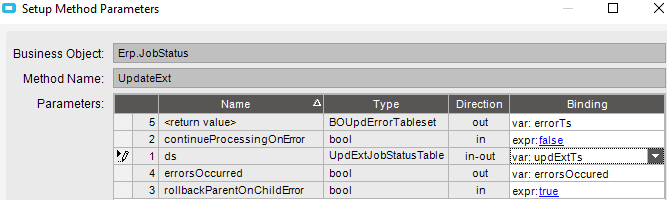
I made a Invoke BO Method widget with UpdateExt and set the parameters as you show.
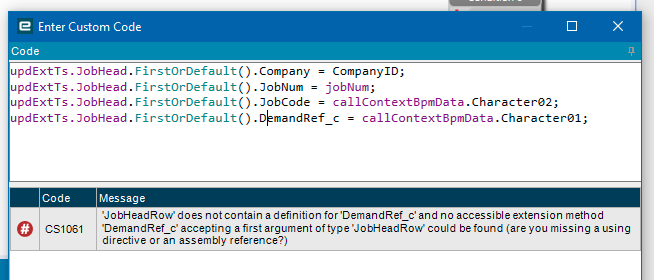
I made a custom code widget and added the lines of code you showed. I put this between the data form and the Invoke BO widgets
I’m getting this syntax error.
Did I set this up incorrectly?
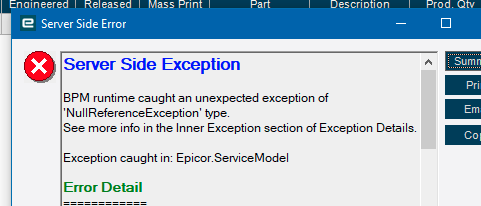
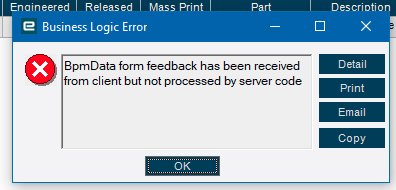
Running the BPM is returning an error now. I set it up with the code and Invoke BO. I’m getting this error:
Clicking OK gets me this error
Clicking OK to this returns me to Job Status but the process of firming and releasing the job is aborted. The job stays as an MRP job and doesn’t firm.
Got any more details than that? I suspect, as I mentioned above, that the UpdateExtTableSet was probably created without a row, so we just have to make one, but it would be nice to confirm that.
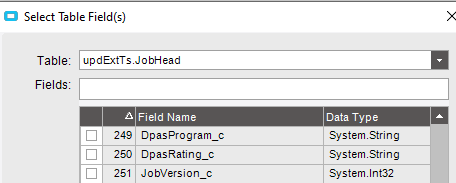
I don’t see it reference updExtTs. I may have a parameter incorrect somewhere. Here’s the first error.
System Information
==================
AppServer Connection: https://Epicor10.ikicorp.com/KineticTest
Form Name: Job Status Maintenance
Customization Name: DemandRef
Menu ID: JCGO3033
Software Version: 11.2.200.0
============
Server Side Exception
BPM runtime caught an unexpected exception of ‘NullReferenceException’ type.
See more info in the Inner Exception section of Exception Details.
Exception caught in: Epicor.ServiceModel
Error Detail
============
##!Correlation ID:##! 52efb8c5-a2ba-41ba-9d2f-30ee326ca73e
##!Description:##! BPM runtime caught an unexpected exception of ‘NullReferenceException’ type.
See more info in the Inner Exception section of Exception Details.
##!Program:##! Erp.BO.JobStatus.ChangeJobHeadFirm.dll
##!Method:##! A002_CustomCodeAction
##!Original Exception Type:##! NullReferenceException
##!Server Trace Stack:##! at Epicor.Customization.Bpm.BO.ChangeJobHeadFirmPreProcessingDirective_JobCode_79B593C10C76427CAA42CA9B803CE268.A002_CustomCodeAction()
at Epicor.Customization.Bpm.BO.ChangeJobHeadFirmPreProcessingDirective_JobCode_79B593C10C76427CAA42CA9B803CE268.ExecuteCore(Int32 step)
at Epicor.Customization.Bpm.DirectiveBase2.Execute() in C:\_releases\ICE\ICE4.2.200.14\Source\Server\Internal\Lib\Epicor.Customization.Bpm\DirectiveBase.Generic.cs:line 330 at Epicor.Customization.Bpm.DirectiveBase2.Execute(TParam parameters) in C:_releases\ICE\ICE4.2.200.14\Source\Server\Internal\Lib\Epicor.Customization.Bpm\DirectiveBase.Generic.cs:line 222
Client Stack Trace
==================
at Ice.Cloud.ProxyBase1.CallWithCommunicationFailureRetry(String methodName, ProxyValuesIn valuesIn, ProxyValuesOut valuesOut, RestRpcValueSerializer serializer) at Ice.Cloud.ProxyBase1.CallWithMultistepBpmHandling(String methodName, ProxyValuesIn valuesIn, ProxyValuesOut valuesOut, Boolean useSparseCopy)
at Ice.Cloud.ProxyBase`1.Call(String methodName, ProxyValuesIn valuesIn, ProxyValuesOut valuesOut, Boolean useSparseCopy)
at Erp.Proxy.BO.JobStatusImpl.ChangeJobHeadFirm(Boolean ipProposedJobFirm, String jobNum, JobStatusDataSet ds)
at Erp.Adapters.JobStatusAdapter.ChangeJobHeadFirm(Boolean ipProposedJobFirm, String jobNum)
Inner Exception
===============
Object reference not set to an instance of an object.