Try an orderby clause before the select inside your foreach?
And do you actually need a Date? Since you only want a readable string for your message (I assume), a ToString(“date format”) with the format you want, tacked onto what you already have in the msg section, should do what you need.
Sorry, but I am on a little bit of a rant on making BPMs as efficient as possible.
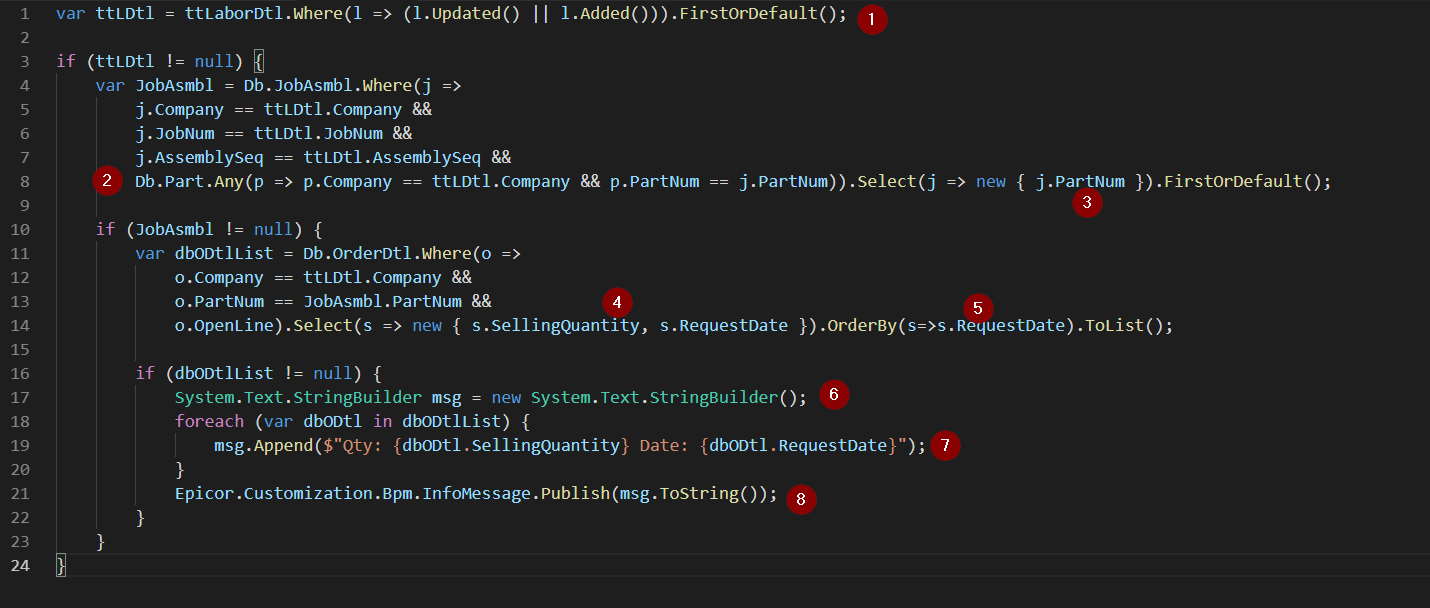
This BPM actually shouldn’t take too long as it was originally written, BUT, there are some efficiencies that can be gained. So (sorry again), I took the BPM and refactored… below is a screenshot with bullets, and what I did to make it different. Most of what I did was reduce the volume of data that is returned by each query. In one case, I completely eliminated a query.
I have been spending time the past few weeks refactoring many BPMs that were consuming unnecessary CPU time retrieving unnecessary data, or doing extra queries… so this is all very fresh in my mind.
I also converted all the queries to Lambda expressions, because personally, i find these more readable.
Simplified tt table query (dont need to look for company here)
merged two queries together, including an “Any” query for the part, since it was only looking to see if a part exists in the part table. This ANY query eliminates the data payload being returned for the part number
only selecting the one field required for this BPM (reduced data payload)
only selecting the two fields required for this BPM (reduced data payload)
the OrderBy that you were asking about
change the building of your string to a “String Builder” which is more efficient on memory.
Rebuilt how to build the string using the $" function
No need to have an if statement, because we are already inside an if condition.
Below is the code in copyable text if you want to use it, OR, if anyone else sees some additional improvements…
One potential improvement would be to combine the JobAsmbl and OrderDtl queries into one joined query.
var ttLDtl = ttLaborDtl.Where(l => (l.Updated() || l.Added())).FirstOrDefault();

if (ttLDtl != null) {
    var JobAsmbl = Db.JobAsmbl.Where(j =>
        j.Company == ttLDtl.Company &&
        j.JobNum == ttLDtl.JobNum &&
        j.AssemblySeq == ttLDtl.AssemblySeq &&
        Db.Part.Any(p => p.Company == ttLDtl.Company && p.PartNum == j.PartNum)).Select(j => new { j.PartNum }).FirstOrDefault();

    if (JobAsmbl != null) {
        var dbODtlList = Db.OrderDtl.Where(o =>
            o.Company == ttLDtl.Company &&
            o.PartNum == JobAsmbl.PartNum &&
            o.OpenLine).Select(s => new { s.SellingQuantity, s.RequestDate }).OrderBy(s=>s.RequestDate).ToList();

        if (dbODtlList != null) {
            System.Text.StringBuilder msg = new System.Text.StringBuilder();
            foreach (var dbODtl in dbODtlList) {
                msg.AppendLine($"Qty: {dbODtl.SellingQuantity} Date: {dbODtl.RequestDate}");
            }
            Epicor.Customization.Bpm.InfoMessage.Publish(msg.ToString());
        }
    }
}
Whoops… I just realized after looking at the msg.Apped, that I meant to use the command msg.AppendLine, which automatically puts the \n at the end of the line… i removed the \n, but forgot the “AppendLine”… I have repaired my original post.
Yes, I learned StringBuilder several years ago when I was building large strings for the Product Configurator. When I build the Part Description that shows on the sales order with the complete “pretty” description, I use a StringBuilder.
There is a really good article on DotNetPerls that describes it all, and why you should use it over simple “+” operator: C# StringBuilder Examples - Dot Net Perls
@timshuwy
Within the OrderRel table - the ShipToCustNum linked to the Customer table would give me the name of the Customer - would it be possible to bring this into the message statement?
Also - rather than link to the Epicor tables - could you link to a View in a separate Db that would contain all the fields required for the message statement - therefore simplifying the joins required in the code?
i dont think you can query into a view, but you could add a join to the query and return the customer. Or you could retrieve the customer inside the error as needed.
Something like this (untested, uncompiled) code:
I receive the following error on the code:
<anonymous type: decimal SellingReqQty, decimal OurJobShippedQty, decimal OurStockShippedQty, DateTime? ReqDate>’ does not contain a definition for ‘Company’ and no extension method ‘Company’ accepting a first argument of type ‘<anonymous type: decimal SellingReqQty, decimal OurJobShippedQty, decimal OurStockShippedQty, DateTime? ReqDate>’ could be found (are you missing a using directive or an assembly reference?)
I have modified your code slightly but can’t debug.
Can you suggest?
Roberto.