When the Order Job Wizard is run, I need to copy a value from a OrderDtl UD field to a JobHead UD field. My planned approach was to add a BPM to the CreateJob method of the OrderJobWiz business object. When I’ve done this type of BPM in the past, I’ve used the Set Field Filler. However, the UD field in JobHead doesn’t show up as a field in ttJWJobHead for me to set. Can anyone point me in the right direction to accomplish this?
Have you done a DB regen after adding the UD field? may also have to recycle the app pool
Yes, to both. And I confirmed that UD Column maintenance shows the table and data models in sync.
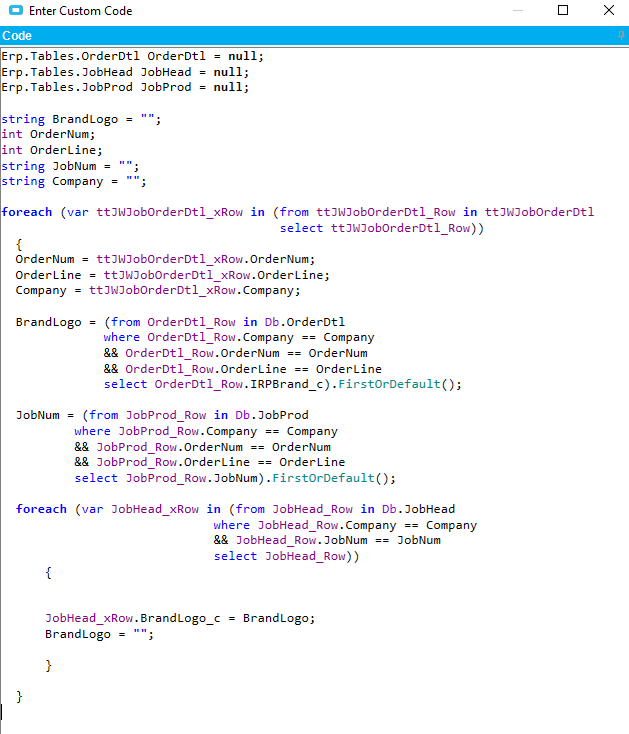
Sorry for Necroposting, but our company wants to start pushing some fields from OrderDtl to the JobHead when the job is created and this seems like exactly what we want to do. Does anyone have this working in Kinetic Public Cloud (2024.2.12)? I’ve been trying to modify this code and get it working, but I keep getting the error:
“The name ‘ttJWJobOrderDtl’ does not exist in the current context”
I’ve been trying to use the Edge Developer tools and API help to figure it out, but I can’t get this one error to go away. I’m figuring this is due to new variations of the code and tables since this was done previously. Would I be farther ahead if I did this another way?
You’re on a newer version than I am. I think I saw something in a post, or maybe release notes, that “tt” was being changed to “ds”??
That definitely helped! Here is my variation of your code below. I have no other errors now other than the following:
“The name ‘dsJWJobOrderDtl’ does not exist in the current context”
My Code:
Erp.Tables.OrderDtl OrderDtl = null;
Erp.Tables.JobHead JobHead = null;
Erp.Tables.JobProd JobProd = null;

string standardPaintColor = "";
string baseProductColor = "";
string rocklandRColor = "";
string customerLogoColor = "";
string customerIDColor = "";
int OrderNum;
int OrderLine;
string JobNum = "";
string Company = "";

foreach (var dsJWJobOrderDtl_xRow in (from dsJWJobOrderDtl_Row in dsJWJobOrderDtl select dsJWJobOrderDtl_Row))
{
  OrderNum = dsJWJobOrderDtl_xRow.OrderNum;
  OrderLine = dsJWJobOrderDtl_xRow.OrderLine;
  Company = dsJWJobOrderDtl_xRow.Company;

  standardPaintColor = (from OrderDtl_Row in Db.OrderDtl where OrderDtl_Row.Company == Company && OrderDtl_Row.OrderNum == OrderNum && OrderDtl_Row.OrderLine == OrderLine select OrderDtl_Row.StandardPaintColor).FirstOrDefault();
  baseProductColor = (from OrderDtl_Row in Db.OrderDtl where OrderDtl_Row.Company == Company && OrderDtl_Row.OrderNum == OrderNum && OrderDtl_Row.OrderLine == OrderLine select OrderDtl_Row.BaseProductColor).FirstOrDefault();
  rocklandRColor = (from OrderDtl_Row in Db.OrderDtl where OrderDtl_Row.Company == Company && OrderDtl_Row.OrderNum == OrderNum && OrderDtl_Row.OrderLine == OrderLine select OrderDtl_Row.RocklandRColor).FirstOrDefault();
  customerLogoColor = (from OrderDtl_Row in Db.OrderDtl where OrderDtl_Row.Company == Company && OrderDtl_Row.OrderNum == OrderNum && OrderDtl_Row.OrderLine == OrderLine select OrderDtl_Row.CustomerLogoColor).FirstOrDefault();
  customerIDColor = (from OrderDtl_Row in Db.OrderDtl where OrderDtl_Row.Company == Company && OrderDtl_Row.OrderNum == OrderNum && OrderDtl_Row.OrderLine == OrderLine select OrderDtl_Row.CustomerIDColor).FirstOrDefault();

  JobNum = (from JobProd_Row in Db.JobProd where JobProd_Row.Company == Company && JobProd_Row.OrderNum == OrderNum && JobProd_Row.OrderLine == OrderLine select JobProd_Row.JobNum).FirstOrDefault();

  foreach (var JobHead_xRow in (from JobHead_Row in Db.JobHead where JobHead_Row.Company == Company && JobHead_Row.JobNum == JobNum select JobHead_Row))
  {
	JobHead_xRow.StandardPaintColor = standardPaintColor;
	JobHead_xRow.BaseProductColor = baseProductColor;
	JobHead_xRow.RocklandRColor = rocklandRColor;
	JobHead_xRow.CustomerLogoColor = customerLogoColor;
	JobHead_xRow.CustomerIDColor = customerIDColor;
	standardPaintColor = "";
	baseProductColor = "";
	rocklandRColor = "";
	customerLogoColor = "";
	customerIDColor = "";
  }
}
Any help on why I am getting this error would be greatly appreciated.
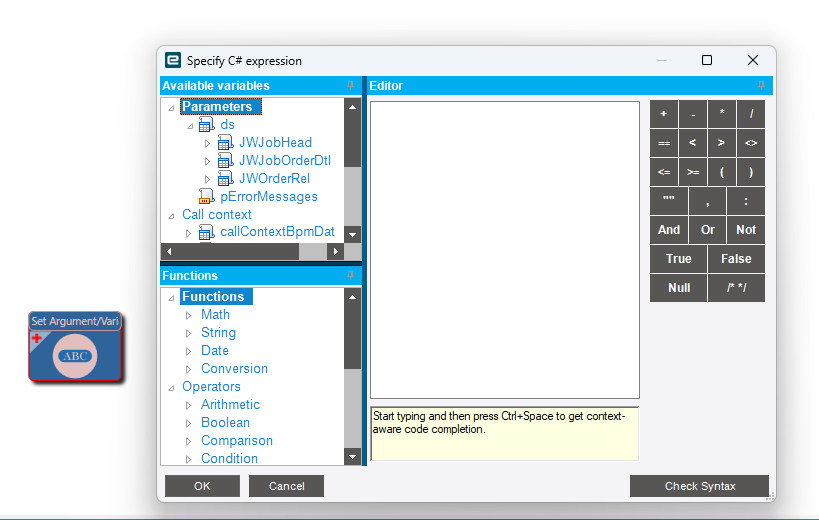
Here is what I see in Kinetic:
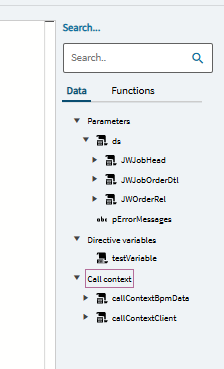
Maybe @josecgomez or another C# expert might have some input?
Here is my solution for making it work in Kinetic. I know that my UD fields don’t look correct, but there was a bug in the early versions of Epicor 10 that allowed removal of the “_c.” Ignoring that fact, everything works as expected with the code below. Just change out the field names to suit what you need. This is currently working in our Live environment.
You need to use a Post-Processing Method Directive on OrderJobWiz.CreateJobs. The only thing I used was an Execute Custom Code element. Here is my code:
foreach (var jwor in ds.JWOrderRel)
{
    // Loop through each JobProd created by the Order Job Wizard
    foreach (var jp in Db.JobProd.Where(r => r.JobNum == jwor.JobNum))
    {
        var orderDtl = (from od in Db.OrderDtl
                        where od.OrderNum == jp.OrderNum
                        && od.OrderLine == jp.OrderLine
                        select od).FirstOrDefault();

        if (orderDtl != null)
        {
            var jobHead = (from jh in Db.JobHead
                        where jh.JobNum == jp.JobNum
                        select jh).FirstOrDefault();

            if (jobHead != null)
            {
                // Copy UD fields from OrderDtl to JobHead
                // Paint Colors
                jobHead.StandardPaintColor = orderDtl.StandardPaintColor;
                jobHead.BaseProductColor = orderDtl.BaseProductColor;
                jobHead.CustomerLogoColor = orderDtl.CustomerLogoColor;
                jobHead.CustomerIDColor = orderDtl.CustomerIDColor;

                // Order Type
                jobHead.OrderType = orderDtl.ShortChar01;

                // Add more mappings as needed
            }
        }
    }
}