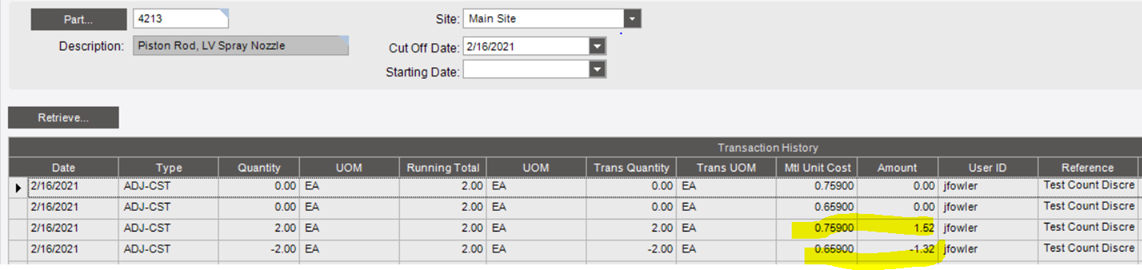
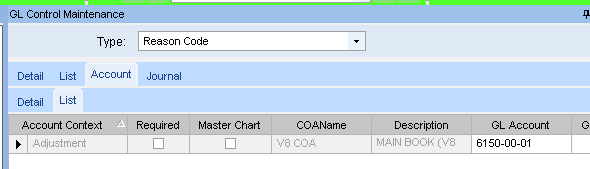
I did a cost adjustment in our test environment using reason “count discrepancy” which for whatever reason has blank GL Control. I can see the stock status increased but no adjustment was made in the GL.
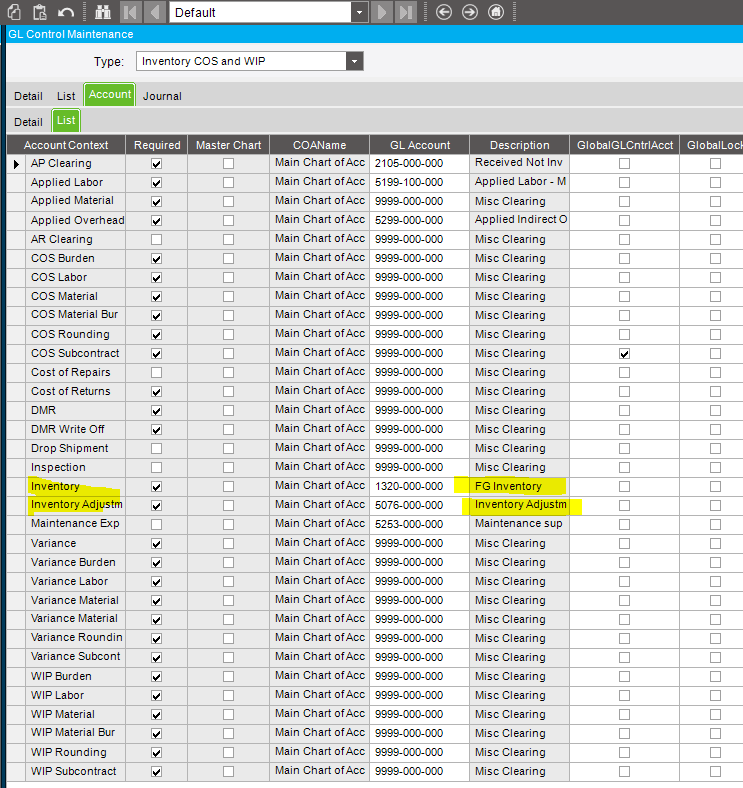
I checked Company Config default GL Control and the inventory default drives to finished goods and the inv adj drives to the inventory adjustment expense account so I don’t understand why the GL did not get hit by this cost adjustment.
Please advise, as there are parts needing adjustment in the live system and I want to understand what happened these last 6 months while there was no GL Control set for 2 of the 5 reason codes attached to inventory adjustment. Thanks.
Do you set Inventory Adjustment account from Company’s Inventory COS and WIP GL control the same as Inventory account from Company’s Inventory COS and WIP GL control ?
That makes sense, as the WIP Recon report uses the posting engine, and those two transactions had no cost, so no GL Tran would be made. And the other two (that do have a cost) net to zero in the same account.
What costing method is being used?
And you’ve confirmed that Acct 5076-000-000 is active?
My next steps would be to enable the PE Logging, run WIP Recon, then inspect the PE Log.
When you say “blank” you mean No GLC assigned to that Reason Code? Or A GLC is assigned, but all the Acct fields in it are blank?
The GL Acct to use is determined by records in the TranGLC table. These are often created prior to the process that will eventually use them. Like the expense acct on a PO Release. If you do the following, in order:
Set the part class (which uses a GLC) on a PO line
Receive the PO
Change the GL acct on that Part Class’s GLC
Run WIP Recon or Capture COS/WIP
Then the GL Acct used by the Posting Engine will be the original acct specified by the Part Class’s GLC. This is because the TranGLC record (which is what the PE uses) won’t have been updated due to the change to the Part Class’s GLC
You noted “those two transactions had no cost.” I made one cost adj entry and Epicor posted 4 lines to the trans history table. I’m not sure why the two zero lines posted.
Does the cost adjustment from $5 to $6 for example, debit inventory and credit inventory adjustment?
And if I can understand what you mean by net to zero in the same account - what account is this? I was thinking inventory and inventory adj would be hit.
By “blank” I mean No GLC assigned to the reason code.
I understand what you mean by the order of events - sequence is important
One of the tests I ran had GL control driving to R&D expense (remove part from inventory to be used by R&D) so I expected the inventory to decrease but the R&D expense to increase but GL was not hit. Yet, stock status was affected.
The cost method used can dictate how many parttran records are made. I think using LAST will generate two records.
The posting engine (used by Capture COS/WIP and the WIP Recon report) works by summarizing all the transactions together. If the net to an account is zero, no GL Tran is made.
For example say the summary of WIP Recon report shows:
When Capture COS/WIP is processed, there will be no GL trans against acct 3324-00-01 because there equal credits and debits.
You’ll never see two lines in the details section of WIP Recon if the specific transaction nets to zero either.
A STK-STK transaction doesn’t show on a WIP Recon, unless a GLC overrode something, like if the transfer was between warehouses that use different Inventory accounts.
First off, be careful how you interpret Stock Status. The quantities shown are calculated based on the date you entered. The costs will always be the current cost. Not the cost on the date specified.
And in your example above, I assume that was a Qty Adj, correct?
We have a Reason Code SHOP-SUP,
When I do A Qty Adj and specify Reason Code “Shop Supplies”, I get the following:
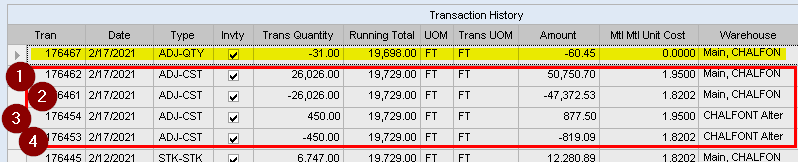
The part tran records in the red box above were for a single cost adj. We’re using cost method AVG.
Like yours, I see a tran for the negative of the QOH at the old cost (#2 and #4), and a tran for QOH at the new cost (#1 and #3) . Note that I see two pairs because I have this part in two warehouses.
Which has me thinking … Do you have multiple cost files?