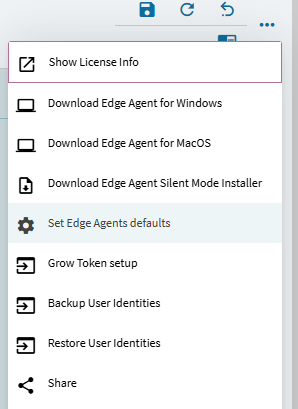
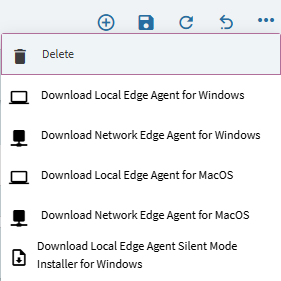
well it is paired with network installer. Because it contains service AND tray app.
We should rename the menu though.
Download network installer and then there will be a choice like on the screenshot above.
well it is paired with network installer. Because it contains service AND tray app.
We should rename the menu though.
Download network installer and then there will be a choice like on the screenshot above.
funny, you should report this.
You can get the direct link then, let me find it
CS0005336720
Thanks Olga!
Should we mark it as solution? Thanks Chadd and Olga for helping with this.
oh you are right. in that case EA for RDS should be just in the main installer.
It was divided later to support autoupdate in local EA.
It’s not in the most recent I pulled down. I don’t get the option for the three different versions.
maybe your version does not support it yet. You cannot just installed the new one then. Because there are changes for that in the Kinetic too.
Hello @Olga
Here is the case CS0005334083
Sorry TLDR looks like @chaddb has filled you in.
So for some reason the information is confusing, Two different installs one network and one local. It was pointed out to me that the network version was for cloud only. We are On-prem.
There seems is a lack of consistency around the different versions and how they install and documtation on Epicare.
The example I mentioned above, Two installers was for 2025.2, Earlier versions only have one with the network and local in the same exe.
On my phone so I can’t send screen shots Nd will update later on.
I did install the virtual desktop version for 2025.2, which is pRt of the network install file it appears to install the service as well as the edge agent tray app. So you end up when a user logs it getting the error stating the port is in use.
Pictures to cone later.
okay, we understood that he uses old version.
Sorry, I should start with checking the version first. Cloud/on-prem is irrelevant here.
Local EA works same for cloud and on-prem, but of course you need to have Kinetic version that supports RDS mode.
If you are on 2023, then it looks like it won’t work for you.
1.2.644 is that latest version as mentioned 2025.2 has those multiple file downloads as well as the option to select the version from the edge agent config screen with a drop down.
There really seems to be a gap with documentation with different versions and different install screen steps as well as changes within kinetic… For such a critical tool for parity and moving to browser it seems to not getting the love it deserves. I am not Epicor bashing, just politely asking to have some more focus on this.
I am so confused it is mentioned it is backwards compatible. I took that to being you can use the 2025.2 Edge agent with 2023.2, which I have proved does work for loading the classic client.
We have 2025.2 as well. Testing that on RDS behaves the same way as using 2023.2. In each case running version 1.2.644 of the edge agent.
it is compatible. but the Kinetic should know how to use it. Old Kinetic does not know about RDS version, so it cannot use it. But old Kinetic knows about local EA and can use any version of EA including the latest 644.
that is upgrade to unconfuse
EA does not work alone, it receives messages from browser or smart client and reacts to them. Old browser version does not know which messages EA will support in the future. The latest EA in this case knows what messages old client version can send and can process them correctly. So it is backward compatible this way.
I got this all to work in 24.2 with the Edge Agent version that @Olga posted. The Terminal Server one works correctly and multiple users can use Kinetic from the browser and it opens classic screens to the correct session. Printing and everything else seems to work per session.
They did open a problem to fix the download link in 24.2 to the version that Olga posted.
Clearly I missed something in my testing then. I’ll go back and install 1.2.644 rds version and yes test with 2025.2 which I thought I had
2024.2 had two installers