For Peoples curiosity, here is a list of versions of edge agent and Kinetic versions. I don’t believe the Kinetic minor release number matters, however since 2025 the Edge Agent Config in the menus allows to select a version to configure. Screen shots to follow.
I included the information from the help about for each version I downloaded from. I didn’t realize there was a platform UX version, which I thought was interesting.
Epicor opened a problem to fix the multiple installers and just link to the latest in on-prem 2024.2. I assume that will apply to 24.2 and newer but not sure.
I am pretty confident now that while you can open the classic screens using the local client, there is either something wrong with the way the VD version is operating, or the 2023.2 web app itself is not passing the correct information… I would have expected it not to matter RDS or not considering it works with the local version. The only thing I can think is that in local mode the default port is 6071 and in RDS it is a random port for the edge agent. Maybe that’s where the difference lays… But how does the browser know what port the edge agent is running on that’s what I’m curious about. Not a great deal in the f12
i already wrote - it uses cookie in default browser. EA tray starts on random port and creates cookie with that port information using the default service port for EA.
Browser HP reads that cookie from the EA on the default port and then connects to that port.
As for smart client - that is a simple pipe, it is easier because we control both sides, unlike with browser.
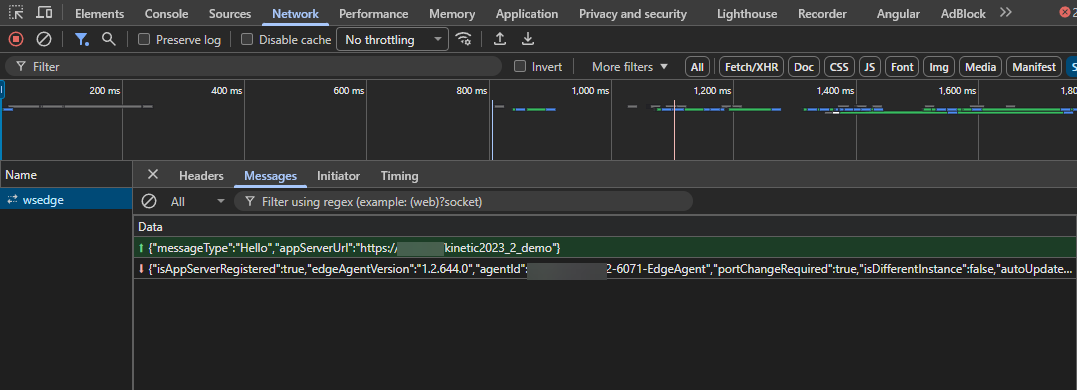
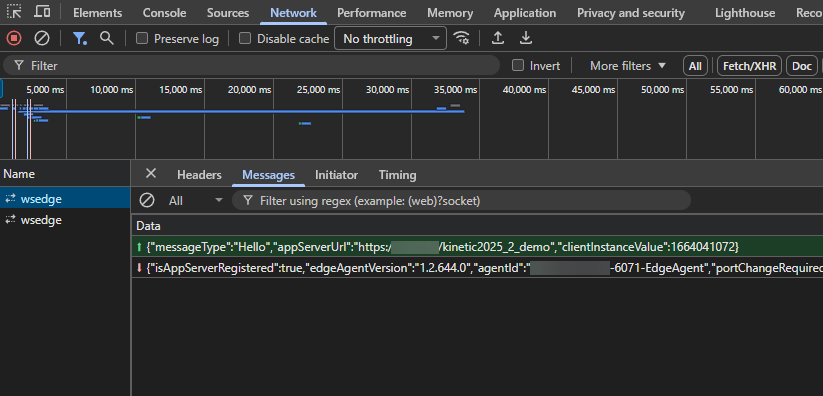
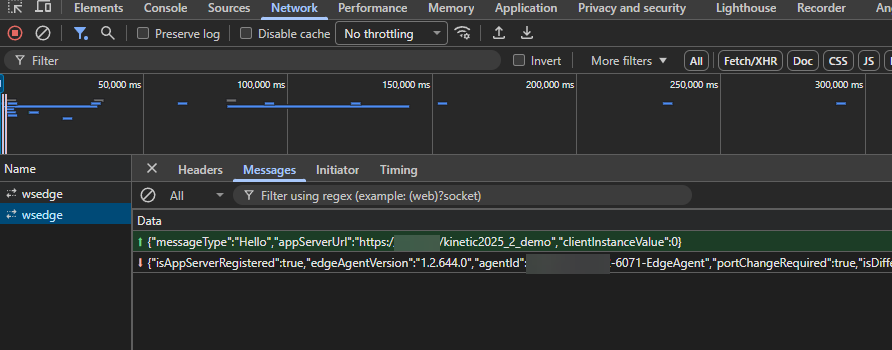
As we can see 2025.2 generates two wsedge socket requests and 2023.2 only 1. With some differences (clientInstanceValue. The null references I have seen while testing have been because of that payload difference.
From what it looks that value tells epicor which edge agent port to respond on, whti that information being stored in the browser.
The way this is generated is baked into the the js, so really nothing that can be done. Sadly 2023.2 is in sustaining support so there is little that is going to be able to be done about this.
So there seems to be a few things going on. Why does it work with the local client and not in RDS? Essentially the standard port is 6071, and I am guessing that if you changed the port in the edge agent maintenance, then deployed using the silent installer, the local may not work for 2023.2 as 6071 is baked into the UI code.
Anyone got any creative ideas to get around this limitation for 2023 to get it to work in RDS?
That’s all I have on this topic. Now we have to and revisit our upgrade plan.
@Olga I appreciate your time in responding to the thread. I know sometimes it can be like to talking to a tree when people try to explain something to me. The whole why it worked in local and not in RDS had me totally stumped, but now I know. Thanks
Sorry to jump on this thread but we have also been dealing with a lot of pain trying to get Edge Agent configuration to function correctly. Hopefully this might also help others too.
Our setup:
Kinetic 2024.1.32
We will likely upgrade to 2026.2 later this year once all our users are on browser and Classic dashboards have been uplifted
Edge Agent 1.2.540
Install on Windows 11 PCs
Requirements:
Open Classic Apps
Client print
Network print
Switch user on PC
We were installing on our users machines via script in Local Mode until we realised this caused an issue when switching users.
From this point we changed script to use –installMode multiSessionInstall and switching users worked.
We started to roll out Edge Agent to more users and found some users would work fine and others would get an error saying Edge Agent could not connect.
We logged CS0005382796 and were advised to use newer version of Edge Agent 1.2.616.0 and were provided with local installer. This resolved the issue with Edge Agent connecting but meant that –installMode multiSessionInstall was not supported and therefore switching users broke. We had same issue as @Hally where if a user opened a Classic app it would open in the session of first user.
We stumbled across the fact that with the old Edge Agent 1.2.540 we do not get Edge Agent connecting errors if user is using default browser. Which reading @Olga comments above seems to be expected. I assume with newer Edge Agent default browser no longer matters? That seems to be our experience with limited testing.
So, I think we need to use the newer Edge Agent, but we need the network/RDS installer instead. Therefore, if we use the version 1.2.644.0 that @Olga provided link too above this should support the –installMode multiSessionInstall command line?
To use the multi-session install for 2025.1 & newer you need to use the Network Installer, not the local Client installer. They split the installer into 2 parts, Local and Network with the multi-session going to the network installer. Doing this will mean no auto-update of the agent but if you are already using a software deployment tool then you can push the updates that way (we use PDQ without issue).
Some of the other flags also changed in 2025.1 as well, I think the actual call for the multisession changed.
If you still have issues with it not recognizing that the agent is installed and running in the multi-session mode:
Is everyone waiting for the pop-up saying the agent is running?
If you click connect on the error does it go away and everything works or it keeps looping the error?
Is the icon active in the tray?
If it is active, does right clicking on it and restarting the service then reloading the site solve the issue?
If someone else (preferably a clean profile) logs onto the machine does it work?
I’ve found two issues with multi-session.
First if a user clears all of their cache/browsing history and then launches kinetic without having restarted the agent it looses its connection but in those cases I believe hitting connect works, if not, then restarting the Edge Agent service does.
Second and more annoying is there seems to be the possibility of a user profile being corrupted, for lack of a better word. In this case the same solution to restart the agent and hit connect solves it until they close the browser. Other users logging into the exact same machine do not have this issue.
Yes - I realise that now after reading through this thread. Frustratingly we logged a Case with Epicare for the Edge Agent not detected issues (which we now know is related to default browser not Edge Agent version or install mode) and we told them we were using multisessioninstall and the fix they gave us was local installer for 1.2.616.
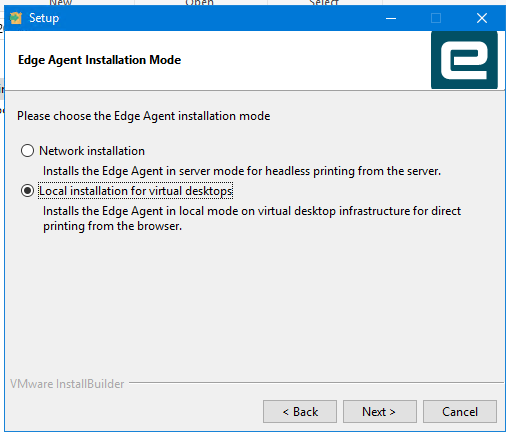
After testing I can confirm that the URL Olga provided is the network installer for 1.2.644 and if you install manually, you see the following options. We chose “Local installation for virtual desktops”.
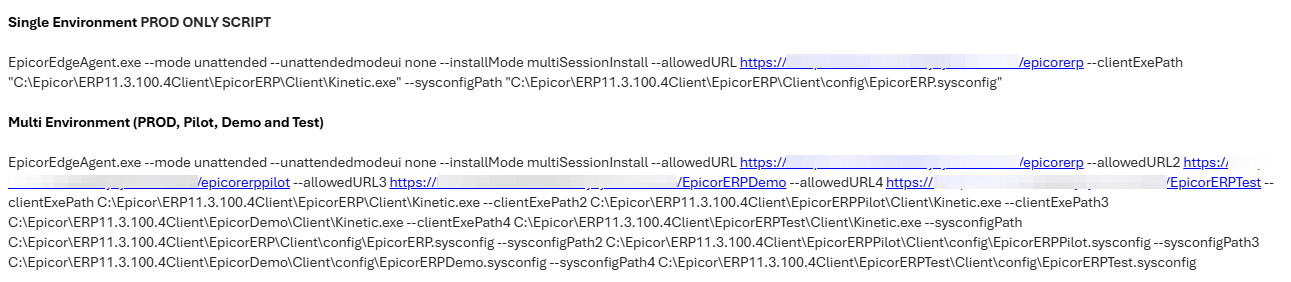
Only thing we had to change in our script for the network installer 1.2.644 was to add the –sysconfigPath for each environment. –InstallMode multiSessionInstall still works.
@leonardpothier Can you confirm that your users still have to use their default browser?
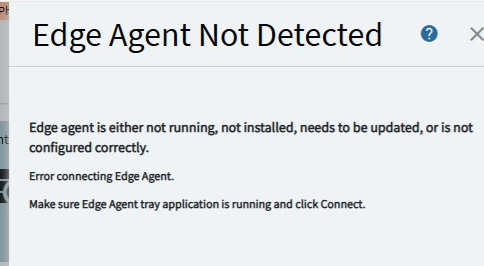
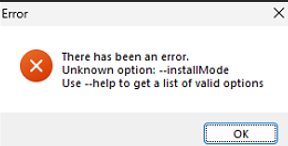
Network installer for 1.2.644 gives us all the other functionality we need (Switch users, Open Classic apps, printing etc) but if they don’t use the default browser we get the below error. I was unclear from Olga’s comments whether that was still the case with newer Kinetic versions than ours.
Hi Olga, when you say “this type of EA” do you mean the network/RDS installer?
Therefore, are the following statements correct:
Local Installer - will work with any supported browser (MS Edge, Chrome etc) regardless of whether it is users default browser but then you can’t switch users on PC
Network/RDS Installer - will only work with default browser but then you can switch users on PC
 But how does the browser know what port the edge agent is running on that’s what I’m curious about. Not a great deal in the f12