Is there a way to set the filename for a report that is emailed.
For example the orderAck report that is mailed out is orderAck.pdf. We have the order number and other field data in the email, but the customer is asking for an enhancement. Their process is a bit manual where they export the attachments into a local folder. They have someone during this time the user has to rename the file to the order and their PO number. Is there a reportParmaRow we can set so that our customer can save some time and reduce the errors that have been going on.
First, if it is a person that saves and renames the file, something like EZDetach will save them sooo much time. Basically an outlook add in that lets you set parameters to manage email attachments. So just set a rule that when I get an email from Ken Nash with an attachment that is a PDF, save it to this folder and make the body of the email the file name. Link below. We use it, I don’t sell it. Think it is like $50 one time.
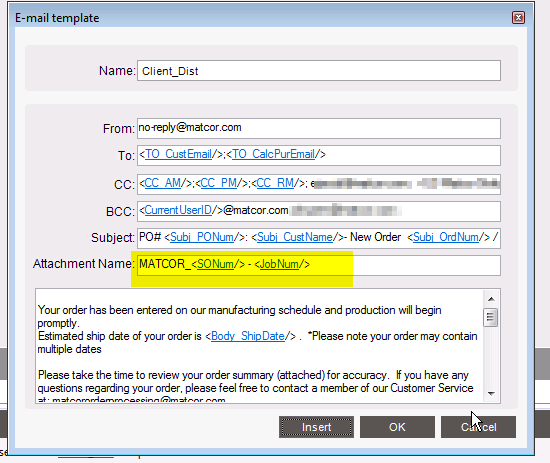
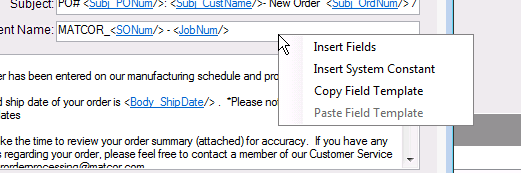
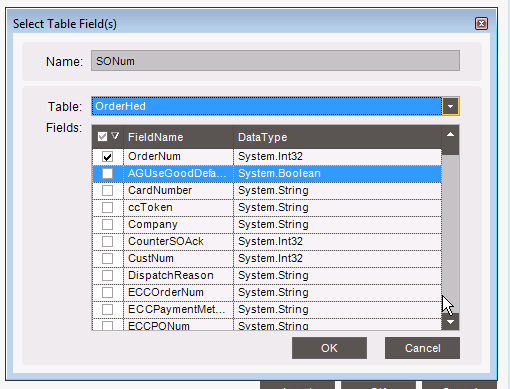
Other than that, you can do this in the report breaking and routing rules. See screenshot below. Just need to make sure the break table is the one you need to pull the field from which works for the Order Acknowledgement in your case.
I don’t know if you can do anything about it when you just manually mail it out from the order entry screen since which I think is your actual question.
I take it the break/routing rules does not work for the situation in which an user wants to manual send an email of a purchase order? Our users have requested if they can see the PO # in the attachment’s file name or manual enter it themselves. And it seems in the email template in the break/routing rules you have to pre-define the “To” address instead of using the users input at the time of the email send.
Break Routing is an extension of a Report Style. If a report style has a break routing and it is enabled, the break/routing intercepts the users “printing method” (print, preview, email, etc…)
If the user selects the Email as the method from the form, I think they still get all the dialogs they would normally see, but then Break/Routing takes over when they hit the final OK or Send button.
You are correct, so all of there criteria provided before the routing would be ignored and the settings would take over from the template created. I would be fine with the template if there was a way to have user input be carried over to it. But that does not seem the case. It just seems odd that the user can’t specify the name of the attachment before sending the email.