Just got an email about this new diagnostic tool from Epicor earlier today. But it seems the Chrome extension is not yet in the Chrome Store…or it got pulled for some reason.
Was anyone able to download and install it?
We’re excited to introduce the Epicor Test Automation Platform (ETAP), a browser extension designed to help you quickly capture, review, and troubleshoot issues within your Epicor web applications.
When something doesn’t work as expected, ETAP allows you to record your workflow and collect valuable diagnostic information, including:
• Step-by-step action documentation with screenshots
• Browser console logs and error messages
• API requests and responses
• Video recordings of your session
By reviewing the captured information, you may be able to identify the cause of an issue without opening a support case. If additional assistance is needed, the generated files can be attached to your support case to help accelerate troubleshooting and resolution.
Benefits of ETAP Capture exactly what happened during a workflow Document issues with screenshots and recordings Review application behavior and error messages Collect API activity for transaction-related issues Provide support teams with complete diagnostic information Reduce time spent reproducing issues
ETAP works with Chromium-based browsers, including Google Chrome, Microsoft Edge, Brave, and Chromium.
We encourage you to install ETAP and become familiar with its capabilities before you need it. Having ETAP available can make troubleshooting faster and provide valuable insight when unexpected issues occur.
Thank you for being an Epicor customer,
The Epicor Support Team
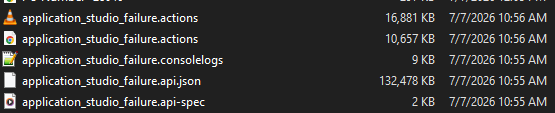
I was able to add it. I turned it on and spent about 5 minutes making a video, pdf file, and json file to add to my Epicare case only to find that the files it created can’t be added because the attachments are limited to 100mb. Nice idea though.
I have a tool at work that I have used for years called Faststone. The licenses are cheap. It creates a .mwv file and the ones I have made for my EpicCare cases are only around 6 - 7 MB. It alsos does screen captures and window captures. EpicCare has been able to view them. So there are other alternatives out there if you can’t get yours to work.
Here are the files it created. Yeah I could work around it, but why did they bother to create a tool and then leave all these hurdles in place that make it difficult to use. The video is just garbled, black, cablebox scrambles nothing useful.
Capture exactly what happened during a workflow