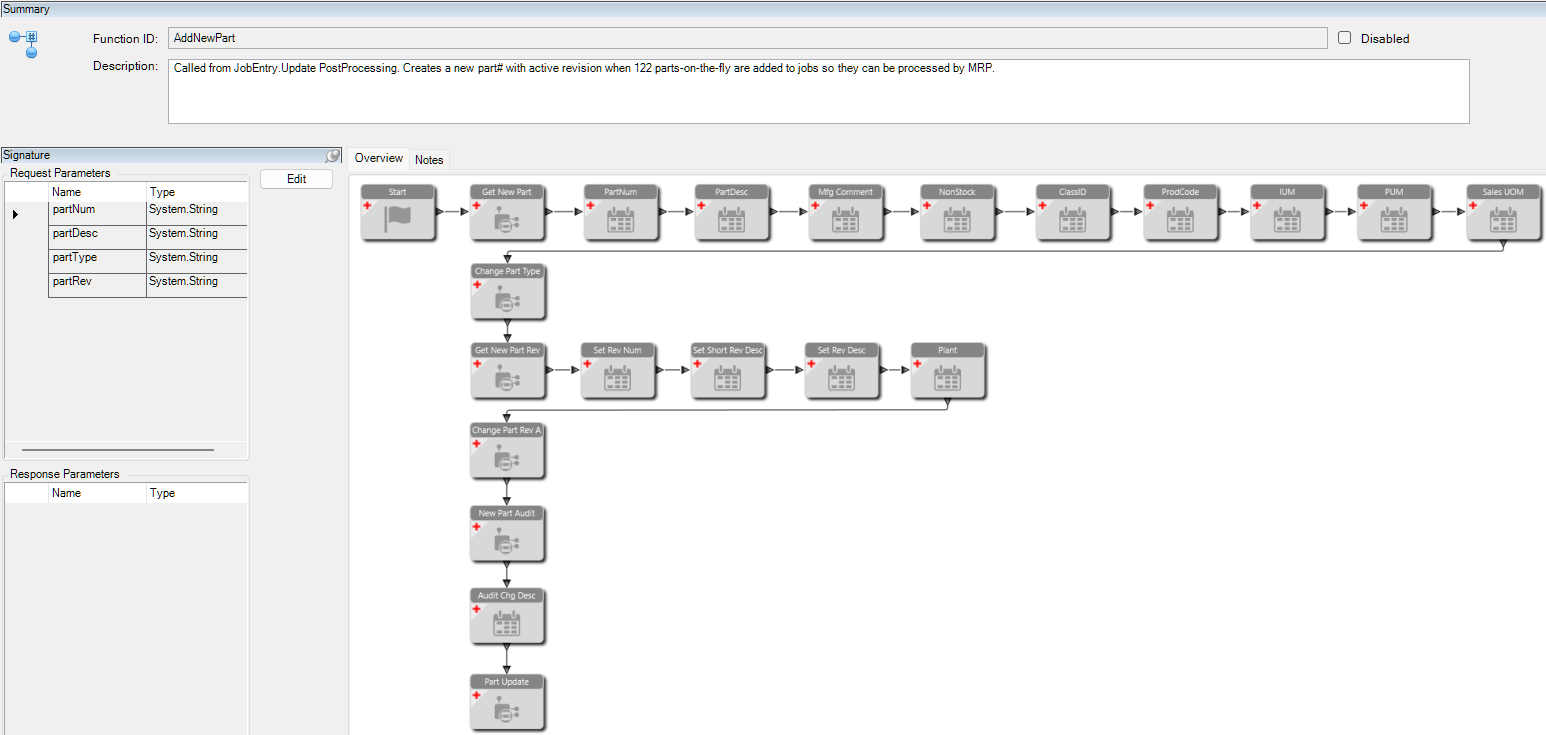
Brand new to functions. I know I’m late to the game, don’t judge me. I made my first one and it does exactly what I want it to do, but I’m curious about your thoughts.
Background - our electrical engineers don’t use CADLink like our Mechs do. When they make a new cable they don’t push it to Epicor to make a part record and will just drop it on the job as a part on the fly. This function will make a part record with an approved rev so MRP can process it properly.
Are functions always this granular? (Call BO, set fields, call another BO, set fields, repeat until the update is called)
Would you have used custom code or widgets like I did? Why?
This is called from a BPM. I can’t figure out for the life of me how to return if it’s successful or not. There are a couple of threads on here about this but I couldn’t get it to work. If anybody knows how to do that please share.
Any other thoughts/advice? I know there are a million ways to do things so I’m generally curious about other ways to go about it.
You picked a pretty complex business need for this function so way to go on getting it all setup. Some needs are going to be pretty granular like this use case it’s just the nature of the business.
Probably more support here for custom code than widgets but both are totally valid. It’s what works for you and future maintenance needs.
Agree with Randy here - your approach is totally valid (assuming it works) but could be easier to write as a custom code function rather than using so many widgets.
For simple functions I like to use widgets, but once we get into multiple methods and multiple data fields being set, I lean towards code.
How do you define success? If it’s as simple as “the update BO actually worked,” then just set an output of the function (use the Set Variable widget, or code) to some banal string like “Success!”
I just voted, but given your techy description, I have no idea what the actual Idea is. I assume its better than what we have. Maybe you will get more votes if your idea has more description for us plebs…
The short answer is there is a standard response object for REST calls. Today, each company defines their own method. The Idea is to adopt the RFC standard, so every function has access to a standard response object and each company (and Epicor) could provide better error messages to the users.
When it comes to custom code, where do you guys learn the syntax from? just trial and error?
things like the difference between function code vs BPM code. What params each BO needs, etc.
It took me a long time of piecing together a hundred of examples of BPM code to finally figure it out. Are there other resources you learned from or were you just born with it?
that makes me feel a little better. I need to write one that builds the MOM for parts based on a bunch of different things when new parts get pushed from CADLink. I figured this would be easier than that so I started small. It wasn’t too bad but a good challenge. Get an error, fix error, get error, fix error, and just keep swimming until it worked.
There isn’t great documentation but doing a trace + using the rest api help pages can usually get you most of the way there. And this website of course.
Download Epicor Server Files and use ILSpy on the dlls, you can glean a lot of info by poking their code with a stick.
Get very familiar with REST Help / Swagger and understand how to “talk” to a BO using the translation it gives you
Use autocomplete to tell you what’s there, you can start from the beginning like “Epicor.” and “Ice.” and hit ctrl-space to see what’s there to work with. Learn the meaning of the (p)roperty, (m)ethod, etc. icons are and how that informs you to “talk” to them.
When you don’t know how a BO/Method works and it’s not documented in REST Help, try to call it with no parameters, it should give you some output as to what the parameters are. Try to set a random variable equal to the output of a method and it will tell you that you are trying to make an invalid cast and the type should be xxxxx, which can inform you as to the output object type.
Learn how to read Epicor OOB App Studio JSON to see how they do things. You can see the data being sent to their BOs this way as well.
Use the F12 Dev Tools, learn to read and set values on app studio components on the fly with ctrl-alt-L
Learn to use the epDebug object, specifically epDebug.views / epDebug.context
Thanks guys, syntax wasn’t the right word.
(this fist part is straight from good ol ChatGPT, I just wanted to use it for reference)
How do you know when to use something like this.CallService vs …GetService?
// Get SalesOrder BO
var orderSvc = Ice.Assemblies.ServiceRenderer.GetService<Erp.Contracts.SalesOrderSvcContract>(this.Db);
// Create a new empty tableset
var orderTS = new Erp.Tablesets.SalesOrderTableset();
// — Create Order Header —
orderSvc.GetNewOrderHed(ref orderTS);
@cpilinko , a configured part may work for this requirement. You can create the revision, build the MOM, based on inputs. It sounds like you might be re-creating functionality that exists with configured parts.