Next step would be to prove the hidden prop is indeed getting set to true on the component.
Does Ctrl + Shift + L work for you?
Next step would be to prove the hidden prop is indeed getting set to true on the component.
Does Ctrl + Shift + L work for you?
If not… try Kevin’s method. The hotkey didn’t work for me, but CTRL+K did.
side-note: IMO, ALL components should have a epBinding property, since rules are the supported way to hide things.
I wonder if you property-set ‘epBinding’ it’ll add the property and the rule would hide the div just like it hides a panel? never tried it but it does add arbitrary props, IIRC.
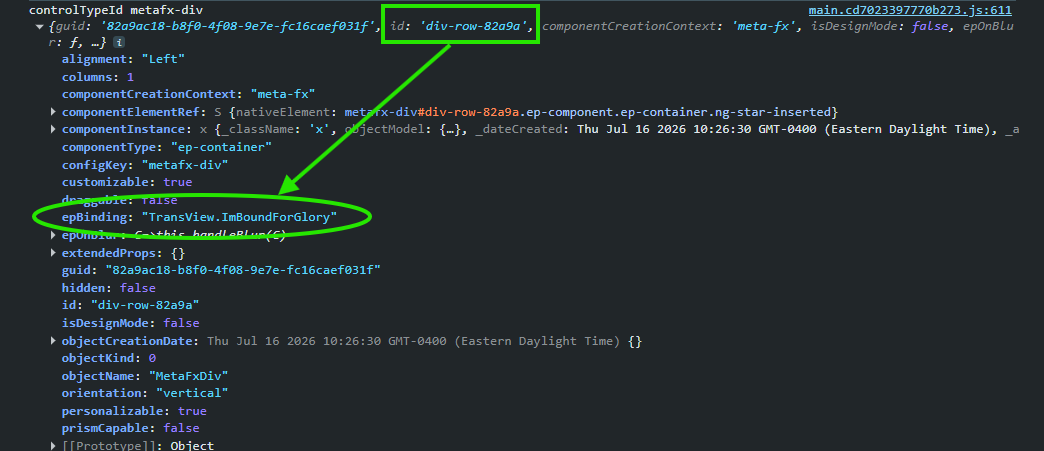
Wanted to try that… I was able to successfully add a binding to the DIV via property-set…
…but the data rule (setting style) actions don’t seem to interact with it.
I’m assuming DIV-Rows don’t have the same structure.
I added a textbox elsewhere on the form and bound it to the same TransView binding as my Div-Row. The textbox hides… the div-row does NOT!
This proved the binding was valid, the data-rule was firing, but the div-row doesn’t appear to be a supported Data Rule target.
I forget does GroupBox (metafx-box) component have epBinding? it’s basically just a div that can be dropped on root page. If so, use that as container instead of div.
Nope. Div-row, group box, container (flex box), column… no stock binding property.
Did an investigation the other day on component droppablilty on root page. updated to include Has epBinding:
| Component | container | canvasContainer | Droppable on root | Has epBinding |
|---|---|---|---|---|
| Div | Yes | No | No | No |
| ep-scheduler | No | Yes | Yes | Yes |
| erp-gl-control-panel | Yes | Yes | Yes | No |
| erp-pdf-viewer | Yes | Yes | Yes | Yes |
| GroupBox | Yes | No | No | No |
| metafx-box | Yes | Yes | Yes | No |
| metafx-col | Yes | No | No | No |
| metafx-div | Yes | No | No | No |
| metafx-flex-box | Yes | No | No | No |
| metafx-matrix | Yes | No | No | No |
| metafx-panel-card | Yes | Yes | Yes | No |
| metafx-panel-card-classic | Yes | Yes | Yes | No |
| metafx-panel-card-gantt | Yes | Yes | Yes | No |
| metafx-panel-card-grid | Yes | Yes | Yes | No |
| metafx-relationship-map | Yes | Yes | Yes | No |
| metafx-tabstrip | Yes | Yes | Yes | No |
| metafx-udc | Yes | Yes | Yes | No |
| Page | Yes | No | No | No |
| page-details | Yes | No | No | No |
| PanelCard | Yes | No | No | No |
| Tab | Yes | Yes | Yes | No |
AI-gen so mileage may vary. Not sure what the non-hyphenated ones are, I think halucinations.
EDIT: nevermind the Has epBinding column, my ai pooped its pants. I’ll fix it when i can.
We can hide it via js if it’s an absolute necessity. I try to avoid though.
I can hide it via property-set… works for me. Just not @shobdy for some reason.
We’re just spit-balling and experimenting with other potentially hacky-as-shit work arounds 

Is this condition correct? Looks incomplete to me, like it needs an “== true” or something.
If that’s a boolean, which it looks to be, it should be fine.
But a test wouldn’t hurt…
It works for booleans. Its plopping the value into the expression… so if the value is true, the event will automatically go down the true branch. If false, down the false branch.
Yeah it’s a bool
that’s how I do all rows in a dataview-condition. The whole expression is just true