I see couple of threads on here saying that it’s possible to DMT into a UD table but I can’t find the DMT template. what am I missing:
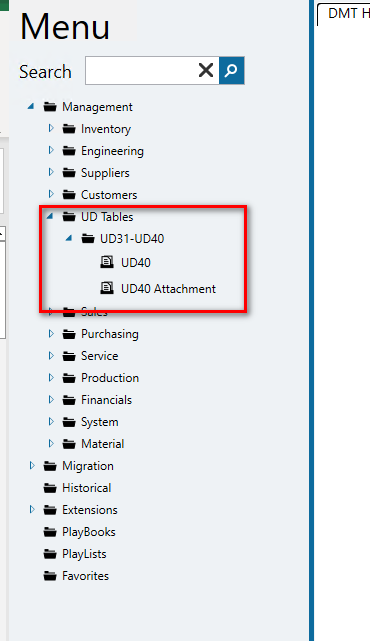
Good question! I just looked at mine in classic, and I can only see UD01, though the folder says UD01-UD10.
I don’t know the answer to this, but, is your UD table on the menu (the maintenance screen for it)? Every time I have a problem with DMT it goes back to menu security so its just a guess.
Maybe this will help: DMT User table 
Are you updating or adding new records?
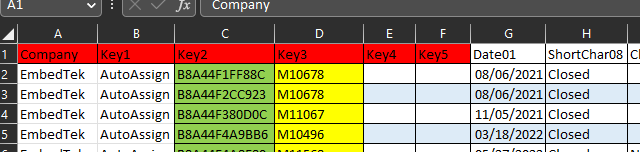
You need the company, key1, key2, key3, key4, key5 and any other columns you are updating/adding.
here is a quick example we use here. All key fields need to be unique though if you are adding them via DMT.
Hm, no it is not.
Is there a native dll or app I can select for my UD table or do I have to build a screen myself?

that did it, thanks for your help!
I am seeing a similar issue however my UD table displayed in DMT and I was able to load data to it. Now it no longer displays in DMT. We did upgrade to 2022.2.11 on 2/19 in our Prod environment and Pilot on 1/18. I am not 100% sure if I’ve used the DMT since the Pilot upgrade or not…I know I haven’t used it in our Prod environment since the upgrade.
Has anyone experienced this?
I figured out that the DMT permissions are totally based on the Classic Form permissions.
I initially deployed a menu item with Program Type = Kinetic App and DMT did not show an option for UD08.
I changed our menu item to program type = Menu Item and selected the classic UD08 dll. I set the menu item to form to use = kinetic. And now DMT shows an option for UD08.
There are two bugs with DMT. One is that DMT misses the permissions if its a kinetic instead of classic menu item. This is fixed in 2022.2. And the second is that DMT misses the permissions if there is a kinetic layer on the kinetic menu item. This is supposed to be fixed in 2022.2.16. I’ve resorted to creating hidden classic menu items as a workaround in the meantime.
I am using 2022.2.11 currently and I have 3 UD tables - 2 are showing in DMT however these are ones I am playing with. I have menus setup as “Kinetic App” and I have custom Kinetic layers but haven’t published them yet. The UD01 table that I wasn’t seeing also has a custom kinetic layer and was showing in DMT however I initially had a Classic & Kinetic menu while I was developing it and recently removed the Classic menu which is when I suspect it quit showing in DMT.
I was able to follow Darius’ suggestion and am now seeing UD01 in DMT. It was a bit quirky as I had to…
- change the Program Type = Menu Item and enter the Program name in Classic as if I tried from the Kinetic Menu Maintenance I got an error “Sorry! Something went wrong. Please contact your system administrator”
- Then I went to the Kinetic Menu Maintenance using the hyper link and check the “Kinetic Enabled” box.
Since I had initially had the menu setup as Kinetic App, it kept the “Kinetic Customization” that I had selected although it does not show from the Classic Menu Maint and can only see the customization selection from Kinetic Menu Maint.
Gotta love Kinetic 
I’m seeing this still be a problem in 2022.2.25.
I presume that the “supposed to” means that there is a PRB for it - would you mind sharing the number?
Anyone seeing it fixed in 2023.anything?
(edit) If it is PRB0262107, it says Completed, and that is incorrect
(edit 2): OK, I was informed by support (in my words, not theirs):
- DMT is never going back to showing all the tables by default
- What is working now is that you can make either a classic menu item or a kinetic menu item for the UD table DLL and either one will be recognized by DMT
- What does you no good is to simply have data in the UD table and then have a BAQ to display it (like I do…)
Also, I will be submitting an idea to allow Security Managers to always have access to all the UD tables in DMT, without jumping through hoops. That will be edit 3…
(edit 3): Idea: Don't hide UD tables in DMT
Yep that is correct, you have to create the menu item. Its just an artifact of the way DMT security works, which should be thrown out and redone properly. Just because somebody has access to order entry doesn’t mean they should have DMT access to sales order header, detail, etc. On the flip side just because somebody does NOT have menu access to UDxx, that doesn’t mean they should NOT Have access to DMT to that table. The whole model is complete garbage. But that is where we are.