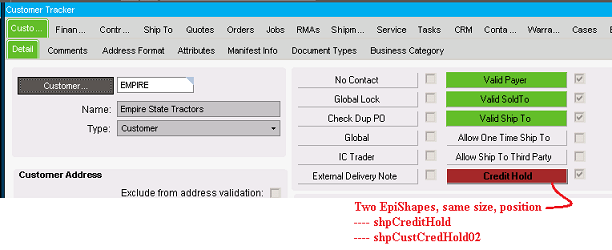
Here is a VERY quick example for the Customer Tracker.
Note that I used two shapes to account for loading multiple customers, where some are on credit hold and others are not. I know it is ugly but… I was just playing around with this. I would definitely do something “cleaner”, only one shape in a production version.
private void CustCreditHold()
	// **** Call from edvCustomer_EpiViewNotification
	//  **** where args.NotifyType == EpiTransaction.NotifyType.Initialize
	{
		// string sCreditHold = edvCustomer.dataView[edvCustomer.Row]["CreditHold"].ToString();
		// string sCustID =  edvCustomer.dataView[edvCustomer.Row]["CustID"].ToString();
		// MessageBox.Show("CustID: " + sCustID + " CreditHold = " + sCreditHold);

            if (Convert.ToBoolean(edvCustomer.dataView[edvCustomer.Row]["CreditHold"].ToString())  == true)
			{
				shpCreditHold.Status = StatusTypes.Stop;
				// shpCreditHold.Status = StatusTypes.Warning;
				// shpCreditHold.Status = StatusTypes.OK;
				// shpCreditHold.Status = StatusTypes.Global;
				shpCreditHold.EnabledCaption = "Credit Hold";
				// shpCreditHold.DisabledCaption = "Credit";
				shpCreditHold.Enabled = true;
				chkCustCredHold.Visible = true;
				shpCreditHold.Visible = true;
				shpCustCredHold02.Visible = false;
			}
			else
			{
				// shpCreditHold.Status = StatusTypes.OK;
				// shpCreditHold.Status = StatusTypes.Warning;
				// shpCreditHold.Status = StatusTypes.Stop;
				// shpCreditHold.Status = StatusTypes.Global;
				shpCreditHold.EnabledCaption = "";
				// shpCreditHold.DisabledCaption = "Credit";
				shpCreditHold.Enabled = false;
				shpCreditHold.Visible = false;
				shpCustCredHold02.Visible = true;
				chkCustCredHold.Visible = false;
			}
	}