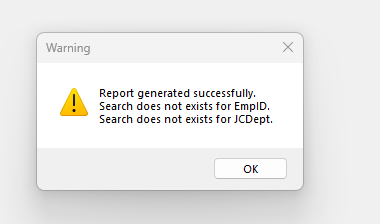
I imported a data definition that references a BAQ and the report style that reference the data definition. I’m looking to hang it on the menu, but when I go to generate the form I get this error about these searches not being present… but in the past I swear I didn’t have to do anything, it generated them for me… Maybe I am just not recalling it correctly, any pointers here fam?
I was asking because I have a problem with filters not working in kinetic report data definition (not being able to select them - list is just empty) and they told me its supposed to be fixed in 2025.1.
No once I set up the filters in classic then my report worked in the browser, although there are many other problems that are still unresolved in the browser. For example, dynamic dates don’t work in the browser. Can’t set defaults. I can go on.
It’s easy, just go into the layer. Click on your search field. Click Behavior. Click ON click. That should take you into the search event. Then just fix the parameters in the search show widget. Put a screenshot of what is there now and it will probably be obvious why its not working.
I was looking forward to checking this one out, I don’t have a ton of experience in app studio other than a few years of extended education at Insights and a few grid customizations I did a year or so ago. Thanks for your help, I’ll check it out and if I can’t solve it I’ll get back to you. I’ll document it as well
Oh yeah I ran into that too. I think I ended up making my own control and then using my control to update the real report field. I wish they would just fix it.