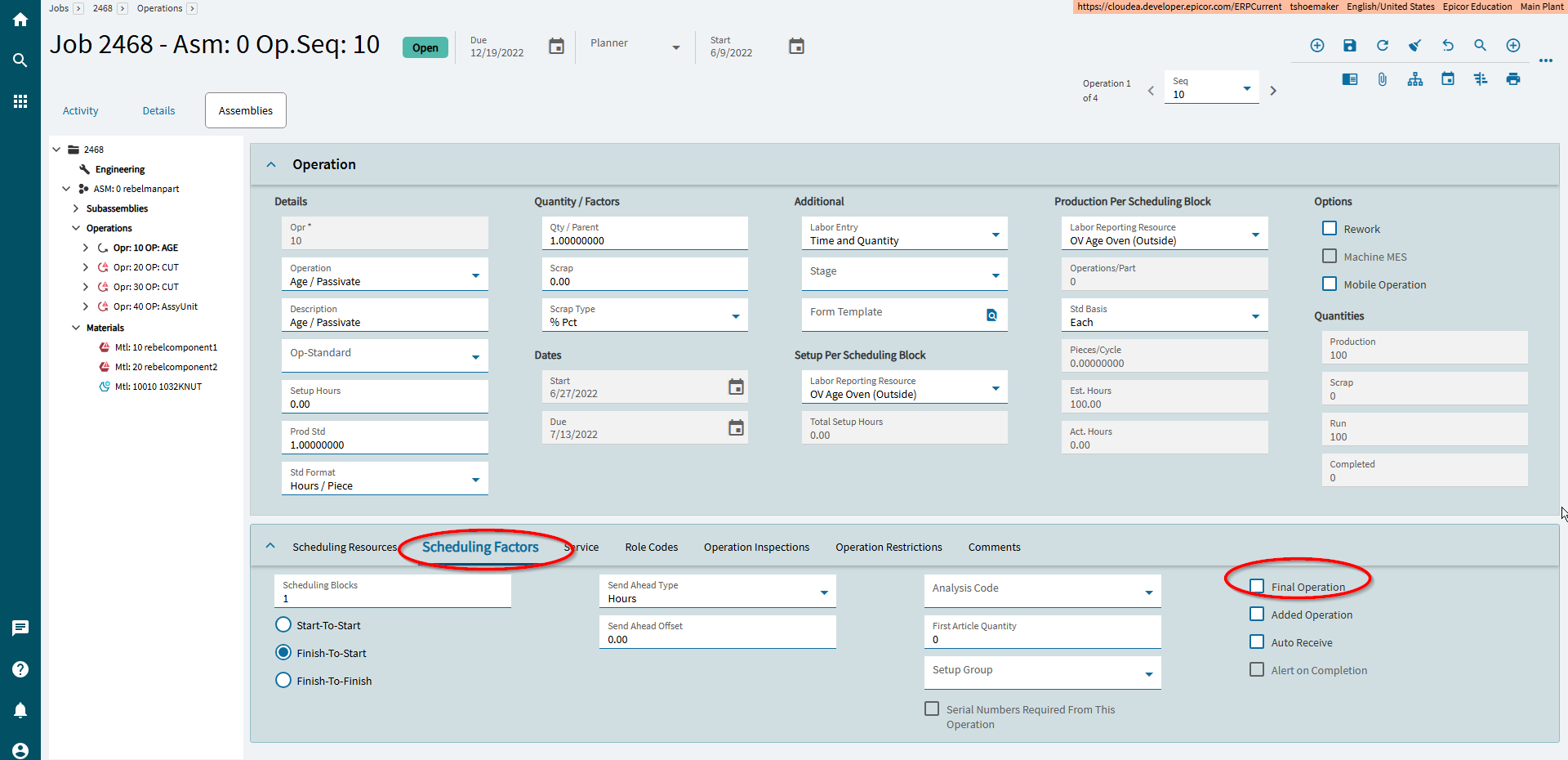
Apparently, they were just moved to a location that none of us knew, under Scheduling Factors!
2 Likes
Yes this was moved due to the need to have more room to have the tabs below. I dont have a firm date for the change, but I believe it happened at or before 2023.1. No significant changes have been made to the job screens since then.
2 Likes
Found a bug in the BAQ Designer, I think:
I’m seeing the same thing even with only 1 TopLevel query. I saw it when I filtered, then remove the filtered column from view, and then re-test. I thought I was going crazy at first!
1 Like
I think this issue is killing me – any updates? I can open my app just fine if I use the menu item directly but I can’t get any version of the app-open widget to work..
ReneZ,
We are struggling with the duplicate PCID issue as well. PRB0309483. I asked Epicor for a workaround, but they do not have one. Have any of you guys been able to find a workaround for this issue? No way we can wait for another until another upgrade/update. We are really needing some good suggestions, if anyone has one.
Hi @Evan_Purdy,
Unfortunately, I have had complete radio silence from the Epicor Support technical team. Our issues were in MES, but to get us working with a temporary workaround, I converted from using the MenuID to using the Kinetic Application and Kinetic Customization (layer). This bypasses the menu security, which isn’t a huge concern for us, but is something to keep in mind if you choose this method. Also, removing any customization layers from the menu item seems to work as well.
I am using a menu item for a kinetic screen, no customization. I have tried using the menu item and the view name in the app-open widget and neither work although they change the error somewhat. If I click on the menu by hand it works, but I need it to open from the quote screen with some values sent in. This all works fine under a full license but not CRM. Very frustrating, I spent 50 minutes on the phone with support and their solution ended up just buy more full licenses 
2 Likes
Yeah, it has been very frustrating dealing with all the issues and having no response from technical support. Using the Ice.UIDbd.dashboardName in the app-open Parameter > View and then using the Layer name in the app-open Parameter > Layer fields are how I got around our issues. Not sure what errors you are getting, but if you post those on here, someone may be able to help you figure it out.
No, Joan, we are still waiting for a solution. We can’t wait for the next upgrade as well, as we will be closing the office from Christmas through New Year’s. We really hope this can be resolved before Wednesday.
1 Like
Is it only transferred PCIDs?
Hey, I fought with them for a week to get this fixed and luckily I have a work around.
The HXPkgControlItem table is not created a unique PCIDItemSeq key, they’re all zeros after the upgrade. This causes problems when you transfer a PCID, ship it, then invoice it.
The solution is an in-transaction data directive on HXPkgControlItem that manually sets the PCIDItemSeq to anything else. I queried for the PkgControlItem record and used that sequence, I can give an example later if needed, but Epicor gave me fixes that just set this value to 1.
4 Likes
That sounds great, Genoah!, I hope you can share more details of that Data directive, as I dont see the PRB0309483 gets any update. You give us hope!
1 Like
First to stop the bleeding, in a BPM data directive, create a new in-transaction directive on the HXPkgControlItem table and create a script with the code below. What it does is check for any HXPkgControlItem rows that weren’t given a sequence (it shouldn’t be 0) before it hits the database.
// Newly created records should NOT have a 0
var ttHXPkgCtrlItmRow = ttHXPkgControlItem
    .Where((r) => r.Added() && r.PCIDItemSeq == 0)
    .FirstOrDefault();

if (ttHXPkgCtrlItmRow == null)
{
    return;
}

// Attempt to retrieve the corresponding PkgControlItem record.
var dbPkgControlItemRow = Db.PkgControlItem
    .Where((r) =>
        r.Company == ttHXPkgCtrlItmRow.Company
        && r.PCID == ttHXPkgCtrlItmRow.PCID
        && r.ItemPCID == ttHXPkgCtrlItmRow.ItemPCID
        && r.ItemPartNum == ttHXPkgCtrlItmRow.ItemPartNum
        && r.ItemLotNum == ttHXPkgCtrlItmRow.ItemLotNum
        && r.ItemIUM == ttHXPkgCtrlItmRow.ItemIUM
        && r.ItemAttributeSetID == ttHXPkgCtrlItmRow.ItemAttributeSetID
        && r.ItemPartWipSysRowID == ttHXPkgCtrlItmRow.ItemPartWipSysRowID)
    .Select((r) => new { r.PCIDItemSeq })
    .FirstOrDefault();

if (dbPkgControlItemRow != null && dbPkgControlItemRow.PCIDItemSeq > 0)
{
    ttHXPkgCtrlItmRow.PCIDItemSeq = dbPkgControlItemRow.PCIDItemSeq;
}
else
{
    ttHXPkgCtrlItmRow.PCIDItemSeq = 1;
}
Then you need to fix all PCIDs already affected with a data fix. In your support case, reference fix CRUHXPkgControlItemPCIDItemSeq in my case CS0005221073. That will allow you to start invoicing again. You’ll need to create a BAQ that pulls all HXPkgControlItem rows where PCIDItemSeq = 0 and send that to them in a spreadsheet.
The last status I have on the problem case is it’s in release planning, they created it last week for me. Whenever they do fix it, the BPM should still be safe since it’s only fixing problem records, but you can disable it afterwards.
Let me know if you have any other questions.
6 Likes
Nasty, great find. Thanks for helping us all out.
Jose, we dont do transferred PCIDs. We are only one site, one warehouse for our parts.
If you’re getting the HXPkgControlItem Primary Key error, use my fix above. The bug occurs when Epicor archives an item on a PCID more than once. There are two times Epicor archives a PCID outside of voiding that I know of: on transfer order receipt a copy of the source plant’s PCID is made, and on invoice posting when the PCID is on the shipment.
Other causes would be if you use mixed PCIDs of any kind (multiple lots, multiple parts, or multiple children PCIDs). Epicor would archive the first item but fail on the second because the sequence right now is always 0.
1 Like
Yeah so @jhmwm, that’s what we need to know, are you getting the same error @genoah.martinelli is getting. If you are, then you know what you need to do.
@genoah.martinelli, We are getting the same error and your fix did work great for us. From an update this morning, I do know Epicor has a fix as well and should be almost ready.
1 Like


Ok, I guess I’ll export all the things before our upgrade tonight to PILOT.

2 Likes