I have made a dashboard in a form and it is only used on a screen for production workers. It is shown on a big screen and it represents production performance relevant data.
I have created an account just for that use. The account has only access to that form.
Currently, the production manager logs in with that account and launch the form.
Is there a way to, upon cliicking the Epicor logo, the account gets logged in automatically, then the form loads automatically as well.
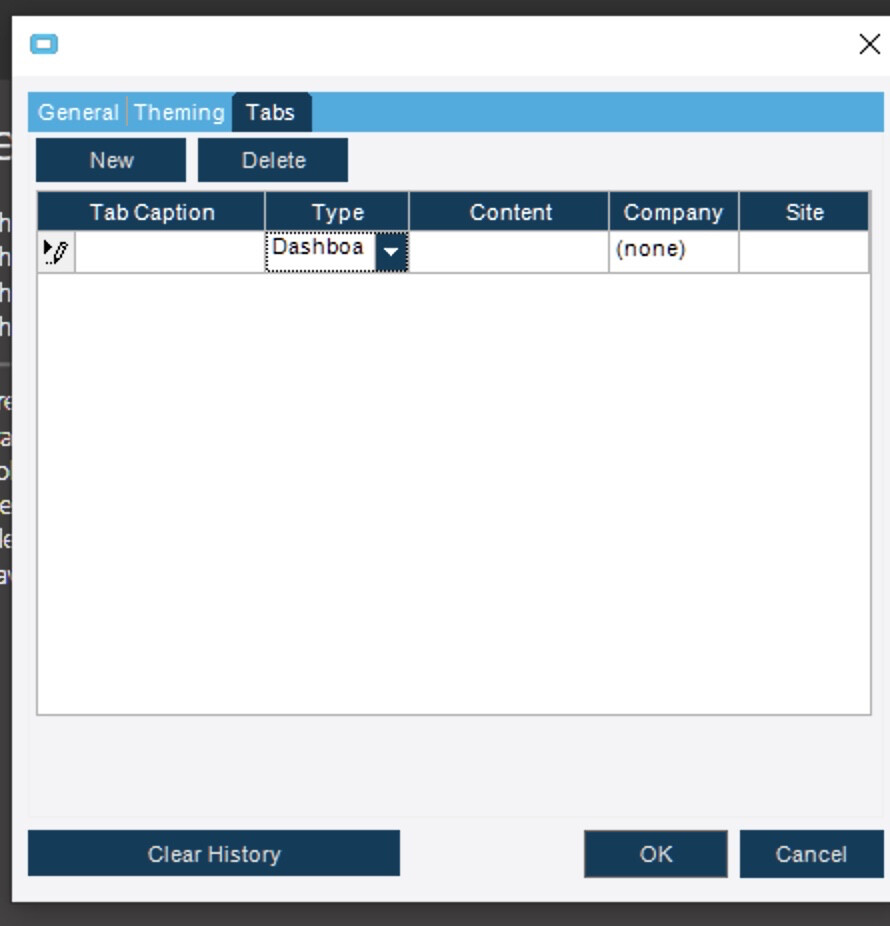
I don’t think you can automatically login to an account without providing authentication credentials (username and password). But once you do that, you can have any form you want automatically popup. Use the method that @MLamkin posted. In Epicor click on Settings > General Options > Preferences > Tabs. This is where you add “tabs” that will launch when you open Epicor. Click New and fill in the company and site information, then select the dashboard you want to launch in the content column.
Sounds like you are looking for the “shortcut” functionality.
Open your UD Form and then from the toolbar - File > Send > Record to File
Save that in the Client Config folder and create a Windows Epicor.exe shortcut that references the Sysconfig file created by the “Record to File” option. When you run with that Sysconfig, it will only open the Menu item stored in the Shortcut section of the Sysconfig.
This is really cool! I didn’t know you could do this either! I just tried in my pilot environment, and a version mismatch error is preventing me from verifying your approach, but I assume it will work if you’re in live. Thanks!
You can edit the Sysconfig created by the Record to File option and Select and copy the Shortcut Section and then Paste that - in the same location - into the Sysconfig file you are using for Pilot. I cannot recall where we get the Sysconfig to use when we create the Shortcut (maybe it is Default.Sysconfig??) but if you have a proper sysconfig for your environment, you should be able to have this work.
@Hogardy you will likely need to edit the Sysconfig that is setup for the Auto-Login and add the Shortcut section to that Sysconfig.
I don’t know why it would open minimized, but I don’t know how to force it maximized. I was just thinking to myself yesterday that the new dashboard I deployed would work best maximized, but nothing I tried would make it open maximized.
It DOES make a larger window if you saved the dashboard with the dashboard maintenance screen maximized though. It won’t maximize it, but makes it about as big as you can make it without it being maximized.