If you click ClockOut manually does it clear it?
You may have to clear it yourself.
If you click ClockOut manually does it clear it?
You may have to clear it yourself.
Been trying to clear it the code after the ClockOut for 3 hours… LOL
Is there any easy way to clear the MES Form without trying to do an oTrans.Clear or oTrans.ClearDataset?
I literally mean, after the clockout, clear the textbox yourself.
Manually 
The horror!
Yes everything done on the MES Main form is 10x more difficult
Nah you just got to learn to love it 
((EpiTextBox)csm.GetNativeControlReference("fca2b60c-95cf-40b4-adc0-c168fc3a43fc")).Text = "";
I tried you method with the GetNativeControlReference… no go…
Ok I give up on trying to set the box to “”
I am going to End the Indirect Labor Detail record and Pop up a box to tell them to Clock Out.
How do you refresh the MES Form so i can see that I already Ended my Indirect Activity?
oTrans.Refresh() did not do it.
I believe the textbox had a different guid in that version.
The clockout should do that for you.
If you are going to clock out, there is no need to log out.
When you are done with your procedure, only call clockout. See what happens.
The clock out button is not available because the Mes labor detail grid has the Indirect row in it.
Probably because I used the labor adapter to update the labor detail record to end it.
sorry cant get the hash marks to surround the code
private void EndIndAct(int LaborDtlSeq)
	{
		    string UserID = ((Ice.Core.Session)oTrans.Session).UserID;
            string PlantID = ((Ice.Core.Session)oTrans.Session).PlantID;
            string msg = "";
            //Get the existing labor head record
            EpiDataView edv = (EpiDataView)(oTrans.EpiDataViews["LaborHed"]);
            int LaborHeadSeq = Convert.ToInt32(Convert.ToDouble(edv.dataView[edv.Row
["LaborHedSeq"].ToString()));

            LaborAdapter LAdpt = new LaborAdapter(oTrans);
            LAdpt.BOConnect();
            LAdpt.GetDetail(LaborHeadSeq,LaborDtlSeq);

            //Close the labor detail and report quantity
            LAdpt.LaborData.LaborDtl.Rows[0]["LaborQty"] = 1;
            LAdpt.LaborData.LaborDtl.Rows[0]["ClockOutTime"] = ((decimal)DateTime.Now.Hour + ((decimal)DateTime.Now.Minute / 60.0M));
            LAdpt.LaborData.LaborDtl.Rows[0]["ActiveTrans"] = 0;
            LAdpt.LaborData.LaborDtl.Rows[0]["ApprovedDate"] = DateTime.Today;
            LAdpt.LaborData.LaborDtl.Rows[0]["TimeStatus"] = "A";
            LAdpt.LaborData.LaborDtl.Rows[0]["SubmittedBy"] = UserID;
            LAdpt.Update();
			LAdpt.Dispose();
			//MessageBox.Show("Indirect Labor Record Ended.");
			ClockOut();
			NewIndRecCreated = false;
//			EmpIDTxtBox.Text = "";
			//oTrans.Refresh();

	}
ftfy
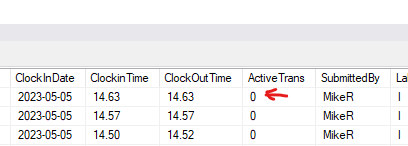
I only ClockOut after I End the Indirect LaborDtl Rec. Clock Out button not available to press. I checked in sql when the screen showed the LaborDtl Record still Active it was InActive
Ok, you’re fighting the system instead of working with it.
Let me think on it, or maybe someone else will see the magic.
I am going to find a cold one and take this up again on Monday! Thank you for your help!
Hmmm

And the backticks is like this:
''' <-these are not backticks, but they won't display right here :)
code here
'''
I tried 2 of the back ticks under the tilda ~ before the first Line then before the first word in that code block and then 2 and 3 at the end.
Don’t get it why it starts blocking the code in the middle of the code not the beginning.
it is
3 backticks
    code
3 backticks
you can also do one liners like this
with
backtick code backtick