New Dataset and new data field - RMA Form - Epicor 11, SRSS

Hello!

I am updating the RMA Form report using SSRS.

Currently, the line description is pulled from the RMADtl table (T2.Calc_LineDesc). However, it needs to be retrieved from the OrderDtl table (OrderDtl.LineDesc).

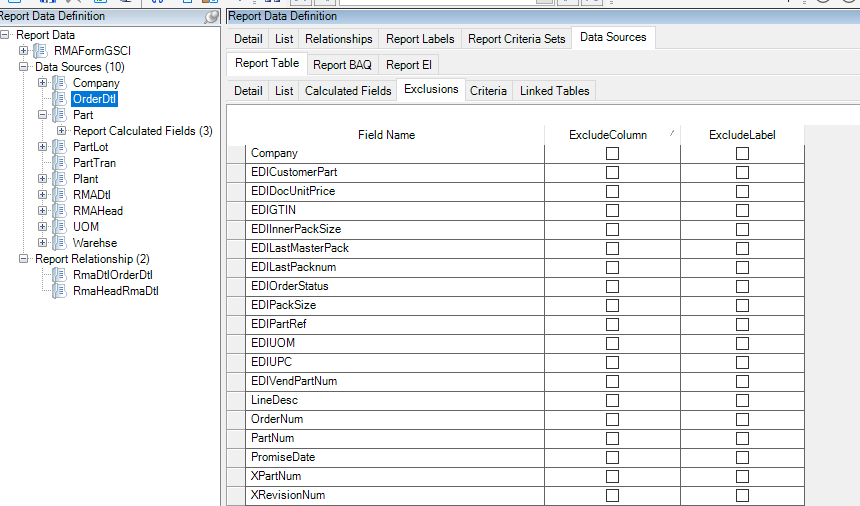
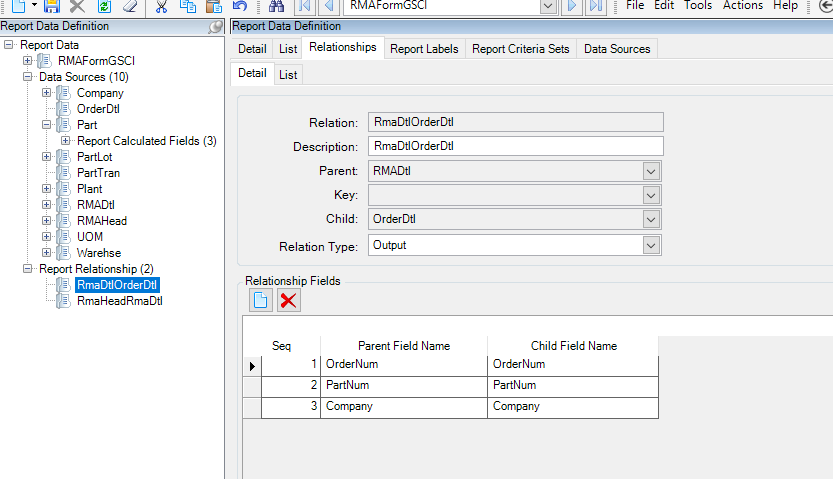
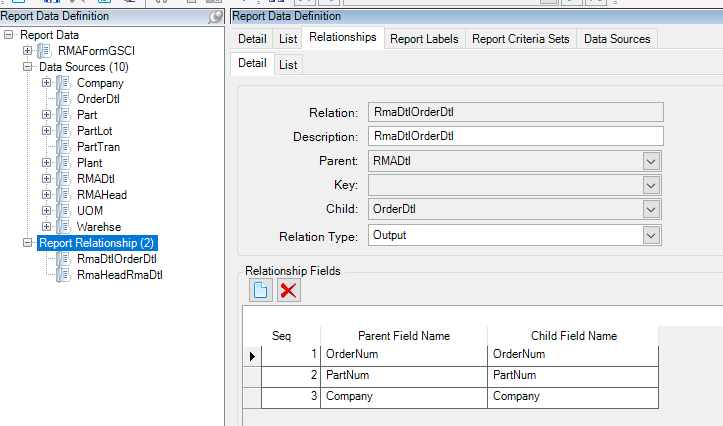
I have already added the OrderDtl table to the Report Data Definition, as shown in the image below:

If the relationship is correct, I need to update the SSRS expression accordingly.

The original SQL query is:

=“SELECT
T1.RptLanguageID,CAST( T1.BTCustNum as nvarchar ) as BTCustNum,
T1.Company,CAST( T1.CustNum as nvarchar ) as CustNum,
T1.RMADate,CAST( T1.RMANum as nvarchar ) as RMANum,CAST( T1.ShipToCustNum as nvarchar ) as ShipToCustNum,
T1.Calc_ReturnPhoneNum,
T1.Calc_ReturnFaxNum,
T1.Customer_FaxNum,
T1.Customer_EMailAddress,
T1.Calc_CustomerAddress,
T1.Calc_ReturnAddress,
T1.Customer_BTName,
T1.Customer_CustID,
T1.Customer_Name,
T2.Company as RMADtl_Company,CAST( T2.ConNum as nvarchar ) as RMADtl_ConNum,CAST( T2.CustNum as nvarchar ) as RMADtl_CustNum,
T2.Note,CAST( T2.OrderRelNum as nvarchar ) as OrderRelNum,
T2.PartNum,CAST( T2.RefInvoiceLine as nvarchar ) as RefInvoiceLine,CAST( T2.RefInvoiceNum as nvarchar ) as RefInvoiceNum,
T2.ReturnQty,
T2.ReturnQtyUOM,CAST( T2.RMALine as nvarchar ) as RMALine,CAST( T2.RMANum as nvarchar ) as RMADtl_RMANum,CAST( T2.ShipToCustNum as nvarchar ) as RMADtl_ShipToCustNum,
T2.Calc_SerialNo,
T2.ShipToNum,CAST( T2.Calc_SerialNoFlag as nvarchar ) as Calc_SerialNoFlag,T2.OrderNum_CurrencyCode,
T2.RevisionNum,
T2.PartNum_PartDescription,CAST( T2.PartNum_TrackDimension as nvarchar ) as PartNum_TrackDimension,CAST( T2.PartNum_TrackLots as nvarchar ) as PartNum_TrackLots,CAST( T2.PartNum_TrackSerialNum as nvarchar ) as PartNum_TrackSerialNum,
T2.Reason_Description,
T2.Calc_LineDesc,
T2.Calc_ReasonDescription,
T2.Calc_LegalNumber,
T2.Calc_AttributeSetShortDescription
FROM RMAHead_” + Parameters!TableGuid.Value + " T1
LEFT OUTER JOIN RMADtl_" + Parameters!TableGuid.Value + " T2
ON T1.RMANum = T2.RMANum"

How should this expression be?
Does anything else need to be done?

Thank you!

@Rafael Welcome. Here is a KB that has the steps needed to add a new field to an SSRS report.

https://epiccare.epicor.com/epiccare?id=epiccare_kb_article&table=kb_knowledge&sys_id=e9feeec5dbaf57088769f25bbf961972

1 Like

Hello Greg,

Thanks for your help.

I tried following the steps you provided, but it didn’t solve my problem. I updated the Query.CommandText to the following, but nothing is coming out in the print preview, not even an error message:

=“SELECT
T1.RptLanguageID,
CAST(T1.BTCustNum AS NVARCHAR) AS BTCustNum,
T1.Company,
CAST(T1.CustNum AS NVARCHAR) AS CustNum,
T1.RMADate,
CAST(T1.RMANum AS NVARCHAR) AS RMANum,
CAST(T1.ShipToCustNum AS NVARCHAR) AS ShipToCustNum,
T1.Calc_ReturnPhoneNum,
T1.Calc_ReturnFaxNum,
T1.Customer_FaxNum,
T1.Customer_EMailAddress,
T1.Calc_CustomerAddress,
T1.Calc_ReturnAddress,
T1.Customer_BTName,
T1.Customer_CustID,
T1.Customer_Name,
T2.Company AS RMADtl_Company,
CAST(T2.ConNum AS NVARCHAR) AS RMADtl_ConNum,
CAST(T2.CustNum AS NVARCHAR) AS RMADtl_CustNum,
T2.Note,
CAST(T2.OrderRelNum AS NVARCHAR) AS OrderRelNum,
T2.PartNum,
CAST(T2.RefInvoiceLine AS NVARCHAR) AS RefInvoiceLine,
CAST(T2.RefInvoiceNum AS NVARCHAR) AS RefInvoiceNum,
T2.ReturnQty,
T2.ReturnQtyUOM,
CAST(T2.RMALine AS NVARCHAR) AS RMALine,
CAST(T2.RMANum AS NVARCHAR) AS RMADtl_RMANum,
CAST(T2.ShipToCustNum AS NVARCHAR) AS RMADtl_ShipToCustNum,
T2.Calc_SerialNo,
T2.ShipToNum,
CAST(T2.Calc_SerialNoFlag AS NVARCHAR) AS Calc_SerialNoFlag,
T2.OrderNum_CurrencyCode,
T2.RevisionNum,
T2.PartNum_PartDescription,
CAST(T2.PartNum_TrackDimension AS NVARCHAR) AS PartNum_TrackDimension,
CAST(T2.PartNum_TrackLots AS NVARCHAR) AS PartNum_TrackLots,
CAST(T2.PartNum_TrackSerialNum AS NVARCHAR) AS PartNum_TrackSerialNum,
T2.Reason_Description,
OrderDtl.LineDesc AS Calc_LineDesc,
T2.Calc_ReasonDescription,
T2.Calc_LegalNumber,
T2.Calc_AttributeSetShortDescription
FROM RMAHead_” + Parameters!TableGuid.Value + " T1
LEFT OUTER JOIN RMADtl_" + Parameters!TableGuid.Value + " T2
ON T1.RMANum = T2.RMANum
LEFT OUTER JOIN OrderDtl_" + Parameters!TableGuid.Value + " OrderDtl
ON T2.OrderNum = OrderDtl.OrderNum
AND T2.PartNum = OrderDtl.PartNum
AND T2.Company = OrderDtl.Company"


You need to follow their pattern so make the table T3. I would not reuse their field name, but name it unique and then add the field and label to the report.

Be sure the field is not excluded in the RDD.

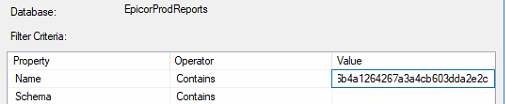
Since you are OnPrem, if you give the report an archive time then you can get the guid from the task monitor to verify the field is being created.
image
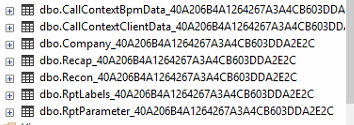
ssms filter views of the report database
image
The tables created for the report. In your case you want to see the OrderDtl here and can open to find your field.
image

1 Like

Hello!

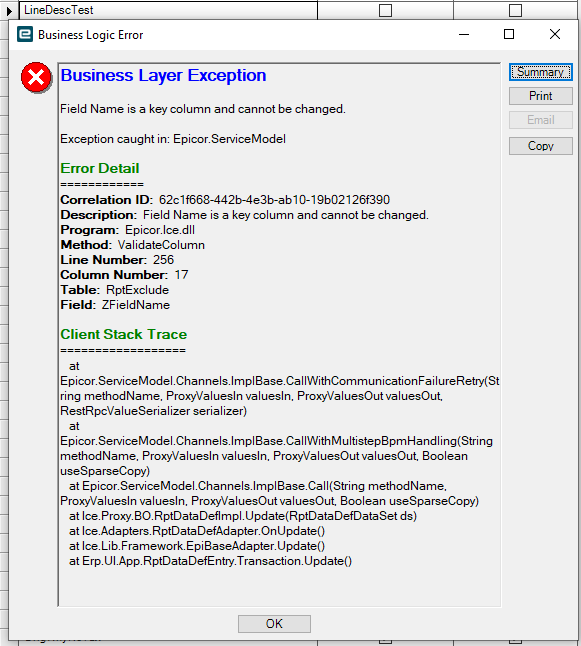
I tried the pattern by making table T3, however, I couldn’t change the field name. I got this error message instead:

Sorry, but I am not a developer. I am trying to customize it using what I’ve learned from the Epicor training, and roughly it was:
1- Add the table and create a relationship between tables (done)
2- Remove the needed fields from the exclusion list (done)
3- Add the table and the needed field to the SQL (done)
4- Add the Query field to SRSS and place it on the report

I can’t understand what I am doing wrong, but this is the error message I am getting:

Program Ice.Services.Lib.RunTask when executing task 36695 raised an unexpected exception with the following message: RunTask:
Ice.Core.SsrsReporting.SsrsCaller.SsrsException: The SSRS server returned the status code 500 (InternalServerError) with the following error text:
System.Web.Services.Protocols.SoapException: An error has occurred during report processing. —> Microsoft.ReportingServices.ReportProcessing.ProcessingAbortedException: An error has occurred during report processing. —> Microsoft.ReportingServices.ReportProcessing.ReportProcessingException: Query execution failed for dataset ‘dsRMA’. —> System.Data.SqlClient.SqlException: Incorrect syntax near ‘.’.
at Microsoft.ReportingServices.Library.ReportExecution2005Impl.InternalRender(String Format, String DeviceInfo, PageCountMode pageCountMode, Stream& Result, String& Extension, String& MimeType, String& Encoding, Warning& Warnings, String& StreamIds)
at Microsoft.ReportingServices.Library.ReportExecution2005Impl.Render(String Format, String DeviceInfo, PageCountMode pageCountMode, Byte& Result, String& Extension, String& MimeType, String& Encoding, Warning& Warnings, String& StreamIds)
at Microsoft.ReportingServices.WebServer.ReportExecutionService.Render(String Format, String DeviceInfo, Byte& Result, String& Extension, String& MimeType, String& Encoding, Warning& Warnings, String& StreamIds)
at Ice.Core.SsrsReporting.SsrsCaller.SoapCaller.Call[TContent,TResponse,TSoapHeader](String actionName, TContent content, TSoapHeader soapHeader) in C:_releases\ICE\ICE4.3.100.0\Source\Server\Internal\Lib\TaskLib\SsrsReporting\SsrsCaller\SoapCaller.cs:line 47
at Ice.Core.SsrsReporting.SsrsCaller.ReportExecutionService.Render(String format, String deviceInfo, String& extension, String& mimeType, String& encoding, Warning& warnings, String& streamIds) in C:_releases\ICE\ICE4.3.100.0\Source\Server\Internal\Lib\TaskLib\SsrsReporting\SsrsCaller\ReportExecutionService.cs:line 75
at Ice.Core.SsrsReporting.SsrsRendererBase.TraceReportRendered(String printProgram, String ssrsRenderFormat, Func1 timedAction) in C:\_releases\ICE\ICE4.3.100.0\Source\Server\Internal\Lib\TaskLib\SsrsReporting\SsrsRendererBase.cs:line 81 at Ice.Core.SsrsReporting.ReportProcessorBase.RenderReport_HttpClient(String ssrsRenderFormat, String printProgram, Boolean ignorePageSettings) in C:\_releases\ICE\ICE4.3.100.0\Source\Server\Internal\Lib\TaskLib\SsrsReporting\ReportProcessorBase.cs:line 382 at Ice.Core.SsrsReporting.ReportProcessorBase.RenderReport(String ssrsRenderFormat, String printProgram, Boolean ignorePageSettings) in C:\_releases\ICE\ICE4.3.100.0\Source\Server\Internal\Lib\TaskLib\SsrsReporting\ReportProcessorBase.cs:line 275 at Ice.Core.SsrsReporting.ReportProcessorBase.ProcessReportPart(String reportLocation) in C:\_releases\ICE\ICE4.3.100.0\Source\Server\Internal\Lib\TaskLib\SsrsReporting\ReportProcessorBase.cs:line 163 at Ice.Core.RoutingAndBreaking.ReportPersister.Persist(ReportInstanceInformation reportInstance, Func2 reportsRenderer, Action1 fillSysRptLstRow, Action2 processReport, Func3 filterTableAttachmentsFunc) in C:\_releases\ICE\ICE4.3.100.0\Source\Server\Internal\Lib\TaskLib\RoutingAndBreaking\ReportPersister.cs:line 58 at Ice.Core.RptBase.ReportSsrsDatabaseBuilder.RenderUnroutedSsrsReport() in C:\_releases\ICE\ICE4.3.100.0\Source\Server\Internal\Lib\TaskLib\RptBase\ReportSsrsDatabaseBuilder.cs:line 360 at Ice.Core.RptTaskBase1.XMLClose() in C:_releases\ICE\ICE4.3.100.0\Source\Server\Internal\Lib\TaskLib\RptBase\RptTaskBase.cs:line 224
at Erp.Internal.OM.RMAForm.RunProcess(Int64 instanceTaskNum, String outputFileName) in C:_releases\ERP\ERP11.3.100.0\Source\Server\Internal\OM\RMAForm\RMAForm.cs:line 156
at Ice.Hosting.TaskCaller.InnerExecuteTask(IceDataContext newContext) in C:_releases\ICE\ICE4.3.100.5\Source\Server\Framework\Epicor.Ice\Hosting\TaskCaller\TaskCaller.cs:line 70
at Ice.Hosting.TaskCaller.ExecuteTask() in C:_releases\ICE\ICE4.3.100.5\Source\Server\Framework\Epicor.Ice\Hosting\TaskCaller\TaskCaller.cs:line 61
at Ice.Lib.RunTask.BpmFriendlyTaskLauncher.Run(String sessionIdPrefix, IceContext db, Action taskRunner) in C:_releases\ICE\ICE4.3.100.0\Source\Server\Services\Lib\RunTask\BpmFriendlyTaskLauncher.cs:line 57
at Ice.Services.Lib.RunTaskSvc.InnerRunTask(Int64 ipTaskNum, Boolean suppressTransaction) in C:_releases\ICE\ICE4.3.100.0\Source\Server\Services\Lib\RunTask\RunTask.cs:line 457
You are not changing theirs. Add one with something like Odtl_LineDesc.

Post your query

Thanks again for your support!

Here is my query:

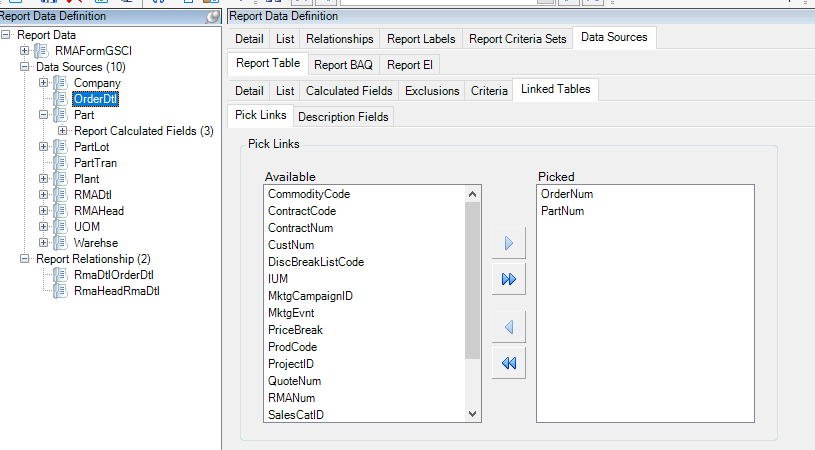
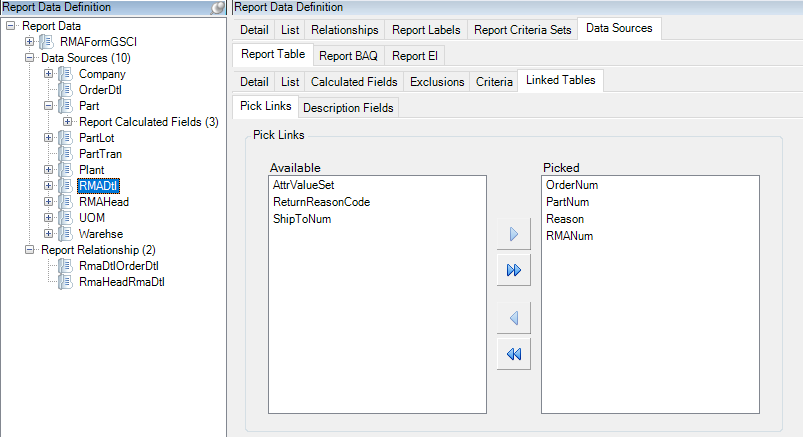
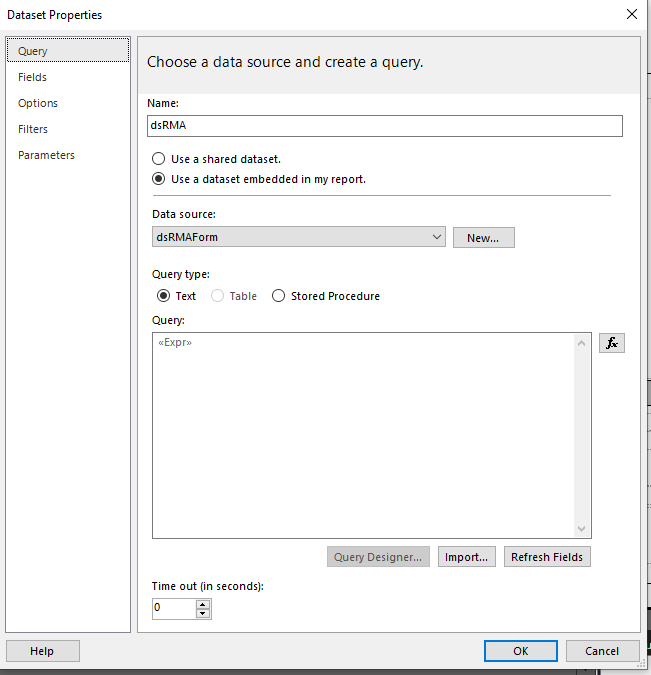
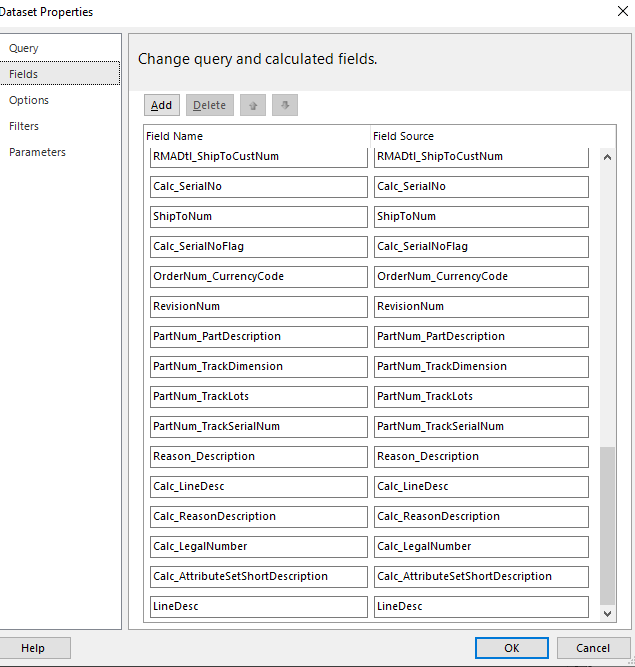
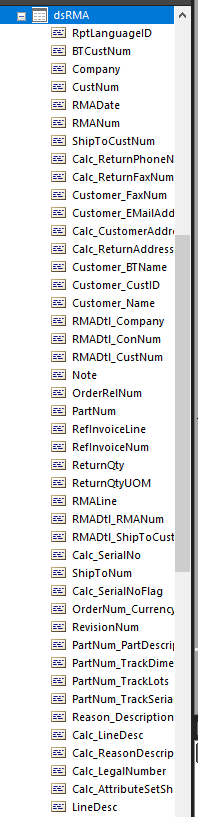
(I am bolding the text I’ve added to it and I’ll post a few screenshots of the RDD just to give you a full picture)

="SELECT

T2.OrderNum,T3.OrderNum, T2.PartNum,T3.PartNum,T3.LineDesc,

T1.RptLanguageID,CAST( T1.BTCustNum as nvarchar ) as BTCustNum,
T1.Company,CAST( T1.CustNum as nvarchar ) as CustNum,
T1.RMADate,CAST( T1.RMANum as nvarchar ) as RMANum,CAST( T1.ShipToCustNum as nvarchar ) as ShipToCustNum,
T1.Calc_ReturnPhoneNum,
T1.Calc_ReturnFaxNum,
T1.Customer_FaxNum,
T1.Customer_EMailAddress,
T1.Calc_CustomerAddress,
T1.Calc_ReturnAddress,T1.Customer_BTName,
T1.Customer_CustID,
T1.Customer_Name,
T2.Company as RMADtl_Company,CAST( T2.ConNum as nvarchar ) as RMADtl_ConNum,CAST( T2.CustNum as nvarchar ) as RMADtl_CustNum,
T2.Note,CAST( T2.OrderRelNum as nvarchar ) as OrderRelNum,T2.PartNum,CAST( T2.RefInvoiceLine as nvarchar ) as RefInvoiceLine,CAST( T2.RefInvoiceNum as nvarchar ) as RefInvoiceNum,
T2.ReturnQty,
T2.ReturnQtyUOM,CAST( T2.RMALine as nvarchar ) as RMALine,CAST( T2.RMANum as nvarchar ) as RMADtl_RMANum,CAST( T2.ShipToCustNum as nvarchar ) as RMADtl_ShipToCustNum,
T2.Calc_SerialNo,
T2.ShipToNum,CAST( T2.Calc_SerialNoFlag as nvarchar ) as Calc_SerialNoFlag,
T2.OrderNum_CurrencyCode,
T2.RevisionNum,
T2.PartNum_PartDescription,CAST( T2.PartNum_TrackDimension as nvarchar ) as PartNum_TrackDimension,CAST( T2.PartNum_TrackLots as nvarchar ) as PartNum_TrackLots,CAST( T2.PartNum_TrackSerialNum as nvarchar ) as PartNum_TrackSerialNum,
T2.Reason_Description,
T2.Calc_LineDesc,
T2.Calc_ReasonDescription,
T2.Calc_LegalNumber,
T2.Calc_AttributeSetShortDescription
FROM RMAHead_" + Parameters!TableGuid.Value + " T1
LEFT OUTER JOIN RMADtl_" + Parameters!TableGuid.Value + " T2
ON T1.RMANum = T2.RMANum

LEFT OUTER JOIN OrderDtl_" + Parameters!TableGuid.Value + " T3
** ON T2.OrderNum = T3.OrderNum, T2.PartNum = T3.PartNum**
"


I don’t see anything in the stuff you posted except the double stars which I assume are from pasting. If you want to make a solution with the resportstyle, rdd and rdl I will load it in my 2024.1 to check it.